
- Kivy 教程
- Kivy - 首頁
- Kivy 基礎
- Kivy - 入門
- Kivy - 安裝
- Kivy - 架構
- Kivy - 檔案語法
- Kivy - 應用
- Kivy - Hello World
- Kivy - 應用生命週期
- Kivy - 事件
- Kivy - 屬性
- Kivy - 輸入
- Kivy - 行為
- Kivy 按鈕
- Kivy - 按鈕
- Kivy - 按鈕事件
- Kivy - 按鈕顏色
- Kivy - 按鈕大小
- Kivy - 按鈕位置
- Kivy - 圓形按鈕
- Kivy - 停用按鈕
- Kivy - 圖片按鈕
- Kivy 元件
- Kivy - 元件
- Kivy - 標籤
- Kivy - 文字輸入
- Kivy - 畫布
- Kivy - 線
- Kivy - 複選框
- Kivy - 下拉列表
- Kivy - 視窗
- Kivy - 滾動檢視
- Kivy - 走馬燈
- Kivy - 滑塊
- Kivy - 圖片
- Kivy - 彈出視窗
- Kivy - 開關
- Kivy - 微調器
- Kivy - 分隔器
- Kivy - 進度條
- Kivy - 氣泡
- Kivy - 標籤頁面板
- Kivy - 散點圖
- Kivy - 手風琴
- Kivy - 檔案選擇器
- Kivy - 顏色選擇器
- Kivy - 程式碼輸入
- Kivy - 模態檢視
- Kivy - 切換按鈕
- Kivy - 相機
- Kivy - 樹形檢視
- Kivy - reStructuredText
- Kivy - 操作欄
- Kivy - 播放器
- Kivy - 模板檢視
- Kivy - 虛擬鍵盤
- Kivy - 觸控漣漪
- Kivy - 音訊
- Kivy - 影片
- Kivy - 拼寫檢查
- Kivy - 效果
- Kivy - 輸入錄製器
- Kivy - OpenGL
- Kivy - 文字
- Kivy - 文字標記
- Kivy - 設定
- Kivy 佈局
- Kivy - 佈局
- Kivy - 浮動佈局
- Kivy - 網格佈局
- Kivy - 箱式佈局
- Kivy - 堆疊佈局
- Kivy - 錨點佈局
- Kivy - 相對佈局
- Kivy - 頁面佈局
- Kivy - 回收佈局
- Kivy - 佈局巢狀佈局
- Kivy 高階概念
- Kivy - 配置物件
- Kivy - 圖集
- Kivy - 資料載入器
- Kivy - 快取管理器
- Kivy - 控制檯
- Kivy - 動畫
- Kivy - 多筆劃
- Kivy - 時鐘
- Kivy - SVG
- Kivy - UrlRequest
- Kivy - 剪貼簿
- Kivy - 工廠
- Kivy - 手勢
- Kivy - 語言
- Kivy - 圖形
- Kivy - 繪製
- Kivy - 打包
- Kivy - 花園
- Kivy - 儲存
- Kivy - 向量
- Kivy - 工具函式
- Kivy - 檢查器
- Kivy - 工具
- Kivy - 日誌記錄器
- Kivy - 幀緩衝區
- Kivy 應用和專案
- Kivy - 繪圖應用
- Kivy - 計算器應用
- Kivy - 計時器應用
- Kivy - 相機處理
- Kivy - 圖片檢視器
- Kivy - 貝塞爾曲線
- Kivy - 畫布壓力測試
- Kivy - 圓形繪製
- Kivy - 元件動畫
- Kivy - 其他
- Kivy 有用資源
- Kivy - 快速指南
- Kivy - 有用資源
- Kivy - 討論
Kivy - 計時器應用
在本章中,我們將使用 Python 的 Kivy GUI 框架構建一個計時器應用。計時器測量從事件開始到事件結束之間經過的時間。例如,用於測量運動員完成 100 米跑所需時間的計時器。
該應用的 GUI 設計應類似於下圖所示:
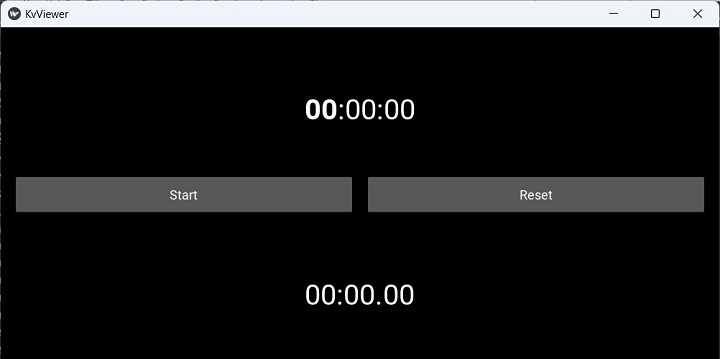
以下“kv”指令碼用於放置兩個標籤和兩個按鈕,如上圖所示。頂部標籤用於顯示當前時間,底部標籤用於顯示計時器啟動後經過的時間。左側按鈕用於啟動/停止計時器。右側按鈕將計時器重置為 0。
BoxLayout:
   orientation: 'vertical'

   Label:
      id: time
      font_size:40
      markup:True
      text: '[b]00[/b]:00:00'

   BoxLayout:
      orientation: 'horizontal'
      padding: 20
      spacing: 20
      height: 90
      size_hint: (1, None)

      Button:
         text: 'Start'
         id: start_stop
         on_press : app.start_stop()

      Button:
         id: reset
         text: 'Reset'
         on_press: app.reset()
   Label:
      id: stopwatch
      font_size:40
      markup:True
      text:'00:00.[size=40]00[/size]'
在應用程式程式碼中,我們定義了一個 on_stop() 事件處理程式,該處理程式在 GUI 填充後立即呼叫。它排程一個時間事件處理程式,該處理程式每秒更新標籤的當前時間。
def on_start(self):
   Clock.schedule_interval(self.update_time, 0)
update_time() 方法更新頂部標籤(id 為 time)上顯示的當前時間,以及底部標籤(id 為 stopwatch)上經過的時間(如果計時器已啟動)。
def update_time(self, t):
   if self.sw_started:
      self.sw_seconds += t
   minutes, seconds = divmod(self.sw_seconds, 60)
   part_seconds = seconds * 100 % 100
   self.root.ids.stopwatch.text = "{:2d} : {:2d}.{:2d}".format(int(minutes), int(seconds), int(part_seconds))
   self.root.ids.time.text = strftime('[b]%H[/b]:%M:%S')
id 為 start 的按鈕繫結到 start_stop() 方法,該方法儲存計時器是否已啟動或停止的狀態,並相應地更新啟動按鈕(id 為 start_stop)的標題。
def start_stop(self):
   self.root.ids.start_stop.text = 'Start' if
self.sw_started else 'Stop'
   self.sw_started = not self.sw_started
右側按鈕將時間計數器重置為 0,將另一個按鈕的標題設定為“開始”,並將底部標籤的標題重置為“0:0.0”。
def reset(self):
   if self.sw_started:
      self.root.ids.start_stop.text = 'Start'
      self.sw_started = False
   self.sw_seconds = 0
示例
整個編碼邏輯如下所示:
from time import strftime
from kivy.clock import Clock
from kivy.app import App
from kivy.core.window import Window

Window.size = (720, 400)

class StopWatchApp(App):
   sw_seconds = 0
   sw_started = False

   def update_time(self, t):
      if self.sw_started:
         self.sw_seconds += t
      minutes, seconds = divmod(self.sw_seconds, 60)
      part_seconds = seconds * 100 % 100

      self.root.ids.stopwatch.text = "{:2d} : {:2d}.{:2d}".format(int(minutes), int(seconds), int(part_seconds))
      self.root.ids.time.text = strftime('[b]%H[/b]:%M:%S')

   def on_start(self):
      Clock.schedule_interval(self.update_time, 0)

   def start_stop(self):
      self.root.ids.start_stop.text = 'Start' if self.sw_started else 'Stop'
      self.sw_started = not self.sw_started

   def reset(self):
      if self.sw_started:
         self.root.ids.start_stop.text = 'Start'
         self.sw_started = False
      self.sw_seconds = 0

StopWatchApp().run()
輸出
由於上述程式碼中 App 類的名稱為 StopWatchApp,因此其“kv”語言設計指令碼必須命名為“StopWatch.kv”,然後執行程式。
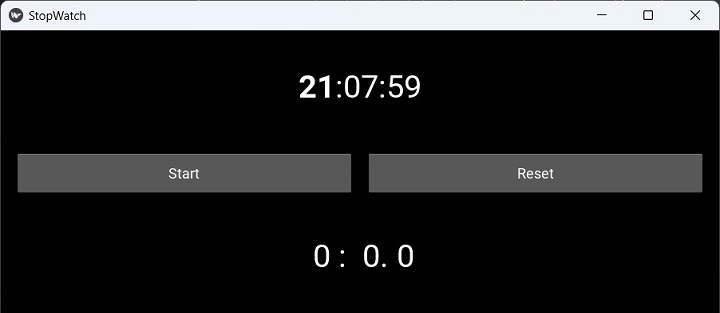
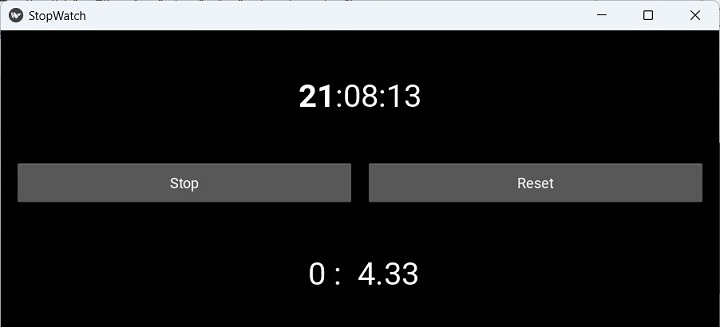
按下“開始”按鈕。計數器將開始,在底部標籤上顯示經過的時間。標題更改為“停止”。再次按下它以停止時鐘執行。點選“重置”按鈕將標籤恢復為“0”。
廣告