
- Kivy 教程
- Kivy 首頁
- Kivy 基礎
- Kivy - 開始入門
- Kivy - 安裝
- Kivy - 架構
- Kivy - 檔案語法
- Kivy - 應用
- Kivy - Hello World
- Kivy - 應用生命週期
- Kivy - 事件
- Kivy - 屬性
- Kivy - 輸入
- Kivy - 行為
- Kivy 按鈕
- Kivy - 按鈕
- Kivy - 按鈕事件
- Kivy - 按鈕顏色
- Kivy - 按鈕大小
- Kivy - 按鈕位置
- Kivy - 圓形按鈕
- Kivy - 停用按鈕
- Kivy - 圖片按鈕
- Kivy 元件
- Kivy - 元件
- Kivy - 標籤
- Kivy - 文字輸入
- Kivy - 畫布
- Kivy - 線
- Kivy - 複選框
- Kivy - 下拉列表
- Kivy - 視窗
- Kivy - 滾動檢視
- Kivy - 旋轉木馬
- Kivy - 滑塊
- Kivy - 圖片
- Kivy - 彈出視窗
- Kivy - 開關
- Kivy - 微調器
- Kivy - 分隔器
- Kivy - 進度條
- Kivy - 氣泡
- Kivy - 標籤面板
- Kivy - 散點圖
- Kivy - 手風琴
- Kivy - 檔案選擇器
- Kivy - 顏色選擇器
- Kivy - 程式碼輸入
- Kivy - 模態檢視
- Kivy - 切換按鈕
- Kivy - 相機
- Kivy - 樹檢視
- Kivy - reStructuredText
- Kivy - 動作欄
- Kivy - 影片播放器
- Kivy - 模板檢視
- Kivy - 虛擬鍵盤
- Kivy - 觸控漣漪
- Kivy - 音訊
- Kivy - 影片
- Kivy - 拼寫檢查
- Kivy - 效果
- Kivy - 輸入記錄器
- Kivy - OpenGL
- Kivy - 文字
- Kivy - 文字標記
- Kivy - 設定
- Kivy 佈局
- Kivy - 佈局
- Kivy - 浮動佈局
- Kivy - 網格佈局
- Kivy - 箱式佈局
- Kivy - 堆疊佈局
- Kivy - 錨點佈局
- Kivy - 相對佈局
- Kivy - 頁面佈局
- Kivy - 回收佈局
- Kivy - 佈局巢狀
- Kivy 高階概念
- Kivy - 配置物件
- Kivy - 圖集
- Kivy - 資料載入器
- Kivy - 快取管理器
- Kivy - 控制檯
- Kivy - 動畫
- Kivy - 多筆畫
- Kivy - 時鐘
- Kivy - SVG
- Kivy - UrlRequest
- Kivy - 剪貼簿
- Kivy - 工廠
- Kivy - 手勢
- Kivy - 語言
- Kivy - 圖形
- Kivy - 繪圖
- Kivy - 打包
- Kivy - Garden
- Kivy - 儲存
- Kivy - 向量
- Kivy - 工具
- Kivy - 檢查器
- Kivy 工具
- Kivy - 日誌記錄器
- Kivy - 幀緩衝區
- Kivy 應用和專案
- Kivy - 繪圖應用
- Kivy - 計算器應用
- Kivy - 計時器應用
- Kivy - 相機處理
- Kivy - 圖片檢視器
- Kivy - 貝塞爾曲線
- Kivy - 畫布壓力測試
- Kivy - 圓形繪製
- Kivy - 元件動畫
- Kivy - 其他
- Kivy 有用資源
- Kivy - 快速指南
- Kivy - 有用資源
- Kivy - 討論
Kivy 工具
“kivy.tools”模組包含一些非常有用的指令碼、命令列實用程式和示例。
KV 檢視器
Kivy 沒有官方的視覺化GUI設計器。因此,Kivy應用程式的佈局設計變得很繁瑣,因為在建立“kv”檔案時計劃好的元件放置,在應用程式中載入時往往不會得到預期的結果。
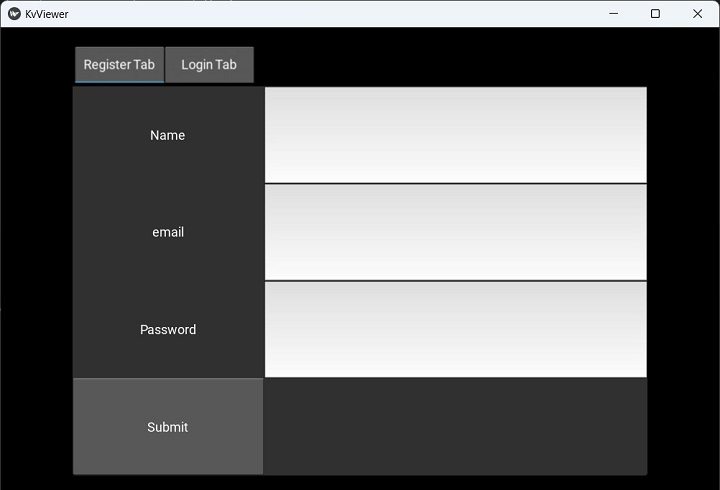
此Kv檢視器實用程式允許您動態顯示“kv”檔案,並考慮其更改。此實用程式的優點之一是,只有當您對該佈局滿意時,才載入此“kv”指令碼。
KViewer是一個命令列實用程式,需要“.kv”檔案作為引數。
python kviewer.py demo.kv
示例
以下“kv”檔案包含Demo應用程式的設計:
TabbedPanel:
   size_hint: .8, .8
   pos_hint: {'center_x': .5, 'center_y': .5}
   do_default_tab: False
   TabbedPanelItem:
      text:"Register Tab"
      GridLayout:
         cols:2

         Label:
            text:"Name"
            size_hint:(.2, .1)
            pos_hint:{'x':.2, 'y':.75}
         TextInput:
            size_hint:(.4, .1)
            pos_hint:{'x':.3, 'y':.65}

         Label:
            text:"email"
            size_hint:(.2, .1)
            pos_hint:{'x':.2, 'y':.55}

         TextInput:
            size_hint:(.4, .1)
            pos_hint:{'x':.3, 'y':.45}

         Label:
            text:"Password"
            size_hint:(.2, .1)
            pos_hint:{'x':.2, 'y':.35}

         TextInput:
            password:True
            size_hint:(.4, .1)
            pos:(400, 150)
            pos_hint:{'x':.3, 'y':.25}

         Button:
            text:'Submit'
            size_hint : (.2, .1)
            pos_hint : {'center_x':.5, 'center_y':.09}

   TabbedPanelItem:
      text:'Login Tab'
      GridLayout:
         cols:2

         Label:
            text:"email"
            size_hint:(.2, .1)
            pos_hint:{'x':.2, 'y':.55}

         TextInput:
            size_hint:(.4, .1)
            pos_hint:{'x':.3, 'y':.45}

         Label:
            text:"Password"
            size_hint:(.2, .1)
            pos_hint:{'x':.2, 'y':.35}

         TextInput:
            password:True
            size_hint:(.4, .1)
            pos:(400, 150)
            pos_hint:{'x':.3, 'y':.25}

         Button:
            text:'Submit'
            size_hint : (.2, .1)
            pos_hint : {'center_x':.5, 'center_y':.09}
輸出
讓我們使用kviewer實用程式檢視設計:
python kviewer.py demo.kv
它將生成以下輸出視窗:
基準測試
此指令碼執行並顯示一組基準測試的結果。這些提供了一組指標,主要用於衡量您系統的OpenGL效能。
要執行該實用程式,請使用以下命令:
Python benchmark.py
您將獲得以下輸出:
GL Vendor: b'Intel'
GL Renderer: b'Intel(R) Iris(R) Xe Graphics'
GL Version: b'4.6.0 - Build 31.0.101.3959'

Benchmark
---------
1/8 Core: button creation (10000 * 10 a-z) 4.246505
2/8 Core: button creation (10000 * 10 a-z), with Clock.tick [INFO ] [GL    ] NPOT texture support is available
6.612230
3/8 Core: label creation (10000 * 10 a-z) 4.543708
4/8 Core: label creation (10000 * 10 a-z), with Clock.tick 9.790683
5/8 Widget: creation (10000 Widget) 0.308506
6/8 Widget: creation (10000 Widget + 1 root) 1.734984
7/8 Widget: event dispatch (1000 on_update in 10*1000 Widget) 0.088639
8/8 Widget: empty drawing (10000 Widget + 1 root) 0.000706

Result: 27.325960

Do you want to send benchmark to gist.github.com (Y/n) : n
No benchmark posted.
生成圖示
此工具將幫助您生成Google Play商店、App Store、Amazon商店所需的所有圖示。
您需要提供要從中生成圖示的影像檔案的名稱,作為tools子目錄中generate-icons.py指令碼的引數。
python GPIcon.png
您將獲得以下輸出:
Generate App store high resolution: 1024x1024
Generate App store normal resolution: 512x512
Generate iPhone (iOS 7): 120x120
Generate iPhone @2 (iOS 7): 120x120
Generate iPad (iOS 7): 76x76
Generate iPad @2 (iOS 7): 152x152
Generate iPhone (iOS >= 6.1): 57x57
Generate iPhone @2 (iOS >= 6.1): 114x114
Generate iPad (iOS >= 6.1): 72x72
Generate iPad @2 (iOS >= 6.1): 114x114
Generate iTunes Artwork (ad-hoc): 512x512
Generate iTunes Artwork @2 (ad-hoc): 1024x1024
Generate Google Play icon: 512x512
Generate Launcher icon MDPI: 48x48
Generate Launcher icon HDPI: 72x72
Generate Launcher icon XHDPI: 96x96
Generate Launcher icon XXHDPI: 48x48
Generate Launcher icon XXXHDPI: 192x192
Generate Small icon: 114x114
Generate Large icon: 512x512
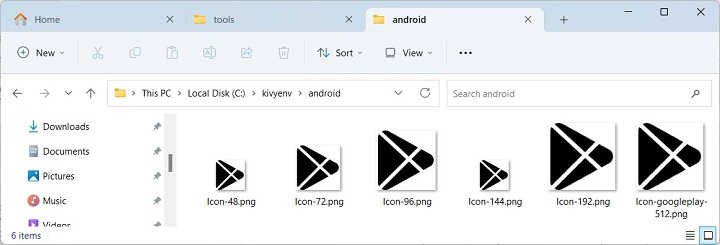
此實用程式生成的圖示儲存在各自的資料夾中:
報表工具
此工具是使用者的幫助工具。它生成在除錯過程中有用的轉儲資訊。
Python report.py
部分輸出如下所示:
==============================================================
Options
==============================================================
window = ('egl_rpi', 'sdl2', 'pygame', 'sdl', 'x11')
text = ('pil', 'sdl2', 'pygame', 'sdlttf')
video = ('gstplayer', 'ffmpeg', 'ffpyplayer', 'null')
audio = ('gstplayer', 'pygame', 'ffpyplayer', 'sdl2', 'avplayer')
image = ('tex', 'imageio', 'dds', 'sdl2', 'pygame', 'pil', 'ffpy', 'gif')
camera = ('opencv', 'gi', 'avfoundation', 'android', 'picamera')
spelling = ('enchant', 'osxappkit')
clipboard = ('android', 'winctypes', 'xsel', 'xclip',
'dbusklipper', 'nspaste', 'sdl2', 'pygame', 'dummy', 'gtk3')

The report will be sent as an anonymous gist.
Do you accept to send report to https://gist.github.com/
(Y/n) : n
No report posted.
Enter any key to leave.
廣告