- Kivy 教程
- Kivy - 首頁
- Kivy 基礎
- Kivy - 入門指南
- Kivy - 安裝
- Kivy - 架構
- Kivy - 檔案語法
- Kivy - 應用
- Kivy - Hello World
- Kivy - 應用生命週期
- Kivy - 事件
- Kivy - 屬性
- Kivy - 輸入
- Kivy - 行為
- Kivy 按鈕
- Kivy - 按鈕
- Kivy - 按鈕事件
- Kivy - 按鈕顏色
- Kivy - 按鈕大小
- Kivy - 按鈕位置
- Kivy - 圓形按鈕
- Kivy - 停用按鈕
- Kivy - 圖片按鈕
- Kivy 元件
- Kivy - 元件
- Kivy - 標籤
- Kivy - 文字輸入
- Kivy - 畫布
- Kivy - 直線
- Kivy - 複選框
- Kivy - 下拉列表
- Kivy - 視窗
- Kivy - 滾動檢視
- Kivy - 輪播圖
- Kivy - 滑塊
- Kivy - 圖片
- Kivy - 彈出視窗
- Kivy - 開關
- Kivy - 微調器
- Kivy - 分隔器
- Kivy - 進度條
- Kivy - 氣泡
- Kivy - 標籤頁面板
- Kivy - 散點圖
- Kivy - 手風琴
- Kivy - 檔案選擇器
- Kivy - 顏色拾取器
- Kivy - 程式碼輸入
- Kivy - 模態檢視
- Kivy - 切換按鈕
- Kivy - 相機
- Kivy - 樹檢視
- Kivy - reStructuredText
- Kivy - 動作欄
- Kivy - 影片播放器
- Kivy - 模板檢視
- Kivy - 虛擬鍵盤
- Kivy - 觸控漣漪效果
- Kivy - 音訊
- Kivy - 影片
- Kivy - 拼寫檢查
- Kivy - 效果
- Kivy - 輸入記錄器
- Kivy - OpenGL
- Kivy - 文字
- Kivy - 文字標記
- Kivy - 設定
- Kivy 佈局
- Kivy - 佈局
- Kivy - 浮動佈局
- Kivy - 網格佈局
- Kivy - 箱式佈局
- Kivy - 堆疊佈局
- Kivy - 錨點佈局
- Kivy - 相對佈局
- Kivy - 分頁佈局
- Kivy - 回收佈局
- Kivy - 佈局巢狀
- Kivy 高階概念
- Kivy - 配置物件
- Kivy - 圖集
- Kivy - 資料載入器
- Kivy - 快取管理器
- Kivy - 控制檯
- Kivy - 動畫
- Kivy - 多筆劃
- Kivy - 時鐘
- Kivy - SVG
- Kivy - UrlRequest
- Kivy - 剪貼簿
- Kivy - 工廠
- Kivy - 手勢
- Kivy - 語言
- Kivy - 圖形
- Kivy - 繪圖
- Kivy - 打包
- Kivy - Garden
- Kivy - 儲存
- Kivy - 向量
- Kivy - 工具函式
- Kivy - 檢查器
- Kivy - 工具
- Kivy - 日誌記錄器
- Kivy - 幀緩衝區
- Kivy 應用和專案
- Kivy - 繪圖應用
- Kivy - 計算器應用
- Kivy - 計時器應用
- Kivy - 相機處理
- Kivy - 圖片檢視器
- Kivy - 貝塞爾曲線
- Kivy - 畫布壓力測試
- Kivy - 圓形繪製
- Kivy - 元件動畫
- Kivy - 其他
- Kivy 有用資源
- Kivy - 快速指南
- Kivy - 有用資源
- Kivy - 討論
Kivy - 觸控漣漪效果
在 Kivy 框架中,“觸控漣漪效果”並非一個真正的元件或具體的類。相反,TouchRippleBehavior 混合器將觸控漣漪的視覺效果新增到佈局或單個元件。通常,Kivy 具有預設的按下/釋放視覺化效果。此類添加了來自 Google Material Design 的漣漪效果。
此混合器類在“kivy.uix.behaviors.touchripple”模組中定義。
from kivy.uix.behaviors.touchripple import TouchRippleBehavior
漣漪行為不會自動觸發。具體的類需要實現此行為混合器並顯式呼叫 ripple_show() 和 ripple_fade() 方法。
要自定義漣漪效果,請使用以下屬性:
ripple_duration_in - 顯示疊加層所需的動畫持續時間。它是一個 NumericProperty,預設為 0.5。
ripple_duration_out - 一個 NumericProperty,預設為 0.2,設定淡出疊加層所需的動畫持續時間。
ripple_fade_from_alpha - 漣漪顏色動畫開始時的 alpha 通道。預設值為 0.5。
ripple_fade_to_alpha - 漣漪顏色動畫的目標 alpha 通道,預設為 0.8。
ripple_rad_default - 動畫開始時的預設半徑。它是一個 NumericProperty,預設為 10。
ripple_scale - 從修飾元件的 max(width/height) 計算出的動畫疊加層的最大比例。
ripple_show() 方法在當前元件上開始漣漪動畫。您需要傳遞一個觸控事件作為引數。
ripple_fade() 方法用於在當前元件上結束漣漪動畫。
ripple_func_in 和 ripple_funcion_out 是顯示和隱藏疊加層的動畫回撥函式。
示例
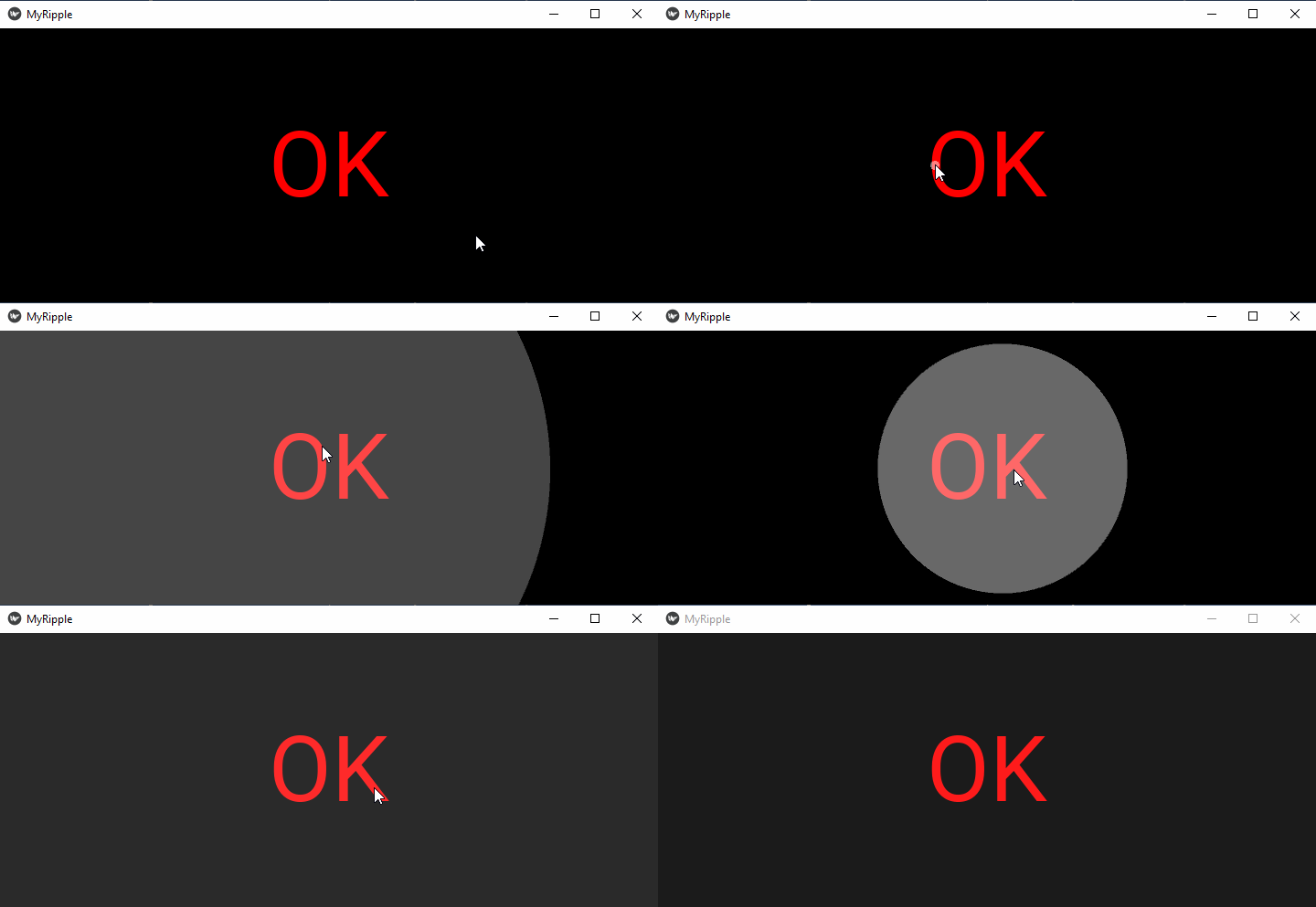
在下面的示例中,我們使用了 kv 指令碼,它將標籤放在網格佈局中,並處理 touch_down 和 touch_up 事件。
on_touch_down() 方法呼叫 ripple_show() 方法以生成持續時間為 3 秒的漣漪效果。
on_touch_up() 方法透過呼叫 ripple_fade() 方法結束漣漪效果。
from kivy.app import App
from kivy.uix.gridlayout import GridLayout
from kivy.uix.behaviors.touchripple import TouchRippleBehavior
from kivy.core.window import Window

Window.size = (720,300)

class RippleLabel(TouchRippleBehavior, GridLayout):
   def __init__(self, **kwargs):
      super(RippleLabel, self).__init__(**kwargs)

   def on_touch_down(self, touch):
      collide_point = self.collide_point(touch.x, touch.y)
      if collide_point:
         touch.grab(self)
         self.ripple_duration_in=3
         self.ripple_show(touch)
         return True
      return False

   def on_touch_up(self, touch):
      if touch.grab_current is self:
         touch.ungrab(self)
         self.ripple_duration_out=3
         self.ripple_fade()
         return True
      return False

class MyRippleApp(App):
   def build(self):
      return RippleLabel(cols=1)

MyRippleApp().run()
“kv”指令碼:
<RippleLabel>:
   GridLayout:
      cols:1
      Label:
         size:(root.width, root.height)
         pos_hint:{'center_x':.5, 'center_y':.5}

         text:'OK'
         font_size:100
         color:(1,0,0,1)
輸出
執行程式並點選“OK”標籤。它將在視窗表面產生漣漪波紋。增加持續時間以檢視效果。