- iOS 教程
- iOS - 首頁
- iOS - 入門
- iOS - 環境設定
- iOS - Objective-C 基礎
- iOS - 第一個 iPhone 應用
- iOS - 動作和出口
- iOS - 代理
- iOS - UI 元素
- iOS - 加速度計
- iOS - 通用應用程式
- iOS - 相機管理
- iOS - 位置處理
- iOS - SQLite 資料庫
- iOS - 傳送電子郵件
- iOS - 音訊和影片
- iOS - 檔案處理
- iOS - 訪問地圖
- iOS - 應用內購買
- iOS - iAd 整合
- iOS - GameKit
- iOS - 故事板
- iOS - 自動佈局
- iOS - Twitter 和 Facebook
- iOS - 記憶體管理
- iOS - 應用程式除錯
- iOS 有用資源
- iOS - 快速指南
- iOS - 有用資源
- iOS - 討論
iOS - 分屏檢視
分屏檢視的使用
分屏檢視是 iPad 專用的容器,用於管理兩個並排顯示的檢視控制器,左側為主檢視控制器,右側為詳細資訊檢視控制器。
重要屬性
- 委託
- 檢視控制器
示例程式碼和步驟
步驟 1 - 建立一個新專案,選擇主從應用程式而不是基於檢視的應用程式,然後點選下一步,輸入專案名稱並選擇建立。
步驟 2 - 預設情況下會建立一個簡單的分屏檢視控制器,其中主檢視中包含一個表格檢視。
步驟 3 - 建立的檔案與基於檢視的應用程式略有不同。在這裡,為我們建立了以下檔案。
- AppDelegate.h
- AppDelegate.m
- DetailViewController.h
- DetailViewController.m
- DetailViewController.xib
- MasterViewController.h
- MasterViewController.m
- MasterViewController.xib
步驟 4 - AppDelegate.h 檔案如下所示 -
#import <UIKit/UIKit.h>

@interface AppDelegate : UIResponder <UIApplicationDelegate>

@property (strong, nonatomic) UIWindow *window;

@property (strong, nonatomic) UISplitViewController *splitViewController;

@end
步驟 5 - AppDelegate.m 中的didFinishLaunchingWithOptions 方法如下所示 -
- (BOOL)application:(UIApplication *)application
   didFinishLaunchingWithOptions:(NSDictionary *)launchOptions
   self.window = [[UIWindow alloc] initWithFrame:[[UIScreen mainScreen]bounds]];

   // Override point for customization after application launch.
   MasterViewController *masterViewController = [[MasterViewController
   alloc] initWithNibName:@"MasterViewController" bundle:nil];
   UINavigationController *masterNavigationController =
   [[UINavigationController alloc] initWithRootViewController:
   masterViewController];

   DetailViewController *detailViewController =
   [[DetailViewController alloc] initWithNibName:@"DetailViewController"
   bundle:nil];
   UINavigationController *detailNavigationController =
   [[UINavigationController alloc] initWithRootViewController:
   detailViewController];

   masterViewController.detailViewController = detailViewController;

   self.splitViewController = [[UISplitViewController alloc] init];
   self.splitViewController.delegate = detailViewController;
   self.splitViewController.viewControllers =
      @[masterNavigationController, detailNavigationController];

   self.window.rootViewController = self.splitViewController;
   [self.window makeKeyAndVisible];
   return YES;
步驟 6 - MasterViewController.h 如下所示 -
#import <UIKit/UIKit.h>

@class DetailViewController;
@interface MasterViewController : UITableViewController
@property (strong, nonatomic) DetailViewController *detailViewController;

@end
步驟 7 - MasterViewController.m 如下所示 -
#import "MasterViewController.h"
#import "DetailViewController.h"

@interface MasterViewController () {
   NSMutableArray *_objects;
}
@end

@implementation MasterViewController

- (id)initWithNibName:(NSString *)nibNameOrNil bundle:(NSBundle *)
   nibBundleOrNil {
   self = [super initWithNibName:nibNameOrNil bundle:nibBundleOrNil];

   if (self) {
      self.title = NSLocalizedString(@"Master", @"Master");
      self.clearsSelectionOnViewWillAppear = NO;
      self.contentSizeForViewInPopover = CGSizeMake(320.0, 600.0);
   }
   return self;
}

- (void)viewDidLoad {
   [super viewDidLoad];
   self.navigationItem.leftBarButtonItem = self.editButtonItem;

   UIBarButtonItem *addButton = [[UIBarButtonItem alloc]
   initWithBarButtonSystemItem: UIBarButtonSystemItemAdd
   target:self action:@selector(insertNewObject:)];
   self.navigationItem.rightBarButtonItem = addButton;
}

- (void)didReceiveMemoryWarning {
   [super didReceiveMemoryWarning];
   // Dispose of any resources that can be recreated.
}

- (void)insertNewObject:(id)sender {
   if (!_objects) {
      _objects = [[NSMutableArray alloc] init];
   }

   [_objects insertObject:[NSDate date] atIndex:0];
   NSIndexPath *indexPath = [NSIndexPath indexPathForRow:0 inSection:0];
   [self.tableView insertRowsAtIndexPaths:@[indexPath] withRowAnimation:
   UITableViewRowAnimationAutomatic];
}

#pragma mark - Table View

- (NSInteger)numberOfSectionsInTableView:(UITableView *)tableView {
   return 1;
}

- (NSInteger)tableView:(UITableView *)tableView numberOfRowsInSection:
   (NSInteger)section {
   return _objects.count;
}

// Customize the appearance of table view cells.
- (UITableViewCell *)tableView:(UITableView *)tableView cellForRowAtIndexPath:
   (NSIndexPath *)indexPath {
   static NSString *CellIdentifier = @"Cell";

   UITableViewCell *cell = [tableView dequeueReusableCellWithIdentifier:
   CellIdentifier];

   if (cell == nil) {
      cell = [[UITableViewCell alloc] initWithStyle:
      UITableViewCellStyleDefault reuseIdentifier:CellIdentifier];
   }
   NSDate *object = _objects[indexPath.row];
   cell.textLabel.text = [object description];
   return cell;
}

- (BOOL)tableView:(UITableView *)tableView canEditRowAtIndexPath:
   (NSIndexPath *)indexPath {
   // Return NO if you do not want the specified item to be editable.
   return YES;
}

- (void)tableView:(UITableView *)tableView commitEditingStyle:
   (UITableViewCellEditingStyle)editingStyle forRowAtIndexPath:
   (NSIndexPath *)indexPath {

   if (editingStyle == UITableViewCellEditingStyleDelete) {
      [_objects removeObjectAtIndex:indexPath.row];
      [tableView deleteRowsAtIndexPaths:@[indexPath] withRowAnimation:
      UITableViewRowAnimationFade];
   } else if (editingStyle == UITableViewCellEditingStyleInsert) {
      // Create a new instance of the appropriate class, insert it into
      //the array, and add a new row to the table view.
   }
}

/*
// Override to support rearranging the table view.
- (void)tableView:(UITableView *)tableView moveRowAtIndexPath:
   (NSIndexPath *) fromIndexPath toIndexPath:(NSIndexPath *)toIndexPath {
}
*/

/*
// Override to support conditional rearranging of the table view.
- (BOOL)tableView:(UITableView *)tableView canMoveRowAtIndexPath:
   (NSIndexPath *)indexPath {
   // Return NO if you do not want the item to be re-orderable.
   return YES;
}
*/

- (void)tableView:(UITableView *)tableView didSelectRowAtIndexPath:
   (NSIndexPath *)indexPath {
   NSDate *object = _objects[indexPath.row];
   self.detailViewController.detailItem = object;
   NSDateFormatter *formatter = [[NSDateFormatter alloc] init];
   [formatter setDateFormat: @"yyyy-MM-dd HH:mm:ss zzz"];
   NSString *stringFromDate = [formatter stringFromDate:object];
   self.detailViewController.detailDescriptionLabel.text = stringFromDate;
}
@end
步驟 8 - DetailViewController.h 如下所示 -
#import <UIKit/UIKit.h>

@interface DetailViewController : UIViewController
<UISplitViewControllerDelegate>

@property (strong, nonatomic) id detailItem;

@property (weak, nonatomic) IBOutlet UILabel *detailDescriptionLabel;
@end
步驟 9 - DetailViewController.m 如下所示 -
#import "DetailViewController.h"

@interface DetailViewController ()
@property (strong, nonatomic) UIPopoverController *masterPopoverController;
- (void)configureView;
@end

@implementation DetailViewController

#pragma mark - Managing the detail item

- (void)setDetailItem:(id)newDetailItem {
   if (_detailItem != newDetailItem) {
      _detailItem = newDetailItem;

      // Update the view.
      [self configureView];
   }

   if (self.masterPopoverController != nil) {
      [self.masterPopoverController dismissPopoverAnimated:YES];
   }
}

- (void)configureView {
   // Update the user interface for the detail item.

   if (self.detailItem) {
      self.detailDescriptionLabel.text = [self.detailItem description];
   }
}

- (void)viewDidLoad {
   [super viewDidLoad];
   [self configureView];
}

- (void)didReceiveMemoryWarning {
   [super didReceiveMemoryWarning];
   // Dispose of any resources that can be recreated.
}

- (id)initWithNibName:(NSString *)nibNameOrNil bundle:
   (NSBundle *)nibBundleOrNil {
   self = [super initWithNibName:nibNameOrNil bundle:nibBundleOrNil];

   if (self) {
      self.title = NSLocalizedString(@"Detail", @"Detail");
   }
   return self;
}

#pragma mark - Split view

- (void)splitViewController:(UISplitViewController *)splitController
   willHideViewController:(UIViewController *)viewController withBarButtonItem:
   (UIBarButtonItem *)barButtonItem forPopoverController:
   (UIPopoverController *)popoverController {
   barButtonItem.title = NSLocalizedString(@"Master", @"Master");
   [self.navigationItem setLeftBarButtonItem:barButtonItem animated:YES];
   self.masterPopoverController = popoverController;
}

- (void)splitViewController:(UISplitViewController *)splitController
   willShowViewController:(UIViewController *)viewController
   invalidatingBarButtonItem:(UIBarButtonItem *)barButtonItem {
   // Called when the view is shown again in the split view,
   //invalidating the button and popover controller.
   [self.navigationItem setLeftBarButtonItem:nil animated:YES];
   self.masterPopoverController = nil;
}
@end
步驟 10 - 當我們執行應用程式時,將在橫向模式下獲得以下輸出 -

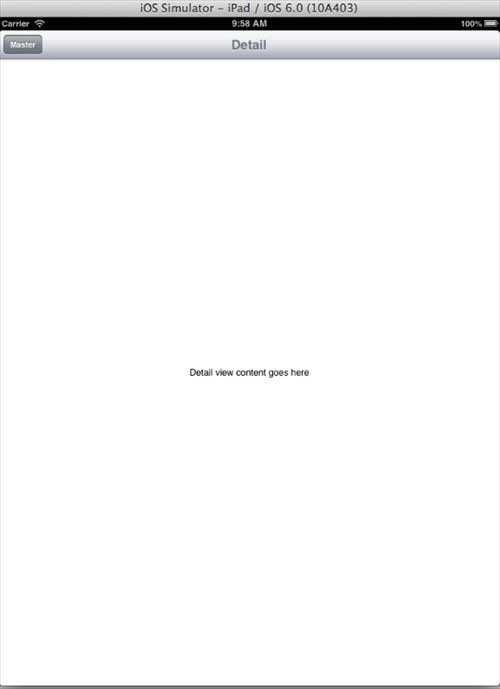
步驟 11 - 當我們切換到縱向模式時,將獲得以下輸出 -
ios_ui_elements.htm
廣告