- iOS 教程
- iOS - 首頁
- iOS - 入門
- iOS - 環境設定
- iOS - Objective-C 基礎
- iOS - 第一個 iPhone 應用
- iOS - 動作和出口
- iOS - 代理
- iOS - UI 元素
- iOS - 加速計
- iOS - 通用應用程式
- iOS - 相機管理
- iOS - 位置處理
- iOS - SQLite 資料庫
- iOS - 傳送郵件
- iOS - 音訊和影片
- iOS - 檔案處理
- iOS - 訪問地圖
- iOS - 應用內購買
- iOS - iAd 整合
- iOS - GameKit
- iOS - 故事板
- iOS - 自動佈局
- iOS - Twitter 和 Facebook
- iOS - 記憶體管理
- iOS - 應用程式除錯
- iOS 有用資源
- iOS - 快速指南
- iOS - 有用資源
- iOS - 討論
iOS - 代理
代理示例
假設物件 A 呼叫物件 B 來執行一個動作。一旦動作完成,物件 A 應該知道 B 已完成任務並採取必要的行動。這是透過代理實現的。
以上示例中的關鍵概念是:
A 是 B 的代理物件。
B 將擁有 A 的引用。
A 將實現 B 的代理方法。
B 將透過代理方法通知 A。
建立代理的步驟
步驟 1 - 首先,建立一個單檢視應用程式。
步驟 2 - 然後選擇 檔案 → 新建 → 檔案…
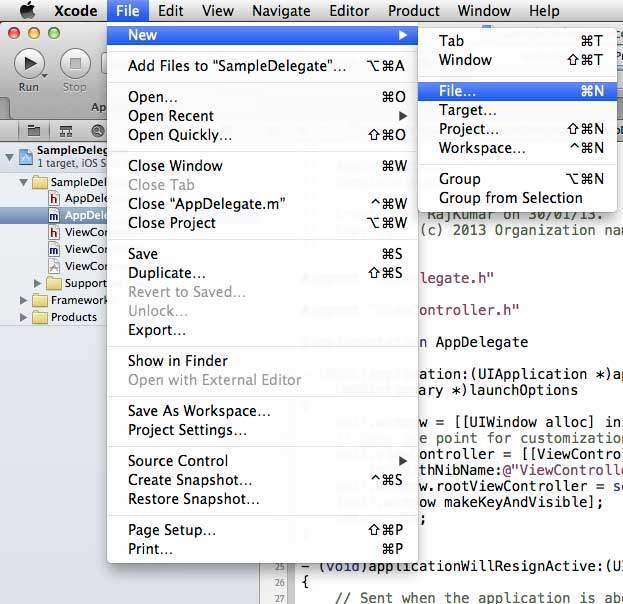
步驟 3 - 然後選擇 Objective C 類並點選 下一步。
步驟 4 - 為類命名,例如 SampleProtocol,子類為 NSObject,如下所示。
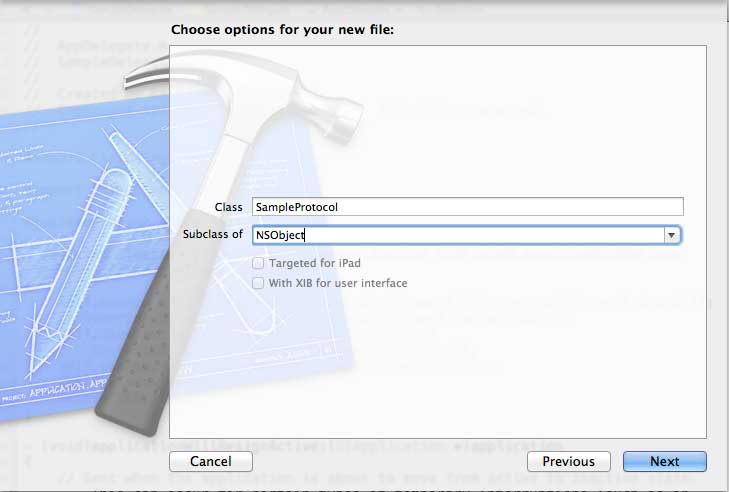
步驟 5 - 然後選擇 建立。
步驟 6 - 向 SampleProtocol.h 檔案新增一個協議,更新後的程式碼如下:
#import <Foundation/Foundation.h>

// Protocol definition starts here
@protocol SampleProtocolDelegate <NSObject>
@required
- (void) processCompleted;
@end

// Protocol Definition ends here
@interface SampleProtocol : NSObject {
   // Delegate to respond back
   id <SampleProtocolDelegate> _delegate;
}
@property (nonatomic,strong) id delegate;

-(void)startSampleProcess; // Instance method
@end
步驟 7 - 透過更新 SampleProtocol.m 檔案來實現例項方法,如下所示:
#import "SampleProtocol.h"

@implementation SampleProtocol

-(void)startSampleProcess {
   [NSTimer scheduledTimerWithTimeInterval:3.0 target:self.delegate
	selector:@selector(processCompleted) userInfo:nil repeats:NO];
}
@end
步驟 8 - 透過將標籤從物件庫拖動到 UIView 中,在 ViewController.xib 中新增一個 UILabel,如下所示。
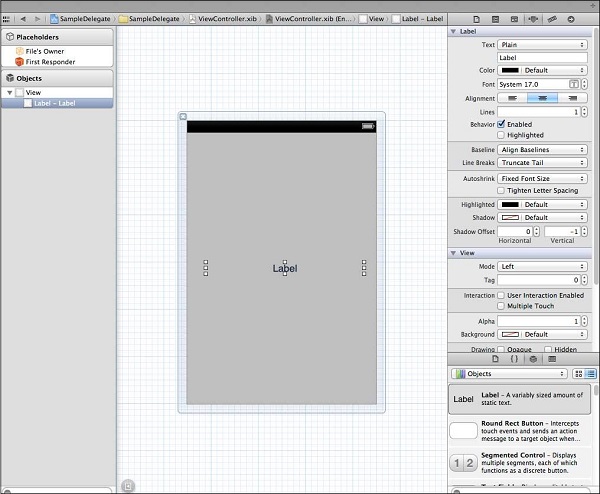
步驟 9 - 為標籤建立一個 IBOutlet 並將其命名為 myLabel,並更新程式碼以在 ViewController.h 中採用 SampleProtocolDelegate。
#import <UIKit/UIKit.h>
#import "SampleProtocol.h"

@interface ViewController : UIViewController<SampleProtocolDelegate> {
   IBOutlet UILabel *myLabel;
}
@end
步驟 10 實現委託方法,建立 SampleProtocol 物件並呼叫 startSampleProcess 方法。更新後的 ViewController.m 檔案如下:
#import "ViewController.h"

@interface ViewController ()

@end

@implementation ViewController

- (void)viewDidLoad {
   [super viewDidLoad];
   SampleProtocol *sampleProtocol = [[SampleProtocol alloc]init];
   sampleProtocol.delegate = self;
   [myLabel setText:@"Processing..."];
   [sampleProtocol startSampleProcess];
   // Do any additional setup after loading the view, typically from a nib.
}

- (void)didReceiveMemoryWarning {
   [super didReceiveMemoryWarning];
   // Dispose of any resources that can be recreated.
}

#pragma mark - Sample protocol delegate
-(void)processCompleted {
   [myLabel setText:@"Process Completed"];
}
@end
步驟 11 我們將看到如下輸出。最初,標籤顯示“處理中…”, 一旦 SampleProtocol 物件呼叫委託方法,它就會被更新。

廣告