- iOS 教程
- iOS - 首頁
- iOS - 入門
- iOS - 環境設定
- iOS - Objective-C 基礎
- iOS - 第一個 iPhone 應用程式
- iOS - 動作和出口
- iOS - 代理
- iOS - UI 元素
- iOS - 加速度計
- iOS - 通用應用程式
- iOS - 相機管理
- iOS - 位置處理
- iOS - SQLite 資料庫
- iOS - 傳送電子郵件
- iOS - 音訊和影片
- iOS - 檔案處理
- iOS - 訪問地圖
- iOS - 應用內購買
- iOS - iAd 整合
- iOS - GameKit
- iOS - 故事板
- iOS - 自動佈局
- iOS - Twitter 和 Facebook
- iOS - 記憶體管理
- iOS - 應用程式除錯
- iOS 有用資源
- iOS - 快速指南
- iOS - 有用資源
- iOS - 討論
iOS - GameKit
Gamekit 是一個框架,它為 iOS 應用程式提供排行榜、成就等功能。在本教程中,我們將解釋新增排行榜和更新分數的步驟。
涉及的步驟
步驟 1 - 在 iTunes Connect 中,確保您擁有一個唯一的 App ID,並在我們建立應用程式時,使用bundle ID 和程式碼簽名在 Xcode 中更新,並使用相應的配置檔案。
步驟 2 - 建立一個新的應用程式並更新應用程式資訊。您可以在 apple-add new apps 文件中瞭解更多相關資訊。
步驟 3 - 在應用程式頁面上的管理 Game Center 中設定排行榜,新增一個排行榜,並提供排行榜 ID 和分數型別。這裡我們使用 tutorialsPoint 作為排行榜 ID。
步驟 4 - 接下來的步驟與處理程式碼和為我們的應用程式建立 UI 相關。
步驟 5 - 建立一個單檢視應用程式,並輸入在iTunes Connect 中指定的bundle identifier。
步驟 6 - 更新 ViewController.xib,如下所示:
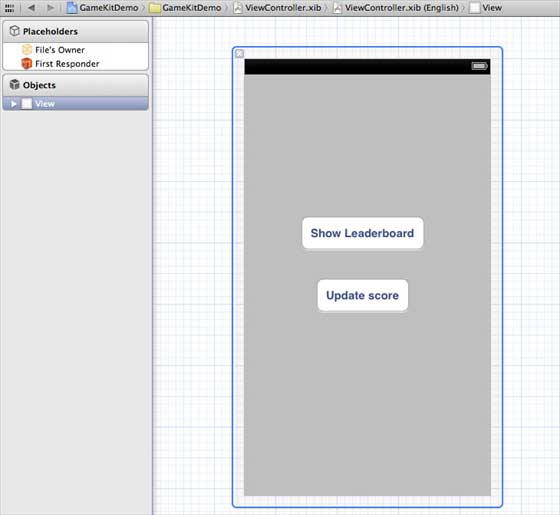
步驟 7 - 選擇您的專案檔案,然後選擇targets,然後新增GameKit.framework。
步驟 8 - 為我們新增的按鈕建立IBActions。
步驟 9 - 按如下方式更新ViewController.h 檔案:
#import <UIKit/UIKit.h>
#import <GameKit/GameKit.h>

@interface ViewController : UIViewController
<GKLeaderboardViewControllerDelegate>

-(IBAction)updateScore:(id)sender;
-(IBAction)showLeaderBoard:(id)sender;

@end
步驟 10 - 按如下方式更新ViewController.m:
#import "ViewController.h"

@interface ViewController ()
@end

@implementation ViewController

- (void)viewDidLoad {
   [super viewDidLoad];
   if([GKLocalPlayer localPlayer].authenticated == NO) {
      [[GKLocalPlayer localPlayer]
      authenticateWithCompletionHandler:^(NSError *error) {
         NSLog(@"Error%@",error);
      }];
   }
}

- (void)didReceiveMemoryWarning {
   [super didReceiveMemoryWarning];
   // Dispose of any resources that can be recreated.
}

- (void) updateScore: (int64_t) score
   forLeaderboardID: (NSString*) category {
   GKScore *scoreObj = [[GKScore alloc]
   initWithCategory:category];
   scoreObj.value = score;
   scoreObj.context = 0;

   [scoreObj reportScoreWithCompletionHandler:^(NSError *error) {
      // Completion code can be added here
      UIAlertView *alert = [[UIAlertView alloc]
      initWithTitle:nil message:@"Score Updated Succesfully"
      delegate:self cancelButtonTitle:@"Ok" otherButtonTitles: nil];
      [alert show];
   }];
}

-(IBAction)updateScore:(id)sender {
   [self updateScore:200 forLeaderboardID:@"tutorialsPoint"];
}

-(IBAction)showLeaderBoard:(id)sender {
   GKLeaderboardViewController *leaderboardViewController =
   [[GKLeaderboardViewController alloc] init];
   leaderboardViewController.leaderboardDelegate = self;
   [self presentModalViewController:
   leaderboardViewController animated:YES];
}

#pragma mark - Gamekit delegates
- (void)leaderboardViewControllerDidFinish:
(GKLeaderboardViewController *)viewController {
   [self dismissModalViewControllerAnimated:YES];
}
@end
輸出
當我們執行應用程式時,我們將獲得以下輸出:

當我們點選“顯示排行榜”時,我們將看到類似於以下內容的螢幕:
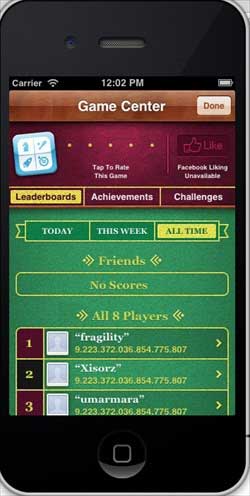
當我們點選“更新分數”時,分數將更新到我們的排行榜,我們還將收到如下所示的警報:

廣告