
- iOS 教程
- iOS - 主頁
- iOS - 入門
- iOS - 環境設定
- iOS - Objective-C 基礎
- iOS - 第一個 iPhone 應用程式
- iOS - 操作與出口
- iOS - 委託
- iOS - UI 元素
- iOS - 加速計
- iOS - 通用應用程式
- iOS - 相機管理
- iOS - 位置處理
- iOS - SQLite 資料庫
- iOS - 傳送電子郵件
- iOS - 音訊和影片
- iOS - 檔案處理
- iOS - 訪問地圖
- iOS - 應用內購買
- iOS - iAd 整合
- iOS - GameKit
- iOS - 情節提要
- iOS - 自動佈局
- iOS - Twitter 和 Facebook
- iOS - 記憶體管理
- iOS - 應用程式除錯
- iOS 實用資源
- iOS - 快速指南
- iOS - 實用資源
- iOS - 討論
iOS - 訪問地圖
地圖對我們來說始終有助於找到地方。地圖使用 MapKit 框架整合到 iOS 中。
涉及的步驟
步驟 1 - 建立一個基於簡單檢視的應用程式。
步驟 2 - 選擇專案檔案,然後選擇目標,再新增 MapKit.framework。
步驟 3 - 我們還應該新增 Corelocation.framework。
步驟 4 - 將 MapView 新增到 ViewController.xib 中,並建立一個 ibOutlet,將其命名為 mapView。
步驟 5 - 透過選擇檔案 → 新建 → 檔案... → 選擇 Objective C 類,再單擊下一步,建立一個新檔案。
步驟 6 - 將類命名為 MapAnnotation,並將“子類”設定為 NSObject。
步驟 7 - 選擇建立。
步驟 8 - 按如下方式更新 MapAnnotation.h −
#import <Foundation/Foundation.h>
#import <MapKit/MapKit.h>

@interface MapAnnotation : NSObject<MKAnnotation>
@property (nonatomic, strong) NSString *title;
@property (nonatomic, readwrite) CLLocationCoordinate2D coordinate;

- (id)initWithTitle:(NSString *)title andCoordinate:
   (CLLocationCoordinate2D)coordinate2d;

@end
步驟 9 - 按如下方式更新 MapAnnotation.m −
#import "MapAnnotation.h"

@implementation MapAnnotation
-(id)initWithTitle:(NSString *)title andCoordinate:
   (CLLocationCoordinate2D)coordinate2d {

   self.title = title;
   self.coordinate =coordinate2d;
   return self;
}
@end
步驟 10 - 按如下方式更新 ViewController.h −
#import <UIKit/UIKit.h>
#import <MapKit/MapKit.h>
#import <CoreLocation/CoreLocation.h>

@interface ViewController : UIViewController<MKMapViewDelegate> {
   MKMapView *mapView;
}
@end
步驟 11 - 按如下方式更新 ViewController.m −
#import "ViewController.h"
#import "MapAnnotation.h"

@interface ViewController ()
@end

@implementation ViewController

- (void)viewDidLoad {
   [super viewDidLoad];
   mapView = [[MKMapView alloc]initWithFrame:
   CGRectMake(10, 100, 300, 300)];
   mapView.delegate = self;
   mapView.centerCoordinate = CLLocationCoordinate2DMake(37.32, -122.03);
   mapView.mapType = MKMapTypeHybrid;
   CLLocationCoordinate2D location;
   location.latitude = (double) 37.332768;
   location.longitude = (double) -122.030039;

   // Add the annotation to our map view
   MapAnnotation *newAnnotation = [[MapAnnotation alloc]
   initWithTitle:@"Apple Head quaters" andCoordinate:location];
   [mapView addAnnotation:newAnnotation];
   CLLocationCoordinate2D location2;
   location2.latitude = (double) 37.35239;
   location2.longitude = (double) -122.025919;
   MapAnnotation *newAnnotation2 = [[MapAnnotation alloc]
   initWithTitle:@"Test annotation" andCoordinate:location2];
   [mapView addAnnotation:newAnnotation2];
   [self.view addSubview:mapView];
}

// When a map annotation point is added, zoom to it (1500 range)
- (void)mapView:(MKMapView *)mv didAddAnnotationViews:(NSArray *)views {
   MKAnnotationView *annotationView = [views objectAtIndex:0];
   id <MKAnnotation> mp = [annotationView annotation];
   MKCoordinateRegion region = MKCoordinateRegionMakeWithDistance
   ([mp coordinate], 1500, 1500);
   [mv setRegion:region animated:YES];
   [mv selectAnnotation:mp animated:YES];
}

- (void)didReceiveMemoryWarning {
   [super didReceiveMemoryWarning];
   // Dispose of any resources that can be recreated.
}
@end
輸出
當執行應用程式時,我們將獲得如下所示的輸出 −
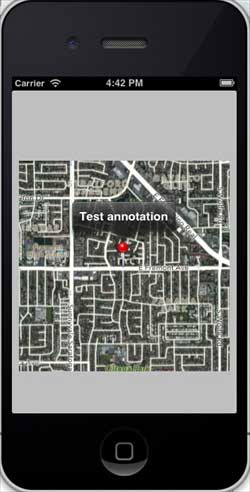
當向上滾動地圖時,我們將獲得如下所示的輸出 −

廣告