
- iOS 教程
- iOS - 主頁
- iOS - 入門
- iOS - 環境設定
- iOS - Objective-C 基礎
- iOS - 第一個 iPhone 應用
- iOS - 操作和出口
- iOS - 委託
- iOS - UI 元素
- iOS - 加速度計
- iOS - 通用應用程式
- iOS - 相機管理
- iOS - 位置處理
- iOS - SQLite 資料庫
- iOS - 傳送電子郵件
- iOS - 音訊和影片
- iOS - 檔案處理
- iOS - 訪問地圖
- iOS - 應用內購買
- iOS - iAd 整合
- iOS - GameKit
- iOS - 故事板
- iOS - 自動佈局
- iOS - Twitter 和 Facebook
- iOS - 記憶體管理
- iOS - 應用除錯
- iOS 有用資源
- iOS - 快速指南
- iOS - 有用資源
- iOS - 討論
iOS - 拾取器
拾取器的使用
拾取器包含一個旋轉的可滾動檢視,用於從專案列表中挑選值。
重要屬性
- 委託
- 資料來源
重要方法
- (void)reloadAllComponents
- (void)reloadComponent:(NSInteger)component
- (NSInteger)selectedRowInComponent:(NSInteger)component
- (void)selectRow:(NSInteger)row inComponent:(NSInteger)component animated:(BOOL)animated
更新 ViewController.h
我們將新增例項用於文字欄位、拾取器檢視和陣列。我們將採用 UITextFieldDelegate, UIPickerViewDataSource 和 UIPickerViewDelegate 協議。ViewController.h 如下所示 -
#import <UIKit/UIKit.h>

@interface ViewController : UIViewController
   <UITextFieldDelegate, UIPickerViewDataSource, UIPickerViewDelegate> {
   UITextField *myTextField;
   UIPickerView *myPickerView;
   NSArray *pickerArray;
}
@end
新增自定義方法 addPickerView
-(void)addPickerView {
   pickerArray = [[NSArray alloc]initWithObjects:@"Chess",
   @"Cricket",@"Football",@"Tennis",@"Volleyball", nil];
   myTextField = [[UITextField alloc]initWithFrame:
   CGRectMake(10, 100, 300, 30)];
   myTextField.borderStyle = UITextBorderStyleRoundedRect;
   myTextField.textAlignment = UITextAlignmentCenter;
   myTextField.delegate = self;
   [self.view addSubview:myTextField];
   [myTextField setPlaceholder:@"Pick a Sport"];
   myPickerView = [[UIPickerView alloc]init];
   myPickerView.dataSource = self;
   myPickerView.delegate = self;
   myPickerView.showsSelectionIndicator = YES;
   UIBarButtonItem *doneButton = [[UIBarButtonItem alloc]
   initWithTitle:@"Done" style:UIBarButtonItemStyleDone
   target:self action:@selector(done:)];
   UIToolbar *toolBar = [[UIToolbar alloc]initWithFrame:
   CGRectMake(0, self.view.frame.size.height-
   myDatePicker.frame.size.height-50, 320, 50)];
   [toolBar setBarStyle:UIBarStyleBlackOpaque];
   NSArray *toolbarItems = [NSArray arrayWithObjects:
   doneButton, nil];
   [toolBar setItems:toolbarItems];
   myTextField.inputView = myPickerView;
   myTextField.inputAccessoryView = toolBar;
}
實現委託,如下所示 -
#pragma mark - Text field delegates

-(void)textFieldDidBeginEditing:(UITextField *)textField {
   if ([textField.text isEqualToString:@""]) {
      [self dateChanged:nil];
   }
}

#pragma mark - Picker View Data source
-(NSInteger)numberOfComponentsInPickerView:(UIPickerView *)pickerView {
   return 1;
}

-(NSInteger)pickerView:(UIPickerView *)pickerView
   numberOfRowsInComponent:(NSInteger)component {
   return [pickerArray count];
}

#pragma mark- Picker View Delegate

-(void)pickerView:(UIPickerView *)pickerView didSelectRow:
   (NSInteger)row inComponent:(NSInteger)component {
   [myTextField setText:[pickerArray objectAtIndex:row]];
}

- (NSString *)pickerView:(UIPickerView *)pickerView titleForRow:
   (NSInteger)row forComponent:(NSInteger)component {
   return [pickerArray objectAtIndex:row];
}
在 ViewController.m 中更新 viewDidLoad,如下所示 -
(void)viewDidLoad {
   [super viewDidLoad];
   [self addPickerView];
}
輸出
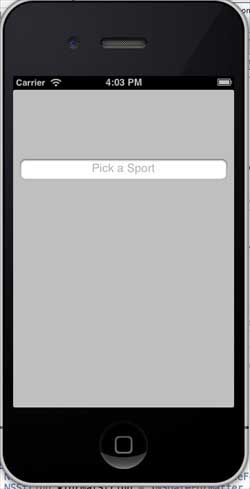
當我們執行應用程式時,我們會得到以下輸出 -
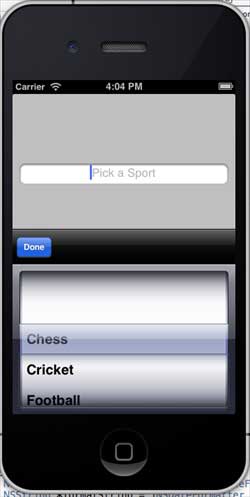
選擇文字欄位時,拾取器檢視將顯示如下所示,我們可以在其中選擇選項 -
ios_ui_elements.htm
廣告