- iOS 教程
- iOS - 主頁
- iOS - 開始
- iOS - 環境設定
- iOS - Objective-C 基礎知識
- iOS - 第一個 iPhone 應用程式
- iOS - 動作和出口
- iOS - 委託
- iOS - UI 元素
- iOS - 加速度計
- iOS - 通用應用程式
- iOS - 相機管理
- iOS - 位置處理
- iOS - SQLite 資料庫
- iOS - 傳送電子郵件
- iOS - 音訊和影片
- iOS - 檔案處理
- iOS - 訪問地圖
- iOS - 應用內購買
- iOS - iAd 整合
- iOS - GameKit
- iOS - 情節提要
- iOS - 自動佈局
- iOS - Twitter 和 Facebook
- iOS - 記憶體管理
- iOS - 應用程式除錯
- iOS 有用資源
- iOS - 快速指南
- iOS - 有用資源
- iOS - 討論
iOS - 提醒
提醒的用法
提醒用於向用戶提供重要資訊。只有在警報檢視中選擇選項後,我們才能使用該應用繼續進行後續操作。
重要屬性
- alertViewStyle
- cancelButtonIndex
- 委託
- 訊息
- 按鈕數
- 標題
重要方法
- (NSInteger)addButtonWithTitle:(NSString *)title
- (NSString *)buttonTitleAtIndex:(NSInteger)buttonIndex
- (void)dismissWithClickedButtonIndex:
   (NSInteger)buttonIndex animated:(BOOL)animated
- (id)initWithTitle:(NSString *)title message:
   (NSString *)message delegate:(id)delegate
   cancelButtonTitle:(NSString *)cancelButtonTitle
   otherButtonTitles:(NSString*)otherButtonTitles, ...
- (void)show
更新 ViewController.h 如下所示 -
使您的類符合警報檢視委託協議,方法是將 < UIAlertViewDelegate> 新增到 ViewController.h 中,如下所示。
#import <UIKit/UIKit.h>

@interface ViewController : UIViewController<UIAlertViewDelegate> {
}
@end
新增自定義方法 addAlertView
-(void)addAlertView {
   UIAlertView *alertView = [[UIAlertView alloc]initWithTitle:
   @"Title" message:@"This is a test alert" delegate:self
   cancelButtonTitle:@"Cancel" otherButtonTitles:@"Ok", nil];
   [alertView show];
}
實現警報檢視委託方法
#pragma mark - Alert view delegate
- (void)alertView:(UIAlertView *)alertView clickedButtonAtIndex:
   (NSInteger)buttonIndex {
      switch (buttonIndex) {
         case 0:
            NSLog(@"Cancel button clicked");
         break;

         case 1:
            NSLog(@"OK button clicked");
         break;

         default:
         break;
      }
   }
}
更新 ViewController.m 中的 viewDidLoad 如下所示 -
(void)viewDidLoad {
   [super viewDidLoad];
   [self addAlertView];
}
輸出
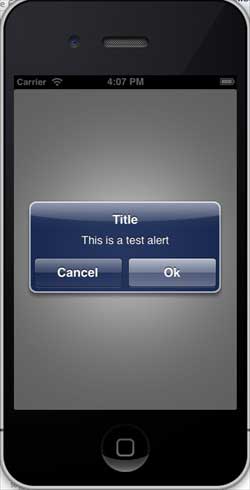
當我們執行應用程式時,我們將得到以下輸出 -
ios_ui_elements.htm
廣告