
- Yii 教程
- Yii - 首頁
- Yii - 概述
- Yii - 安裝
- Yii - 建立頁面
- Yii - 應用結構
- Yii - 入口指令碼
- Yii - 控制器
- Yii - 使用控制器
- Yii - 使用操作
- Yii - 模型
- Yii - 小部件
- Yii - 模組
- Yii - 檢視
- Yii - 佈局
- Yii - 資源
- Yii - 資源轉換
- Yii - 擴充套件
- Yii - 建立擴充套件
- Yii - HTTP 請求
- Yii - 響應
- Yii - URL 格式
- Yii - URL 路由
- Yii - URL 規則
- Yii - HTML 表單
- Yii - 驗證
- Yii - 特設驗證
- Yii - AJAX 驗證
- Yii - 會話
- Yii - 使用快閃記憶體資料
- Yii - Cookie
- Yii - 使用 Cookie
- Yii - 檔案上傳
- Yii - 格式化
- Yii - 分頁
- Yii - 排序
- Yii - 屬性
- Yii - 資料提供者
- Yii - 資料小部件
- Yii - ListView 小部件
- Yii - GridView 小部件
- Yii - 事件
- Yii - 建立事件
- Yii - 行為
- Yii - 建立行為
- Yii - 配置
- Yii - 依賴注入
- Yii - 資料庫訪問
- Yii - 資料訪問物件
- Yii - 查詢構建器
- Yii - 活動記錄
- Yii - 資料庫遷移
- Yii - 主題
- Yii - RESTful API
- Yii - RESTful API 實戰
- Yii - 欄位
- Yii - 測試
- Yii - 快取
- Yii - 片段快取
- Yii - 別名
- Yii - 日誌記錄
- Yii - 錯誤處理
- Yii - 認證
- Yii - 授權
- Yii - 本地化
- Yii - Gii
- Gii – 建立模型
- Gii – 生成控制器
- Gii – 生成模組
- Yii 有用資源
- Yii - 快速指南
- Yii - 有用資源
- Yii - 討論
Yii - 驗證
您永遠不應該信任使用者提供的的資料。要使用使用者輸入驗證模型,您應該呼叫yii\base\Model::validate()方法。如果驗證成功,它將返回一個布林值。如果存在錯誤,您可以從yii\base\Model::$errors屬性獲取它們。
使用規則
要使validate()函式工作,您應該重寫yii\base\Model::rules()方法。
步驟 1 − rules()方法返回以下格式的陣列。
[
   // required, specifies which attributes should be validated
   ['attr1', 'attr2', ...],
   // required, specifies the type a rule.
   'type_of_rule',
   // optional, defines in which scenario(s) this rule should be applied
   'on' => ['scenario1', 'scenario2', ...],
   // optional, defines additional configurations
   'property' => 'value', ...
]
對於每個規則,您至少應定義該規則適用的屬性以及應用的規則型別。
核心驗證規則為 - boolean, captcha, compare, date, default, double, each, email, exist, file, filter, image, ip, in, integer, match, number, required, safe, string, trim, unique, url.
步驟 2 − 在models資料夾中建立一個新的模型。
<?php
   namespace app\models;
   use Yii;
   use yii\base\Model;
   class RegistrationForm extends Model {
      public $username;
      public $password;
      public $email;
      public $country;
      public $city;
      public $phone;
      public function rules() {
         return [
            // the username, password, email, country, city, and phone attributes are
            //required
            [['username' ,'password', 'email', 'country', 'city', 'phone'], 'required'],
            // the email attribute should be a valid email address
            ['email', 'email'],
         ];
      }
   }
?>
我們已經為登錄檔單聲明瞭模型。該模型具有五個屬性 - username、password、email、country、city 和 phone。它們都是必需的,並且 email 屬性必須是有效的電子郵件地址。
步驟 3 − 將actionRegistration方法新增到SiteController中,我們在這裡建立一個新的RegistrationForm模型並將其傳遞給檢視。
public function actionRegistration() {
   $model = new RegistrationForm();
   return $this->render('registration', ['model' => $model]);
}
步驟 4 − 為我們的登錄檔單新增一個檢視。在 views/site 資料夾內,建立一個名為 registration.php 的檔案,其中包含以下程式碼。
<?php
   use yii\bootstrap\ActiveForm;
   use yii\bootstrap\Html;
?>

<div class = "row">
   <div class = "col-lg-5">
      <?php $form = ActiveForm::begin(['id' => 'registration-form']); ?>
         <?= $form->field($model, 'username') ?>
         <?= $form->field($model, 'password')->passwordInput() ?>
         <?= $form->field($model, 'email')->input('email') ?>
         <?= $form->field($model, 'country') ?>
         <?= $form->field($model, 'city') ?>
         <?= $form->field($model, 'phone') ?>
         <div class = "form-group">
            <?= Html::submitButton('Submit', ['class' => 'btn btn-primary',
               'name' => 'registration-button']) ?>
         </div>
      <?php ActiveForm::end(); ?>
   </div>
</div>
我們正在使用ActiveForm小部件來顯示我們的登錄檔單。
步驟 5 − 如果您轉到本地主機https://:8080/index.php?r=site/registration並單擊提交按鈕,您將看到驗證規則正在起作用。

步驟 6 − 要自定義username屬性的錯誤訊息,請以以下方式修改RegistrationForm的rules()方法。
public function rules() {
   return [
      // the username, password, email, country, city, and phone attributes are required
      [['password', 'email', 'country', 'city', 'phone'], 'required'],
      ['username', 'required', 'message' => 'Username is required'],
      // the email attribute should be a valid email address
      ['email', 'email'],
   ];
}
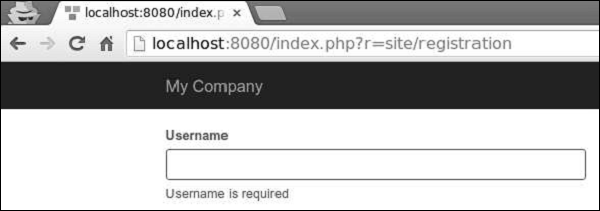
步驟 7 − 轉到本地主機https://:8080/index.php?r=site/registration並單擊提交按鈕。您會注意到 username 屬性的錯誤訊息已更改。
步驟 8 − 要自定義驗證過程,您可以重寫這些方法。
yii\base\Model::beforeValidate(): 觸發
yii\base\Model::EVENT_BEFORE_VALIDATE 事件。
yii\base\Model::afterValidate(): 觸發
yii\base\Model::EVENT_AFTER_VALIDATE 事件。
步驟 9 − 要修剪 country 屬性周圍的空格並將 city 屬性的空輸入轉換為 null,您可以使用trim和default驗證器。
public function rules() {
   return [
      // the username, password, email, country, city, and phone attributes are required
      [['password', 'email', 'country', 'city', 'phone'], 'required'],
      ['username', 'required', 'message' => 'Username is required'],
      ['country', 'trim'],
      ['city', 'default'],
      // the email attribute should be a valid email address
      ['email', 'email'],
   ];
}
步驟 10 − 如果輸入為空,您可以為其設定預設值。
public function rules() {
   return [
      ['city', 'default', 'value' => 'Paris'],
   ];
}
如果 city 屬性為空,則將使用預設值“Paris”。