
- Yii 教程
- Yii - 首頁
- Yii - 概述
- Yii - 安裝
- Yii - 建立頁面
- Yii - 應用結構
- Yii - 入口指令碼
- Yii - 控制器
- Yii - 使用控制器
- Yii - 使用動作
- Yii - 模型
- Yii - 小部件
- Yii - 模組
- Yii - 檢視
- Yii - 佈局
- Yii - 資源
- Yii - 資源轉換
- Yii - 擴充套件
- Yii - 建立擴充套件
- Yii - HTTP 請求
- Yii - 響應
- Yii - URL 格式
- Yii - URL 路由
- Yii - URL 規則
- Yii - HTML 表單
- Yii - 驗證
- Yii - 特設驗證
- Yii - AJAX 驗證
- Yii - 會話
- Yii - 使用快閃記憶體資料
- Yii - Cookie
- Yii - 使用 Cookie
- Yii - 檔案上傳
- Yii - 格式化
- Yii - 分頁
- Yii - 排序
- Yii - 屬性
- Yii - 資料提供者
- Yii - 資料小部件
- Yii - ListView 小部件
- Yii - GridView 小部件
- Yii - 事件
- Yii - 建立事件
- Yii - 行為
- Yii - 建立行為
- Yii - 配置
- Yii - 依賴注入
- Yii - 資料庫訪問
- Yii - 資料訪問物件
- Yii - 查詢構建器
- Yii - 活動記錄
- Yii - 資料庫遷移
- Yii - 主題
- Yii - RESTful API
- Yii - RESTful API 實戰
- Yii - 欄位
- Yii - 測試
- Yii - 快取
- Yii - 碎片快取
- Yii - 別名
- Yii - 日誌記錄
- Yii - 錯誤處理
- Yii - 身份驗證
- Yii - 授權
- Yii - 本地化
- Yii - Gii
- Gii – 建立模型
- Gii – 生成控制器
- Gii – 生成模組
- Yii 有用資源
- Yii - 快速指南
- Yii - 有用資源
- Yii - 討論
Yii - 佈局
佈局表示多個檢視的公共部分,例如頁面頁首和頁尾。預設情況下,佈局應儲存在views/layouts資料夾中。
讓我們看看基本應用程式模板的主佈局:
<?php
   /* @var $this \yii\web\View */
   /* @var $content string */
   use yii\helpers\Html;
   use yii\bootstrap\Nav;
   use yii\bootstrap\NavBar;
   use yii\widgets\Breadcrumbs;
   use app\assets\AppAsset;
   AppAsset::register($this);
?>

<?php $this->beginPage() ?>
<!DOCTYPE html>
<html lang = "<?= Yii::$app->language ?>">
   <head>
      <meta charset = "<?= Yii::$app->charset ?>">
      <meta name = "viewport" content = "width = device-width, initial-scale = 1">
      <?= Html::csrfMetaTags() ?>
      <title><?= Html::encode($this->title) ?></title>
      <?php $this->head() ?>
   </head>

   <body>
      <?php $this->beginBody() ?>
         <div class = "wrap">
            <?php
               NavBar::begin([
                  'brandLabel' => 'My Company',
                  'brandUrl' => Yii::$app->homeUrl,
                  'options' => [
                     'class' => 'navbar-inverse navbar-fixed-top',
                  ],
               ]);

               echo Nav::widget([
                  'options' => ['class' => 'navbar-nav navbar-right'],
                  'items' => [
                     ['label' => 'Home', 'url' => ['/site/index']],
                     ['label' => 'About', 'url' => ['/site/about']],
                     ['label' => 'Contact', 'url' => ['/site/contact']],
                     Yii::$app->user->isGuest ?
                        ['label' => 'Login', 'url' => ['/site/login']] :
                        [
                           'label' => 'Logout (' . Yii::$app->user->identity->username.')',
                           'url' => ['/site/logout'],
                           'linkOptions' => ['data-method' => 'post']
                        ],
                  ],
               ]);

               NavBar::end();
            ?>
            <div class = "container">
               <?= Breadcrumbs::widget([
                  'links' => isset($this->params['breadcrumbs']) ? $this>params
                     ['breadcrumbs'] : [],
               ]) ?>
               <?= $content ?>
            </div>

         </div>

         <footer class = "footer">
            <div class = "container">
               <p class = "pull-left">© My Company <?= date('Y') ?></p>
               <p class = "pull-right"><?= Yii::powered() ?></p>
            </div>
         </footer>

      <?php $this->endBody() ?>
   </body>
</html>
<?php $this->endPage() ?>
此佈局生成所有頁面通用的 HTML 頁面。$content變數是內容檢視的渲染結果。以下方法會觸發有關渲染過程的事件,以便可以正確注入其他地方註冊的指令碼和標籤:
head() - 應在head部分中呼叫。生成一個佔位符,該佔位符將被針對頭部位置註冊的 HTML 替換。
beginBody() - 應在body部分的開頭呼叫。觸發EVENT_BEGIN_BODY事件。生成一個佔位符,該佔位符將被針對 body 開始位置註冊的 HTML 替換。
endBody() - 應在body部分的結尾呼叫。觸發EVENT_END_BODY事件。生成一個佔位符,該佔位符將被針對 body 結束位置註冊的 HTML 替換。
beginPage() - 應在佈局的開頭呼叫。觸發EVENT_BEGIN_PAGE事件。
endPage() - 應在佈局的結尾呼叫。觸發EVENT_END_PAGE事件。
建立佈局
步驟 1 - 在 views/layouts 目錄中,建立一個名為newlayout.php的檔案,其中包含以下程式碼。
<?php
   /* @var $this \yii\web\View */
   /* @var $content string */
   use yii\helpers\Html;
   use yii\bootstrap\Nav;
   use yii\bootstrap\NavBar;
   use yii\widgets\Breadcrumbs;
   use app\assets\AppAsset;
   AppAsset::register($this);
?>
<?php $this->beginPage() ?>
<!DOCTYPE html>
<html lang = "<?= Yii::$app->language ?>">
   <head>
      <meta charset = "<?= Yii::$app->charset ?>">
      <meta name = "viewport" content = "width = device-width, initial-scale = 1">
      <? = Html::csrfMetaTags() ?>
      <title><? = Html::encode($this->title) ?></title>
      <?php $this->head() ?>
   </head>

   <body>
      <?php $this->beginBody() ?>
         <div class = "wrap">
            <div class = "container">
               <? = $content ?>
            </div>
         </div>

         <footer class = "footer">
            <div class = "container">
               <p class = "pull-left">© My Company <?= date('Y') ?></p>
               <p class = "pull-right"><? = Yii::powered() ?></p>
            </div>
         </footer>
      <?php $this->endBody() ?>
   </body>

</html>
<?php $this->endPage() ?>
我們去掉了頂部的選單欄。
步驟 2 - 要將此佈局應用於SiteController,請將$layout屬性新增到SiteController類。
<?php
   namespace app\controllers;
   use Yii;
   use yii\filters\AccessControl;
   use yii\web\Controller;
   use yii\filters\VerbFilter;
   use app\models\LoginForm;
   use app\models\ContactForm;
   class SiteController extends Controller {
      public $layout = “newlayout”;
      /* other methods */
   }
?>
步驟 3 - 現在,如果您在 SiteController 的任何檢視的網頁瀏覽器中訪問,您將看到佈局已更改。
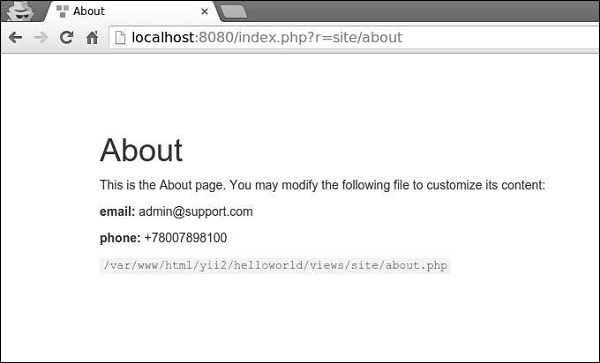
步驟 4 - 要註冊各種元標記,您可以在內容檢視中呼叫yii\web\View::registerMetaTag()。
步驟 5 - 修改SiteController的“關於”檢視。
<?php
   /* @var $this yii\web\View */
   use yii\helpers\Html;
   $this->title = 'About';
   $this->params['breadcrumbs'][] = $this->title;
   $this->registerMetaTag(['name' => 'keywords', 'content' => 'yii, developing, views,
      meta, tags']);
   $this->registerMetaTag(['name' => 'description', 'content' => 'This is the description
      of this page!'], 'description');
?>
<div class="site-about">
   <h1><?= Html::encode($this->title) ?></h1>
   <p>
      This is the About page. You may modify the following file to customize its content:
   </p>
   <code><?= __FILE__ ?></code>
</div>
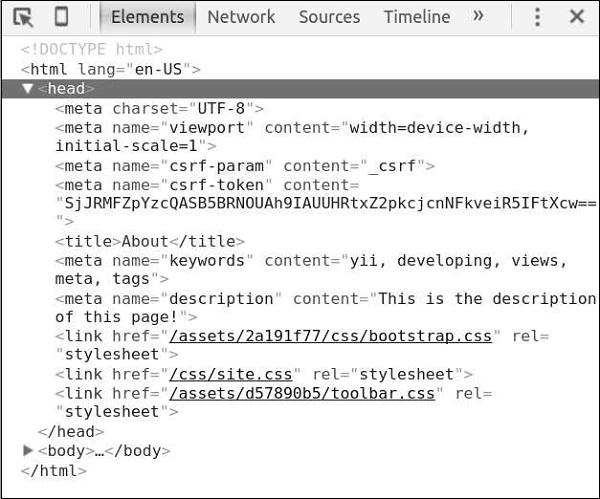
我們剛剛註冊了兩個元標記 - keywords 和 description。
步驟 6 - 現在訪問https://:8080/index.php?r=site/about,您將在頁面的 head 部分找到元標記,如下面的螢幕截圖所示。
檢視觸發多個事件:
EVENT_BEGIN_BODY - 透過呼叫yii\web\View::beginBody()在佈局中觸發。
EVENT_END_BODY - 透過呼叫yii\web\View::endBody()在佈局中觸發。
EVENT_BEGIN_PAGE - 透過呼叫yii\web\View::beginPage()在佈局中觸發。
EVENT_END_PAGE - 透過呼叫yii\web\View::endPage()在佈局中觸發。
EVENT_BEFORE_RENDER - 在控制器中,在渲染檔案開始時觸發。
EVENT_AFTER_RENDER - 渲染檔案後觸發。
您可以響應這些事件以將內容注入檢視。
步驟 7 - 要在SiteController的actionAbout中顯示當前日期和時間,請按此方式修改它。
public function actionAbout() {
   \Yii::$app->view->on(View::EVENT_BEGIN_BODY, function () {
      echo date('m.d.Y H:i:s');
   });
   return $this->render('about');
}
步驟 8 - 在網頁瀏覽器的位址列中鍵入https://:8080/index.php?r=site/about,您將看到以下內容。

重要提示
為了使檢視更易於管理,您應該:
- 將複雜的檢視分成幾個較小的檢視。
- 對常見的 HTML 部分(頁首、頁尾、選單等)使用佈局。
- 使用小部件。
檢視應:
- 包含 HTML 和簡單的 PHP 程式碼以格式化和呈現資料。
- 不處理請求。
- 不修改模型屬性。
- 不執行資料庫查詢。