
- Yii 教程
- Yii - 首頁
- Yii - 概覽
- Yii - 安裝
- Yii - 建立頁面
- Yii - 應用程式結構
- Yii - 入口指令碼
- Yii - 控制器
- Yii - 使用控制器
- Yii - 使用操作
- Yii - 模型
- Yii - 小部件
- Yii - 模組
- Yii - 檢視
- Yii - 佈局
- Yii - 資源
- Yii - 資源轉換
- Yii - 擴充套件
- Yii - 建立擴充套件
- Yii - HTTP 請求
- Yii - 響應
- Yii - URL 格式
- Yii - URL 路由
- Yii - URL 規則
- Yii - HTML 表單
- Yii - 驗證
- Yii - 特設驗證
- Yii - AJAX 驗證
- Yii - 會話
- Yii - 使用快閃記憶體資料
- Yii - Cookie
- Yii - 使用 Cookie
- Yii - 檔案上傳
- Yii - 格式化
- Yii - 分頁
- Yii - 排序
- Yii - 屬性
- Yii - 資料提供者
- Yii - 資料小部件
- Yii - ListView 小部件
- Yii - GridView 小部件
- Yii - 事件
- Yii - 建立事件
- Yii - 行為
- Yii - 建立行為
- Yii - 配置
- Yii - 依賴注入
- Yii - 資料庫訪問
- Yii - 資料訪問物件
- Yii - 查詢構建器
- Yii - 活動記錄
- Yii - 資料庫遷移
- Yii - 主題
- Yii - RESTful API
- Yii - RESTful API 實踐
- Yii - 欄位
- Yii - 測試
- Yii - 快取
- Yii - 片段快取
- Yii - 別名
- Yii - 日誌記錄
- Yii - 錯誤處理
- Yii - 身份驗證
- Yii - 授權
- Yii - 本地化
- Yii - Gii
- Gii – 建立模型
- Gii – 生成控制器
- Gii – 生成模組
- Yii 有用資源
- Yii - 快速指南
- Yii - 有用資源
- Yii - 討論
Yii - 快取
快取是提高應用程式效能的有效方法。快取機制將靜態資料儲存在快取中,並在請求時從快取中獲取。在伺服器端,您可以使用快取來儲存基本資料,例如最近新聞列表。您還可以儲存頁面片段或整個網頁。在客戶端,您可以使用 HTTP 快取將最近訪問的頁面儲存在瀏覽器快取中。
準備資料庫
步驟 1 - 建立一個新的資料庫。可以透過以下兩種方式準備資料庫。
在終端執行 mysql -u root –p
.透過 CREATE DATABASE helloworld CHARACTER SET utf8 COLLATE utf8_general_ci; 建立一個新的資料庫。
步驟 2 - 在config/db.php檔案中配置資料庫連線。以下配置適用於當前使用的系統。
<?php
   return [
      'class' => 'yii\db\Connection',
      'dsn' => 'mysql:host=localhost;dbname=helloworld',
      'username' => 'vladimir',
      'password' => '12345',
      'charset' => 'utf8',
   ];
?>
步驟 3 - 在根資料夾內執行 ./yii migrate/create test_table。此命令將建立一個用於管理我們資料庫的資料庫遷移。遷移檔案應出現在專案根目錄的migrations資料夾中。
步驟 4 - 以這種方式修改遷移檔案(在本例中為m160106_163154_test_table.php)。
<?php
   use yii\db\Schema;
   use yii\db\Migration;
   class m160106_163154_test_table extends Migration {
      public function safeUp()\ {
         $this->createTable("user", [
            "id" => Schema::TYPE_PK,
            "name" => Schema::TYPE_STRING,
            "email" => Schema::TYPE_STRING,
         ]);
         $this->batchInsert("user", ["name", "email"], [
            ["User1", "user1@gmail.com"],
            ["User2", "user2@gmail.com"],
            ["User3", "user3@gmail.com"],
            ["User4", "user4@gmail.com"],
            ["User5", "user5@gmail.com"],
            ["User6", "user6@gmail.com"],
            ["User7", "user7@gmail.com"],
            ["User8", "user8@gmail.com"],
            ["User9", "user9@gmail.com"],
            ["User10", "user10@gmail.com"],
            ["User11", "user11@gmail.com"],
         ]);
      }
      public function safeDown() {
         $this->dropTable('user');
      }
   }
?>
上述遷移建立了一個user表,其中包含以下欄位:id、name 和 email。它還添加了一些演示使用者。
步驟 5 - 在專案根目錄內執行 ./yii migrate以將遷移應用於資料庫。
步驟 6 - 現在,我們需要為我們的user表建立一個模型。為了簡單起見,我們將使用Gii程式碼生成工具。開啟此網址:https://:8080/index.php?r=gii。然後,單擊“模型生成器”標題下的“開始”按鈕。填寫表名(“user”)和模型類(“MyUser”),單擊“預覽”按鈕,最後單擊“生成”按鈕。
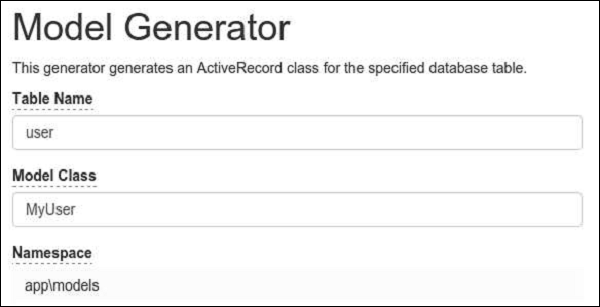
MyUser 模型應該出現在 models 目錄中。
資料快取
資料快取有助於將 PHP 變數儲存在快取中並在以後檢索它們。資料快取依賴於快取元件,這些元件通常註冊為應用程式元件。要訪問應用程式元件,您可以呼叫Yii::$app → cache。您可以註冊多個快取應用程式元件。
Yii 支援以下快取儲存 -
yii\caching\DbCache - 使用資料庫表來儲存快取資料。您必須建立一個表,如 yii\caching\DbCache::$cacheTable 中所指定。
yii\caching\ApcCache - 使用 PHP APC 擴充套件。
yii\caching\FileCache - 使用檔案來儲存快取資料。
yii\caching\DummyCache - 充當快取佔位符,不執行真正的快取。此元件的目的是簡化需要檢查快取可用性的程式碼。
yii\caching\MemCache - 使用 PHP memcache 擴充套件。
yii\caching\WinCache - 使用 PHP WinCache 擴充套件。
yii\redis\Cache - 實現基於 Redis 資料庫的快取元件。
yii\caching\XCache - 使用 PHP XCache 擴充套件。
所有快取元件都支援以下 API -
get() - 使用指定的鍵從快取中檢索資料值。如果資料值已過期/失效或未找到,則將返回 false 值。
add() - 如果快取中未找到鍵,則使用鍵在快取中儲存資料值。
set() - 使用鍵在快取中儲存資料值。
multiGet() - 使用指定的鍵從快取中檢索多個數據值。
multiAdd() - 在快取中儲存多個數據值。每個專案都由一個鍵標識。如果快取中已存在鍵,則將跳過資料值。
multiSet() - 在快取中儲存多個數據值。每個專案都由一個鍵標識。
exists() - 返回一個值,指示快取中是否找到了指定的鍵。
flush() - 從快取中刪除所有資料值。
delete() - 從快取中刪除由鍵標識的資料值。
儲存在快取中的資料值將永遠保留在那裡,除非將其刪除。要更改此行為,您可以在呼叫 set() 方法儲存資料值時設定過期引數。
快取資料值也可以透過快取依賴項的變化來使無效 -
yii\caching\DbDependency - 如果指定 SQL 語句的查詢結果發生更改,則依賴項將發生更改。
yii\caching\ChainedDependency - 如果鏈上的任何依賴項發生更改,則依賴項將發生更改。
yii\caching\FileDependency - 如果檔案的最後修改時間發生更改,則依賴項將發生更改。
yii\caching\ExpressionDependency - 如果指定 PHP 表示式的結果發生更改,則依賴項將發生更改。
現在,將cache應用程式元件新增到您的應用程式中。
步驟 1 - 修改config/web.php檔案。
<?php
   $params = require(__DIR__ . '/params.php');
   $config = [
      'id' => 'basic',
      'basePath' => dirname(__DIR__),
      'bootstrap' => ['log'],
      'components' => [
         'request' => [
            // !!! insert a secret key in the following (if it is empty) - this
               //is required by cookie validation
            'cookieValidationKey' => 'ymoaYrebZHa8gURuolioHGlK8fLXCKjO',
         ],
         'cache' => [
            'class' => 'yii\caching\FileCache',
         ],
         'user' => [
            'identityClass' => 'app\models\User',
            'enableAutoLogin' => true,
         ],
         'errorHandler' => [
            'errorAction' => 'site/error',
         ],
         'mailer' => [
            'class' => 'yii\swiftmailer\Mailer',
            // send all mails to a file by default. You have to set
            // 'useFileTransport' to false and configure a transport
            // for the mailer to send real emails.
            'useFileTransport' => true,
         ],
         'log' => [
            'traceLevel' => YII_DEBUG ? 3 : 0,
            'targets' => [
               [
                  'class' => 'yii\log\FileTarget',
                  'levels' => ['error', 'warning'],
               ],
            ],
         ],
         'db' => require(__DIR__ . '/db.php'),
      ],
      'modules' => [
         'hello' => [
            'class' => 'app\modules\hello\Hello',
         ],
      ],
      'params' => $params,
   ];
   if (YII_ENV_DEV) {
      // configuration adjustments for 'dev' environment
      $config['bootstrap'][] = 'debug';
      $config['modules']['debug'] = [
         'class' => 'yii\debug\Module',
      ];
      $config['bootstrap'][] = 'gii';
      $config['modules']['gii'] = [
         'class' => 'yii\gii\Module',
      ];
   }
   return $config;
?>
步驟 2 - 向 SiteController 新增一個名為actionTestCache()的新函式。
public function actionTestCache() {
   $cache = Yii::$app->cache;
   // try retrieving $data from cache
   $data = $cache->get("my_cached_data");
   if ($data === false) {
      // $data is not found in cache, calculate it from scratch
      $data = date("d.m.Y H:i:s");
      // store $data in cache so that it can be retrieved next time
      $cache->set("my_cached_data", $data, 30);
   }
   // $data is available here
   var_dump($data);
}
步驟 3 - 在網頁瀏覽器的位址列中鍵入https://:8080/index.php?r=site/test-cache,您將看到以下內容。
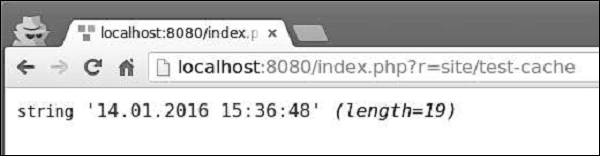
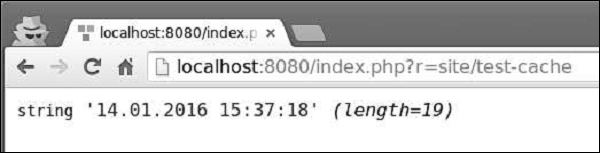
步驟 4 - 如果您重新載入頁面,您應該會注意到日期沒有改變。日期值被快取,快取將在 30 秒內過期。30 秒後重新載入頁面。
查詢快取
查詢快取為您提供了快取資料庫查詢結果的功能。查詢快取需要一個數據庫連線和快取應用程式元件。
步驟 1 - 向 SiteController 新增一個名為actionQueryCaching()的新方法。
public function actionQueryCaching() {
   $duration = 10;
   $result = MyUser::getDb()->cache(function ($db) {
      return MyUser::find()->count();
   }, $duration);
   var_dump($result);
   $user = new MyUser();
   $user->name = "cached user name";
   $user->email = "cacheduseremail@gmail.com";
   $user->save();
   echo "==========";
   var_dump(MyUser::find()->count());
}
在上面的程式碼中,我們快取資料庫查詢,新增一個新使用者並顯示使用者計數。
步驟 2 - 轉到 URLhttps://:8080/index.php?r=site/query-caching並重新載入頁面。
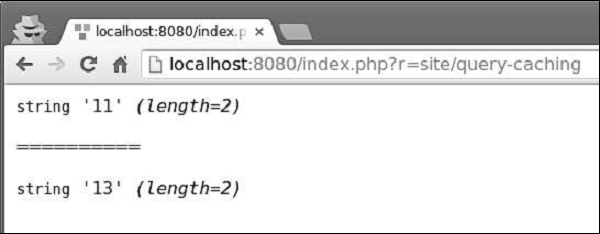
當我們第一次開啟頁面時,我們快取資料庫查詢並顯示所有使用者的計數。當我們重新載入頁面時,快取的資料庫查詢的結果與之前相同,因為資料庫查詢已快取。
您可以使用以下命令從控制檯重新整理快取 -
yii cache - 顯示可用的快取元件。
yii cache/flush cache1 cache2 cache3 - 重新整理快取元件 cache1、cache2 和 cache3。
yii cache/flush-all - 重新整理所有快取元件。
步驟 3 - 在應用程式的專案根目錄內執行./yii cache/flush-all。
