
- Yii 教程
- Yii - 首頁
- Yii - 概述
- Yii - 安裝
- Yii - 建立頁面
- Yii - 應用結構
- Yii - 入口指令碼
- Yii - 控制器
- Yii - 使用控制器
- Yii - 使用操作
- Yii - 模型
- Yii - 小部件
- Yii - 模組
- Yii - 檢視
- Yii - 佈局
- Yii - 資源
- Yii - 資源轉換
- Yii - 擴充套件
- Yii - 建立擴充套件
- Yii - HTTP 請求
- Yii - 響應
- Yii - URL 格式
- Yii - URL 路由
- Yii - URL 規則
- Yii - HTML 表單
- Yii - 驗證
- Yii - 即席驗證
- Yii - AJAX 驗證
- Yii - 會話
- Yii - 使用快閃記憶體資料
- Yii - Cookie
- Yii - 使用 Cookie
- Yii - 檔案上傳
- Yii - 格式化
- Yii - 分頁
- Yii - 排序
- Yii - 屬性
- Yii - 資料提供者
- Yii - 資料小部件
- Yii - ListView 小部件
- Yii - GridView 小部件
- Yii - 事件
- Yii - 建立事件
- Yii - 行為
- Yii - 建立行為
- Yii - 配置
- Yii - 依賴注入
- Yii - 資料庫訪問
- Yii - 資料訪問物件
- Yii - 查詢構建器
- Yii - 活動記錄
- Yii - 資料庫遷移
- Yii - 主題
- Yii - RESTful API
- Yii - RESTful API 實戰
- Yii - 欄位
- Yii - 測試
- Yii - 快取
- Yii - 片段快取
- Yii - 別名
- Yii - 日誌記錄
- Yii - 錯誤處理
- Yii - 身份驗證
- Yii - 授權
- Yii - 國際化
- Yii - Gii
- Gii – 建立模型
- Gii – 生成控制器
- Gii – 生成模組
- Yii 有用資源
- Yii - 快速指南
- Yii - 有用資源
- Yii - 討論
Yii - 國際化
國際化 (I18N) 是設計一個可適應多種語言的應用程式的過程。Yii 提供全方位的 I18N 功能。
語言環境是一組引數,用於指定使用者的語言和國家/地區。例如,en-US 代表英語語言環境和美國。Yii 提供兩種型別的語言:源語言和目標語言。源語言是應用程式中所有文字訊息的編寫語言。目標語言是應用於向終端使用者顯示內容的語言。
訊息翻譯元件將文字訊息從源語言翻譯成目標語言。要翻譯訊息,訊息翻譯服務必須在訊息源中查詢它。
要使用訊息翻譯服務,您應該:
- 將要翻譯的文字訊息包裝在 Yii::t() 方法中。
- 配置訊息源。
- 將訊息儲存在訊息源中。
步驟 1 - Yii::t() 方法可以這樣使用:`echo Yii::t('app', 'Hello, world!');`
echo \Yii::t('app', 'This is a message to translate!');
在上面的程式碼片段中,“app”代表訊息類別。
```php
<?php
   $params = require(__DIR__ . '/params.php');
   $config = [
      'id' => 'basic',
      'basePath' => dirname(__DIR__),
      'bootstrap' => ['log'],
      'components' => [
         'request' => [
            // !!! insert a secret key in the following (if it is empty) - this
               //is required by cookie validation
            'cookieValidationKey' => 'ymoaYrebZHa8gURuolioHGlK8fLXCKjO',
         ],
         'cache' => [
            'class' => 'yii\caching\FileCache',
         ],
         'i18n' => [
            'translations' => [
               'app*' => [
                  'class' => 'yii\i18n\PhpMessageSource',
                  'fileMap' => [
                     'app' => 'app.php'
                  ],
               ],
            ],
         ],
         'user' => [
            'identityClass' => 'app\models\User',
            'enableAutoLogin' => true,
         ],
         'errorHandler' => [
            'errorAction' => 'site/error',
         ],
         'mailer' => [
            'class' => 'yii\swiftmailer\Mailer',
            // send all mails to a file by default. You have to set
            // 'useFileTransport' to false and configure a transport
            // for the mailer to send real emails.
            'useFileTransport' => true,
         ],
         'log' => [
            'flushInterval' => 1,
            'traceLevel' => YII_DEBUG ? 3 : 0,
            'targets' => [
               [
                  'class' => 'yii\log\FileTarget',
                  'exportInterval' => 1,
                  'logVars' => [],
               ],
            ],
         ],
         'db' => require(__DIR__ . '/db.php'),
      ],
      // set target language to be Russian
      'language' => 'ru-RU',
      // set source language to be English
      'sourceLanguage' => 'en-US',
      'modules' => [
         'hello' => [
            'class' => 'app\modules\hello\Hello',
         ],
      ],
      'params' => $params,
   ];
   if (YII_ENV_DEV) {
      // configuration adjustments for 'dev' environment
      $config['bootstrap'][] = 'debug';
      $config['modules']['debug'] = [
         'class' => 'yii\debug\Module',
      ];
      $config['bootstrap'][] = 'gii';
      $config['modules']['gii'] = [
         'class' => 'yii\gii\Module',
      ];
   }
   return $config;
?>
在上面的程式碼中,我們定義了源語言和目標語言。我們還指定了一個由yii\i18n\PhpMessageSource支援的訊息源。“app*”模式表示所有以“app”開頭的訊息類別都必須使用此特定訊息源進行翻譯。在上述配置中,所有俄語翻譯都將位於messages/ru-RU/app.php檔案中。
步驟 3 - 現在,建立messages/ru-RU目錄結構。在ru-RU資料夾內建立一個名為app.php的檔案。這將儲存所有EN→RU翻譯。
<?php
   return [
      'This is a string to translate!' => 'Эта строка для перевода!'
   ];
?>
步驟 4 - 在SiteController中建立一個名為actionTranslation()的函式。
public function actionTranslation() {
   echo \Yii::t('app', 'This is a string to translate!');
}
步驟 5 - 在 Web 瀏覽器中輸入 URL https://:8080/index.php?r=site/translation,您將看到以下內容。
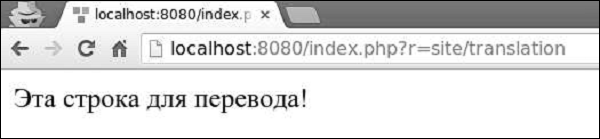
訊息被翻譯成俄語,因為我們將目標語言設定為ru-RU。我們可以動態更改應用程式的語言。
步驟 6 - 修改actionTranslation()方法。
public function actionTranslation() {
   \Yii::$app->language = 'en-US';
   echo \Yii::t('app', 'This is a string to translate!');
}
現在,訊息以英文顯示:
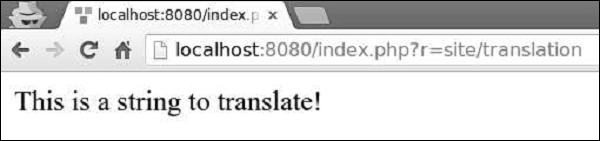
步驟 7 - 在翻譯後的訊息中,您可以插入一個或多個引數。
public function actionTranslation() {
   $username = 'Vladimir';
   // display a translated message with username being "Vladimir"
   echo \Yii::t('app', 'Hello, {username}!', [
      'username' => $username,
   ]), "<br>";
   $username = 'John';
   // display a translated message with username being "John"
   echo \Yii::t('app', 'Hello, {username}!', [
      'username' => $username,
   ]), "<br>";
   $price = 150;
   $count = 3;
   $subtotal = 450;
   echo \Yii::t('app', 'Price: {0}, Count: {1}, Subtotal: {2}', [$price, $count, $subtotal]);
}
輸出如下:
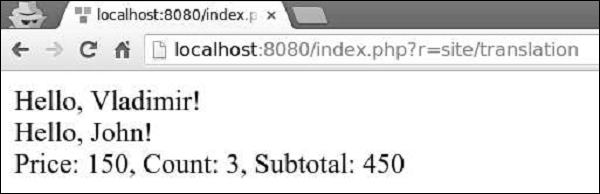
您可以翻譯整個檢視指令碼,而不是翻譯單個文字訊息。例如,如果目標語言是ru-RU,並且您要翻譯views/site/index.php檢視檔案,則應翻譯該檢視並將其儲存在views/site/ru-RU目錄下。
步驟 8 - 建立views/site/ru-RU目錄結構。然後,在ru-RU資料夾內建立一個名為index.php的檔案,其中包含以下程式碼。
<?php
   /* @var $this yii\web\View */
   $this->title = 'My Yii Application';
?>

<div class = "site-index">
   <div class = "jumbotron">
      <h1>Добро пожаловать!</h1>
   </div>
</div>
步驟 9 - 目標語言是ru-RU,因此,如果您輸入 URL https://:8080/index.php?r=site/index,您將看到帶有俄語翻譯的頁面。
