
- XAML 教程
- XAML - 首頁
- XAML - 概述
- XAML - 環境設定
- 在 macOS 上編寫 XAML 應用程式
- XAML 與 C# 程式碼
- XAML 與 VB.NET
- XAML - 構建塊
- XAML - 控制元件
- XAML - 佈局
- XAML - 事件處理
- XAML - 資料繫結
- XAML - 標記擴充套件
- XAML - 依賴屬性
- XAML - 資源
- XAML - 模板
- XAML - 樣式
- XAML - 觸發器
- XAML - 除錯
- XAML - 自定義控制元件
- XAML 有用資源
- XAML - 快速指南
- XAML - 有用資源
- XAML - 討論
XAML - 文字塊
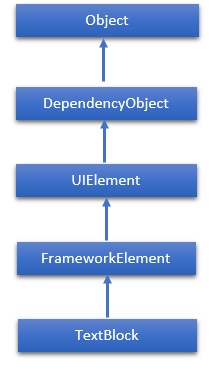
TextBlock 提供了一個輕量級的控制元件,用於顯示少量只讀文字。TextBlock 類的層次繼承如下:
屬性
| 序號 | 屬性和描述 |
|---|---|
| 1 | ContentEnd 獲取 TextBlock 中文字內容末尾的 TextPointer 物件。 |
| 2 | ContentStart 獲取 TextBlock 中文字內容開頭的 TextPointer 物件。 |
| 3 | IsTextSelectionEnabled 獲取或設定一個值,該值指示是否在 TextBlock 中啟用文字選擇,無論是透過使用者操作還是呼叫與選擇相關的 API。 |
| 4 | IsTextSelectionEnabledProperty 標識 IsTextSelectionEnabled 依賴屬性。 |
| 5 | LineHeight 獲取或設定每行內容的高度。 |
| 6 | MaxLines 獲取或設定 TextBlock 中顯示的最大文字行數。 |
| 7 | SelectedText 獲取選定文字的文字範圍。 |
| 8 | SelectionEnd 獲取 TextBlock 中選定文字的結束位置。 |
| 9 | SelectionHighlightColor 獲取或設定用於突出顯示選定文字的畫筆。 |
| 10 | SelectionStart 獲取 TextBlock 中選定文字的起始位置。 |
| 11 | Text 獲取或設定 TextBlock 的文字內容。 |
| 12 | TextAlignment 獲取或設定一個值,該值指示文字內容的水平對齊方式。 |
| 13 | TextTrimming 獲取或設定當內容超出內容區域時要使用的文字修剪行為。 |
| 14 | TextWrapping 獲取或設定 TextBlock 如何換行文字。 |
事件
| 序號 | 事件和描述 |
|---|---|
| 1 | ContextMenuOpening 當系統處理顯示上下文選單的互動時發生。 |
| 2 | SelectionChanged 當文字選擇發生更改時發生。 |
方法
| 序號 | 方法和描述 |
|---|---|
| 1 | Focus 使 TextBlock 獲得焦點,就像它是一個常規的可獲得焦點的控制元件一樣。 |
| 2 | Select 選擇 TextBlock 中的一段文字。 |
| 3 | SelectAll 選擇 TextBlock 中的全部內容。 |
示例
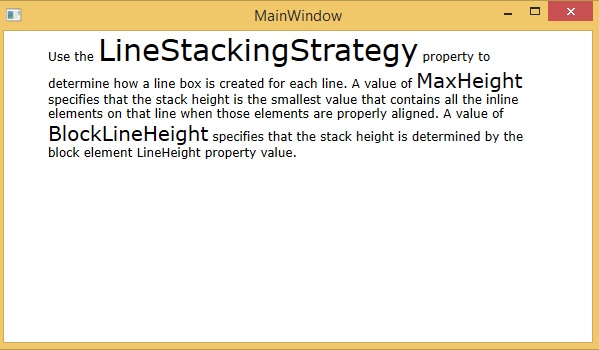
以下示例演示了在 XAML 應用程式中使用 TextBlock 的方法。以下是建立和初始化具有某些屬性的 TextBlock 的 XAML 程式碼。
<Window x:Class = "XAMLTextBlock.MainWindow"
   xmlns = "http://schemas.microsoft.com/winfx/2006/xaml/presentation"
   xmlns:x = "http://schemas.microsoft.com/winfx/2006/xaml"
   Title = "MainWindow" Height = "350" Width = "604">

   <Grid>
      <StackPanel>
         <TextBlock FontFamily = "Verdana"
            LineStackingStrategy = "MaxHeight"
            LineHeight = "10" Width = "500" TextWrapping = "Wrap">

            Use the <Run FontSize = "30"> LineStackingStrategy</Run>
            property to determine how a line box is created for each line.
            A value of <Run FontSize = "20">MaxHeight</Run>
            specifies that the stack height is the smallest value
            that contains all the inline elements on that line
            when those elements are properly aligned.
            A value of <Run FontSize = "20">BlockLineHeight</Run>
            specifies that the stack height is determined by
            the block element LineHeight property value.
         </TextBlock>
      </StackPanel>
   </Grid>

</Window>
編譯並執行上述程式碼後,將產生以下輸出:
我們建議您執行上述示例程式碼,並嘗試一些其他屬性和事件。