
- XAML 教程
- XAML - 首頁
- XAML - 概述
- XAML - 環境設定
- 在 macOS 上編寫 XAML 應用程式
- XAML 與 C# 程式碼
- XAML 與 VB.NET
- XAML - 構建塊
- XAML - 控制元件
- XAML - 佈局
- XAML - 事件處理
- XAML - 資料繫結
- XAML - 標記擴充套件
- XAML - 依賴屬性
- XAML - 資源
- XAML - 模板
- XAML - 樣式
- XAML - 觸發器
- XAML - 除錯
- XAML - 自定義控制元件
- XAML 有用資源
- XAML - 快速指南
- XAML - 有用資源
- XAML - 討論
XAML - 資源
資源通常是與您預期多次使用的某些物件相關的定義。它能夠為控制元件或當前視窗本地儲存資料,或為整個應用程式全域性儲存資料。
將物件定義為資源允許我們從其他地方訪問它。因此,它允許重用。資源在資源字典中定義,任何物件都可以定義為資源,從而有效地使其成為可共享的資產。一個唯一的鍵被指定給 XAML 資源,並且可以使用該鍵透過 StaticResource 標記擴充套件來引用它。
讓我們再次來看一個簡單的例子,其中建立了兩個文字塊,並定義了它們的某些屬性以及它們的字型顏色在Window.Resources中。
<Window x:Class = "XAMLResources.MainWindow"
   xmlns = "http://schemas.microsoft.com/winfx/2006/xaml/presentation"
   xmlns:x = "http://schemas.microsoft.com/winfx/2006/xaml"
   Title = "MainWindow" Height = "350" Width = "604">

   <Window.Resources>
      <SolidColorBrush Color = "Blue" x:Key = "myBrush"></SolidColorBrush>
   </Window.Resources>

   <StackPanel Orientation = "Vertical">
      <TextBlock Foreground = "{StaticResource myBrush}"
         Text = "First Name" Width = "100" Margin = "10" />
      <TextBlock Foreground = "{StaticResource myBrush}"
         Text = "Last Name" Width = "100" Margin = "10" />
   </StackPanel>

</Window>
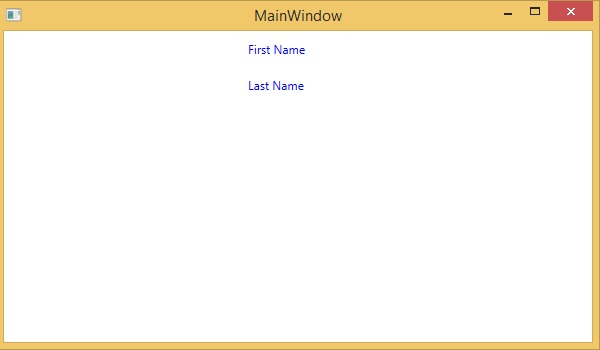
編譯並執行上述程式碼後,將生成以下 MainWindow。您可以看到兩個帶有藍色前景色文字塊。資源的優點是,如果有多個文字塊並且您想更改其背景顏色,則只需要在資源字典中更改它即可。
資源範圍
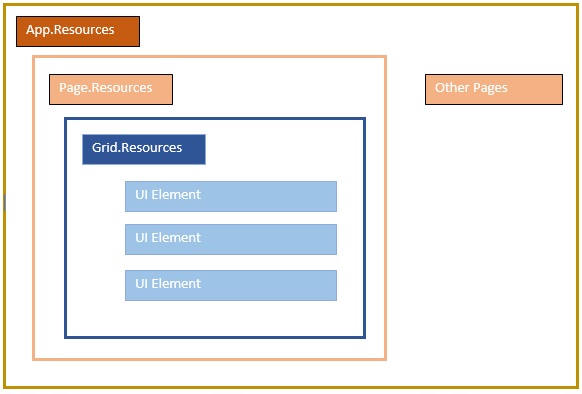
資源在資源字典中定義,但是可以在許多地方定義資源字典。在上面的示例中,資源字典是在 Window/頁面級別定義的。資源在哪個字典中定義會立即限制該資源的範圍。因此,範圍(即可以使用資源的位置)取決於您定義資源的位置。
在網格的資源字典中定義資源,它只能被該網格及其子元素訪問。
在視窗/頁面上定義它,它可以被該視窗/頁面上的所有元素訪問。
應用程式根可以在 App.xaml 資源字典中找到。它是我們應用程式的根,因此此處定義的資源的範圍是整個應用程式。
就資源的範圍而言,最常見的是應用程式級別、頁面級別和特定元素級別,例如 Grid、StackPanel 等。
資源字典
XAML 應用程式中的資源字典意味著單獨檔案中的資源字典。這幾乎在所有 XAML 應用程式中都遵循。在單獨的檔案中定義資源可以具有以下優點:
在資源字典和 UI 相關程式碼之間進行分離。
在單獨的檔案(例如 App.xaml)中定義所有資源,將使它們在整個應用程式中可用。
那麼,我們如何在單獨檔案中的資源字典中定義資源呢?很簡單,只需透過以下步驟透過 Visual Studio 新增一個新的資源字典:
在您的解決方案中,新增一個新資料夾並將其命名為ResourceDictionaries。
右鍵單擊此資料夾,然後從“新增”子選單項中選擇“資源字典”,並將其命名為DictionaryWithBrush.xaml
讓我們來看一下同一個應用程式;只是資源字典現在是在應用程式級別定義的。
以下是 MainWindow.xaml 的 XAML 程式碼。
<Window x:Class = "XAMLResources.MainWindow"
   xmlns = "http://schemas.microsoft.com/winfx/2006/xaml/presentation"
   xmlns:x = "http://schemas.microsoft.com/winfx/2006/xaml"
   Title = "MainWindow" Height = "350" Width = "604">

   <StackPanel Orientation = "Vertical">
      <TextBlock Foreground = "{StaticResource myBrush}" Text = "First Name"
         Width = "100" Margin = "10" />
      <TextBlock Foreground = "{StaticResource myBrush}" Text = "Last Name"
         Width = "100" Margin = "10"/>
   </StackPanel>

</Window>
以下是 DictionaryWithBrush.xaml 中的實現:
<ResourceDictionary
   xmlns = "http://schemas.microsoft.com/winfx/2006/xaml/presentation"
   xmlns:x = "http://schemas.microsoft.com/winfx/2006/xaml">

   <SolidColorBrush Color = "Blue" x:Key = "myBrush"></SolidColorBrush>

</ResourceDictionary>
以下是 app.xaml 中的實現:
<Application x:Class = "XAMLResources.App"
   xmlns = "http://schemas.microsoft.com/winfx/2006/xaml/presentation"
   xmlns:x = "http://schemas.microsoft.com/winfx/2006/xaml"
   StartupUri = "MainWindow.xaml">

   <Application.Resources>
      <ResourceDictionary Source = " XAMLResources\ResourceDictionaries\DictionaryWithBrush.xaml" />
   </Application.Resources>

</Application>
編譯並執行上述程式碼後,將生成以下輸出:
我們建議您執行上述程式碼並嘗試更多資源,例如背景顏色等。