
- XAML 教程
- XAML - 首頁
- XAML - 概述
- XAML - 環境設定
- 在 macOS 上編寫 XAML 應用程式
- XAML 與 C# 程式碼
- XAML 與 VB.NET
- XAML - 構建塊
- XAML - 控制元件
- XAML - 佈局
- XAML - 事件處理
- XAML - 資料繫結
- XAML - 標記擴充套件
- XAML - 依賴屬性
- XAML - 資源
- XAML - 模板
- XAML - 樣式
- XAML - 觸發器
- XAML - 除錯
- XAML - 自定義控制元件
- XAML 有用資源
- XAML - 快速指南
- XAML - 有用資源
- XAML - 討論
XAML - 搜尋框
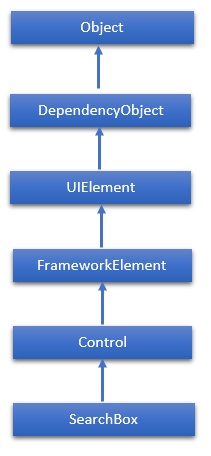
搜尋框表示一個可用於輸入搜尋查詢文字的控制元件。WPF 專案不支援搜尋框,因此它將在 Windows 應用中實現。搜尋框類的層次繼承如下:
屬性
| 序號 | 屬性和描述 |
|---|---|
| 1 | PlaceholderText 獲取或設定在使用者操作或其他操作更改值之前顯示在控制元件中的文字。 |
| 2 | ChooseSuggestionOnEnter 獲取或設定一個值,該值確定使用者按 Enter 鍵時是否啟用建議的搜尋查詢。 |
| 3 | ChooseSuggestionOnEnterProperty 標識 ChooseSuggestionOnEnter 依賴屬性。 |
| 4 | FocusOnKeyboardInput 獲取或設定一個值,該值確定使用者是否可以透過在應用程式中的任何位置鍵入來進行搜尋。 |
| 5 | FocusOnKeyboardInputProperty 標識 FocusOnKeyboardInput 依賴屬性。 |
| 6 | PlaceholderTextProperty 標識 PlaceholderText 依賴屬性。 |
| 7 | QueryText 獲取或設定搜尋框的文字內容。 |
| 8 | QueryTextProperty 標識 QueryText 依賴屬性。 |
| 9 | SearchHistoryContext 獲取或設定標識搜尋上下文並用於將使用者的搜尋歷史記錄與應用程式一起儲存的字串。 |
| 10 | SearchHistoryContextProperty 標識 SearchHistoryContext 依賴屬性。 |
| 11 | SearchHistoryEnabled 獲取或設定一個值,該值確定是否根據搜尋歷史記錄提供搜尋建議。 |
| 12 | SearchHistoryEnabledProperty 標識 SearchHistoryEnabled 依賴屬性。 |
事件
| 序號 | 事件和描述 |
|---|---|
| 1 | PrepareForFocusOnKeyboardInput 當 FocusOnKeyboardInput 屬性為 true 且應用程式接收文字鍵盤輸入時發生。 |
| 2 | QueryChanged 查詢文字更改時發生。 |
| 3 | QuerySubmitted 使用者提交搜尋查詢時發生。 |
| 4 | ResultSuggestionChosen 使用者選擇建議的搜尋結果時發生。 |
| 5 | SuggestionsRequested 當用戶的查詢文字更改且應用程式需要提供新的建議以在搜尋窗格中顯示時發生。 |
方法
| 序號 | 方法和描述 |
|---|---|
| 1 | OnManipulationCompleted 在 ManipulationCompleted 事件發生之前呼叫。(繼承自 Control) |
| 2 | OnManipulationDelta 在 ManipulationDelta 事件發生之前呼叫。(繼承自 Control) |
| 3 | OnManipulationInertiaStarting 在 ManipulationInertiaStarting 事件發生之前呼叫。(繼承自 Control) |
| 4 | OnManipulationStarted 在 ManipulationStarted 事件發生之前呼叫。(繼承自 Control) |
| 5 | OnManipulationStarting 在 ManipulationStarting 事件發生之前呼叫。(繼承自 Control) |
| 6 | OnMaximumChanged 當 Maximum 屬性更改時呼叫。(繼承自 RangeBase) |
| 7 | OnMinimumChanged 當 Minimum 屬性更改時呼叫。(繼承自 RangeBase) |
| 8 | OnValueChanged 觸發 ValueChanged 路由事件。(繼承自 RangeBase) |
| 9 | SetBinding 使用提供的繫結物件將繫結附加到 FrameworkElement。(繼承自 FrameworkElement) |
| 10 | SetLocalContentSuggestionSettings 指定是否在搜尋框建議中自動顯示基於本地檔案的建議,並定義 Windows 用於查詢和篩選這些建議的條件。 |
| 11 | SetValue 設定 DependencyObject 上依賴屬性的區域性值。(繼承自 DependencyObject) |
| 12 | StartDragAsync 啟動拖放操作。(繼承自 UIElement) |
| 13 | UnregisterPropertyChangedCallback 取消先前透過呼叫 RegisterPropertyChangedCallback 註冊的更改通知。(繼承自 DependencyObject) |
示例
以下示例演示了在 XAML 應用程式中使用搜索框。以下是建立和初始化具有某些屬性和事件的搜尋框的 XAML 程式碼。
<Page x:Class = "XAML_SearchBox.MainPage"
   xmlns = "http://schemas.microsoft.com/winfx/2006/xaml/presentation"
   xmlns:x = "http://schemas.microsoft.com/winfx/2006/xaml"
   xmlns:local = "using:XAML_SearchBox"
   xmlns:d = "http://schemas.microsoft.com/expression/blend/2008"
   xmlns:mc = "http://schemas.openxmlformats.org/markup-compatibility/2006"
   mc:Ignorable = "d">

   <Grid Background = "{ThemeResource ApplicationPageBackgroundThemeBrush}">
      <SearchBox x:Name = "mySearchBox"
         FocusOnKeyboardInput = "False"
         QuerySubmitted = "mySearchBox_QuerySubmitted"
         Height = "35" Width = "400" Margin = "234,132,732,601"/>
   </Grid>

</Page>
以下是 C# 中的搜尋查詢實現:
using System;
using System.Collections.Generic;
using System.IO;
using System.Linq;
using System.Runtime.InteropServices.WindowsRuntime;

using Windows.Foundation;
using Windows.Foundation.Collections;

using Windows.UI.Xaml;
using Windows.UI.Xaml.Controls;
using Windows.UI.Xaml.Controls.Primitives;
using Windows.UI.Xaml.Data;
using Windows.UI.Xaml.Input;
using Windows.UI.Xaml.Media;
using Windows.UI.Xaml.Navigation;

// The Blank Page item template is documented at http://go.microsoft.com/fwlink/?LinkId=234238

namespace XAML_SearchBox {
   /// <summary>
      /// An empty page that can be used on its own or navigated to within a Frame.
   /// </summary>

   public sealed partial class MainPage : Page {
      public MainPage() {
         this.InitializeComponent();
      }
      private void mySearchBox_QuerySubmitted(SearchBox sender,
         SearchBoxQuerySubmittedEventArgs args) {

         this.Frame.Navigate(typeof(SearchResultsPage1), args.QueryText);
      }
   }
}
在此示例的 Windows 應用專案中,新增一個名為 **SearchResultsPage1.xaml** 的 **搜尋結果頁**。預設實現足以執行此應用。
編譯並執行上述程式碼後,將產生以下輸出:
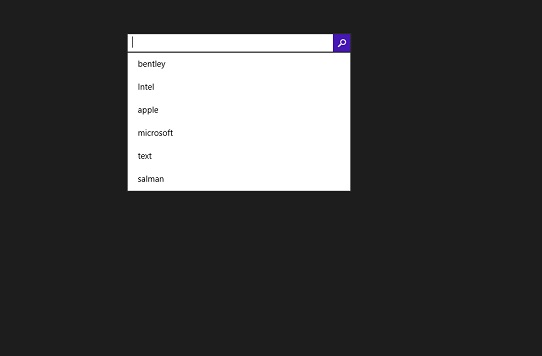
建議您執行上述示例程式碼並嘗試其他一些屬性和事件。