
- XAML 教程
- XAML - 首頁
- XAML - 概述
- XAML - 環境設定
- 在 macOS 上編寫 XAML 應用程式
- XAML 與 C# 程式碼
- XAML 與 VB.NET
- XAML - 構建塊
- XAML - 控制元件
- XAML - 佈局
- XAML - 事件處理
- XAML - 資料繫結
- XAML - 標記擴充套件
- XAML - 依賴屬性
- XAML - 資源
- XAML - 模板
- XAML - 樣式
- XAML - 觸發器
- XAML - 除錯
- XAML - 自定義控制元件
- XAML 有用資源
- XAML - 快速指南
- XAML - 有用資源
- XAML - 討論
XAML - RichEditBox
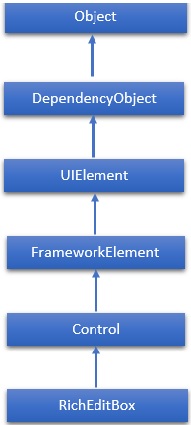
RichEditBox 是一種富文字編輯控制元件,支援格式化文字、超連結和其他富內容。WPF 專案不支援此控制元件。因此它將在 Windows 應用中實現。RichEditBox 類的層次繼承如下:
屬性
| 序號 | 屬性和描述 |
|---|---|
| 1 | AcceptsReturn 獲取或設定一個值,該值指示 RichEditBox 是否允許並在按下 ENTER 或 RETURN 鍵時顯示換行符或回車符。 |
| 2 | AcceptsReturnProperty 標識 AcceptsReturn 依賴屬性。 |
| 3 | DesiredCandidateWindowAlignment 獲取或設定一個值,該值指示輸入法編輯器 (IME) 的首選對齊方式。 |
| 4 | DesiredCandidateWindowAlignmentProperty 標識 DesiredCandidateWindowAlignment 依賴屬性。 |
| 5 | Document 獲取一個物件,該物件允許訪問 RichEditBox 中包含的文字的文字物件模型。 |
| 6 | Header 獲取或設定控制元件標題的內容。 |
| 7 | HeaderProperty 標識 Header 依賴屬性。 |
| 8 | HeaderTemplate 獲取或設定用於顯示控制元件標題內容的 DataTemplate。 |
| 9 | HeaderTemplateProperty 標識 HeaderTemplate 依賴屬性。 |
| 10 | InputScope 獲取或設定此 RichEditBox 使用的輸入上下文。 |
| 11 | InputScopeProperty 標識 InputScope 依賴屬性。 |
| 12 | IsColorFontEnabled 獲取或設定一個值,該值確定是否以彩色渲染包含彩色圖層的字型字形,例如 Segoe UI Emoji。 |
| 13 | IsColorFontEnabledProperty 標識 IsColorFontEnabled 依賴屬性。 |
| 14 | IsReadOnly 獲取或設定一個值,該值指示使用者是否可以更改 RichEditBox 中的文字。 |
| 15 | IsReadOnlyProperty 標識 IsReadOnly 依賴屬性。 |
| 16 | IsSpellCheckEnabled 獲取或設定一個值,該值指示文字輸入是否應與拼寫檢查引擎互動。 |
| 17 | IsSpellCheckEnabledProperty 標識 IsSpellCheckEnabled 依賴屬性。 |
| 18 | IsTextPredictionEnabled 獲取或設定一個值,該值指示是否為此 RichEditBox 啟用文字預測功能(“自動完成”)。 |
| 19 | IsTextPredictionEnabledProperty 標識 IsTextPredictionEnabled 依賴屬性。 |
| 20 | PlaceholderText 獲取或設定在使用者操作或其他操作更改值之前在控制元件中顯示的文字。 |
| 21 | PlaceholderTextProperty 標識 PlaceholderText 依賴屬性。 |
| 22 | PreventKeyboardDisplayOnProgrammaticFocus 獲取或設定一個值,該值指示當控制元件以程式設計方式獲得焦點時是否顯示螢幕鍵盤。 |
| 23 | PreventKeyboardDisplayOnProgrammaticFocusProperty 標識 PreventKeyboardDisplayOnProgrammaticFocus 依賴屬性。 |
| 24 | SelectionHighlightColor 獲取或設定用於突出顯示所選文字的畫刷。 |
| 25 | SelectionHighlightColorProperty 標識 SelectionHighlightColor 依賴屬性。 |
| 26 | TextAlignment 獲取或設定一個值,該值指示文字在 RichEditBox 中如何對齊。 |
| 27 | TextAlignmentProperty 標識 TextAlignment 依賴屬性。 |
| 28 | TextReadingOrder 獲取或設定一個值,該值指示如何確定 RichEditBox 的閱讀順序。 |
| 29 | TextReadingOrderProperty 標識 TextReadingOrder 依賴屬性。 |
| 30 | TextWrapping 獲取或設定一個值,該值指示如果一行文字超出 RichEditBox 的可用寬度,則文字換行如何發生。 |
| 31 | TextWrappingProperty 標識 TextWrapping 依賴屬性。 |
事件
| 序號 | 事件和描述 |
|---|---|
| 1 | CandidateWindowBoundsChanged 當輸入法編輯器 (IME) 視窗開啟、更新或關閉時發生。 |
| 2 | ContextMenuOpening 當系統處理顯示上下文選單的互動時發生。 |
| 3 | Paste 當文字貼上到控制元件中時發生。 |
| 4 | SelectionChanged 當文字選擇發生更改時發生。 |
| 5 | TextChanged 當 RichEditBox 中的內容發生更改時發生。 |
| 6 | TextChanging 當 RichEditBox 中的文字開始更改時發生。 |
| 7 | TextCompositionChanged 當透過輸入法編輯器 (IME) 撰寫的文字發生更改時發生。 |
| 8 | TextCompositionEnded 當用戶停止透過輸入法編輯器 (IME) 撰寫文字時發生。 |
| 9 | TextCompositionStarted 當用戶開始透過輸入法編輯器 (IME) 撰寫文字時發生。 |
方法
| 序號 | 方法和描述 |
|---|---|
| 1 | OnManipulationCompleted 在 ManipulationCompleted 事件發生之前呼叫。(繼承自 Control) |
| 2 | OnManipulationDelta 在 ManipulationDelta 事件發生之前呼叫。(繼承自 Control) |
| 3 | OnManipulationInertiaStarting 在 ManipulationInertiaStarting 事件發生之前呼叫。(繼承自 Control) |
| 4 | OnManipulationStarted 在 ManipulationStarted 事件發生之前呼叫。(繼承自 Control) |
| 5 | OnManipulationStarting 在 ManipulationStarting 事件發生之前呼叫。(繼承自 Control) |
| 6 | OnMaximumChanged 當 Maximum 屬性更改時呼叫。(繼承自 RangeBase) |
| 7 | OnMinimumChanged 當 Minimum 屬性更改時呼叫。(繼承自 RangeBase) |
| 8 | OnValueChanged 觸發 ValueChanged 路由事件。(繼承自 RangeBase) |
| 9 | SetBinding 使用提供的繫結物件將繫結附加到 FrameworkElement。(繼承自 FrameworkElement) |
| 10 | SetValue 設定 DependencyObject 上依賴屬性的區域性值。(繼承自 DependencyObject) |
| 11 | StartDragAsync 啟動拖放操作。(繼承自 UIElement) |
| 12 | UnregisterPropertyChangedCallback 取消先前透過呼叫 RegisterPropertyChangedCallback 註冊的更改通知。(繼承自 DependencyObject) |
示例
以下示例演示如何在 RichEditBox 中開啟和儲存 RTF 檔案。以下是建立和初始化兩個按鈕和一個具有某些屬性和事件的 RichEditBox 的 XAML 程式碼。
<Page x:Class = "XAMLRichEditBox.MainPage"
   xmlns = "http://schemas.microsoft.com/winfx/2006/xaml/presentation"
   xmlns:x = "http://schemas.microsoft.com/winfx/2006/xaml"
   xmlns:local = "using:XAMLRichEditBox"
   xmlns:d = "http://schemas.microsoft.com/expression/blend/2008"
   xmlns:mc = "http://schemas.openxmlformats.org/markup-compatibility/2006"
   mc:Ignorable = "d">

   <Grid Background = "{ThemeResource ApplicationPageBackgroundThemeBrush}">
      <Grid Margin = "120">
         <Grid.RowDefinitions>
            <RowDefinition Height="50"/>
            <RowDefinition/>
         </Grid.RowDefinitions>

         <StackPanel Orientation = "Horizontal">
            <Button Content = "Open file" Click = "OpenButton_Click"/>
            <Button Content = "Save file" Click = "SaveButton_Click"/>
         </StackPanel>

         <RichEditBox x:Name = "editor" Grid.Row = "1"/>
      </Grid>
   </Grid>

</Page>
以下是針對不同事件和檔案處理的 C# 實現:
using System;
using System.Collections.Generic;
using System.IO; using System.Linq;
using System.Runtime.InteropServices.WindowsRuntime;

using Windows.Foundation;
using Windows.Foundation.Collections;

using Windows.Storage;
using Windows.Storage.Pickers;
using Windows.Storage.Provider;

using Windows.UI.ViewManagement;
using Windows.UI.Xaml;
using Windows.UI.Xaml.Controls;
using Windows.UI.Xaml.Controls.Primitives;
using Windows.UI.Xaml.Data;
using Windows.UI.Xaml.Input;
using Windows.UI.Xaml.Media;
using Windows.UI.Xaml.Navigation;

// The Blank Page item template is documented at
http://go.microsoft.com/fwlink/?LinkId=234238

namespace XAMLRichEditBox {
   /// <summary>
      /// An empty page that can be used on its own or navigated to within a Frame.
   /// </summary>

   public sealed partial class MainPage : Page {
      public MainPage() {
         this.InitializeComponent();
      }
      private async void OpenButton_Click(object sender, RoutedEventArgs e) {
         // Open a text file.
         Windows.Storage.Pickers.FileOpenPicker open = new
            Windows.Storage.Pickers.FileOpenPicker();
         open.SuggestedStartLocation =
            Windows.Storage.Pickers.PickerLocationId.DocumentsLibrary;
         open.FileTypeFilter.Add(".rtf");
         Windows.Storage.StorageFile file = await open.PickSingleFileAsync();

         if (file != null) {
            Windows.Storage.Streams.IRandomAccessStream randAccStream = await
               file.OpenAsync(Windows.Storage.FileAccessMode.Read);

            // Load the file into the Document property of the RichEditBox.
            editor.Document.LoadFromStream(Windows.UI.Text.TextSetOptions.FormatRtf, randAccStream);
         }
      }
      private async void SaveButton_Click(object sender, RoutedEventArgs e) {
         if (((ApplicationView.Value != ApplicationViewState.Snapped) ||
            ApplicationView.TryUnsnap())) {

            FileSavePicker savePicker = new FileSavePicker();
            savePicker.SuggestedStartLocation = PickerLocationId.DocumentsLibrary;

            // Dropdown of file types the user can save the file as
            savePicker.FileTypeChoices.Add("Rich Text", new List <string>() { ".rtf" });

            // Default file name if the user does not type one in or select a file to replace
            savePicker.SuggestedFileName = "New Document";

            StorageFile file = await savePicker.PickSaveFileAsync();

            if (file != null) {
               // Prevent updates to the remote version of the file until we
               //finish making changes and call
               CompleteUpdatesAsync. CachedFileManager.DeferUpdates(file);

               // write to file
               Windows.Storage.Streams.IRandomAccessStream randAccStream = await
                  file.OpenAsync(Windows.Storage.FileAccessMode.ReadWrite);

               editor.Document.SaveToStream(Windows.UI.Text.TextGetOptions.FormatRtf, randAccStream);

               // Let Windows know that we're finished changing the file so the
               // other app can update the remote version of the file.

               FileUpdateStatus status = await CachedFileManager.CompleteUpdatesAsync(file);

               if (status != FileUpdateStatus.Complete) {
                  Windows.UI.Popups.MessageDialog
                     errorBox = new Windows.UI.Popups.MessageDialog(
                     "File " + file.Name + " couldn't be saved.");

                  await errorBox.ShowAsync();
               }
            }
         }
      }
   }
}
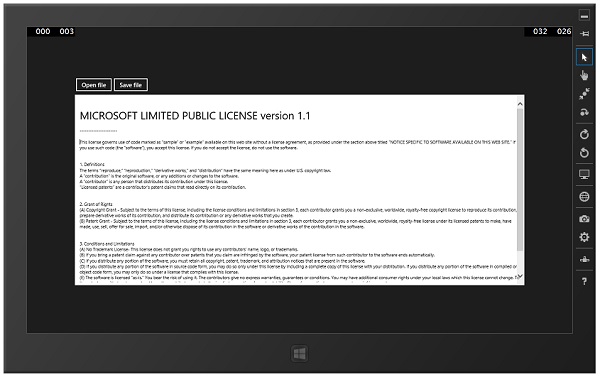
編譯並執行上述程式碼後,將產生以下輸出。您可以使用此應用程式開啟、編輯和儲存任何 RTF 檔案。
我們建議您執行上述示例程式碼並嘗試其他一些屬性和事件。