
- XAML 教程
- XAML - 首頁
- XAML - 概述
- XAML - 環境設定
- 在 macOS 上編寫 XAML 應用程式
- XAML 與 C# 程式碼
- XAML 與 VB.NET
- XAML - 構建塊
- XAML - 控制元件
- XAML - 佈局
- XAML - 事件處理
- XAML - 資料繫結
- XAML - 標記擴充套件
- XAML - 依賴屬性
- XAML - 資源
- XAML - 模板
- XAML - 樣式
- XAML - 觸發器
- XAML - 除錯
- XAML - 自定義控制元件
- XAML 有用資源
- XAML - 快速指南
- XAML - 有用資源
- XAML - 討論
XAML - 進度環
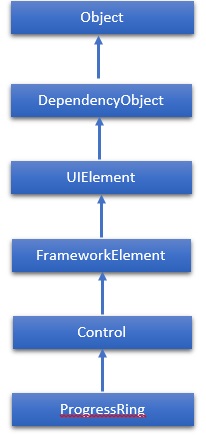
進度環 (ProgressRing) 是一種指示正在進行的操作的控制元件。典型的視覺外觀是一個環形的“旋轉器”,在進度繼續時迴圈播放動畫。這裡需要注意的是,WPF 專案不支援 ProgressRing。因此,對於此控制元件,我們將使用 Windows 應用商店應用進行操作。ProgressRing 類的層次繼承如下:
屬性
| 序號 | 屬性及說明 |
|---|---|
| 1 | IsActive 獲取或設定一個值,該值指示 ProgressRing 是否正在顯示進度。 |
| 2 | IsActiveProperty 標識 IsActive 依賴屬性。 |
| 3 | TemplateSettings 獲取一個物件,該物件提供計算值,這些值在為 ProgressRing 控制元件定義模板時可以作為 TemplateBinding 源進行引用。 |
事件
| 序號 | 事件及說明 |
|---|---|
| 1 | ManipulationCompleted 當對 UIElement 的操作完成後發生。(繼承自 UIElement) |
| 2 | ManipulationDelta 當輸入裝置在操作過程中改變位置時發生。(繼承自 UIElement) |
| 3 | ManipulationInertiaStarting 當輸入裝置在操作過程中與 UIElement 物件失去接觸並開始慣性時發生。(繼承自 UIElement) |
| 4 | ManipulationStarted 當輸入裝置開始對 UIElement 進行操作時發生。(繼承自 UIElement) |
| 5 | ManipulationStarting 當首次建立操作處理器時發生。(繼承自 UIElement) |
| 6 | ValueChanged 當範圍值改變時發生。(繼承自 RangeBase) |
方法
| 序號 | 方法及說明 |
|---|---|
| 1 | OnManipulationCompleted 在 ManipulationCompleted 事件發生之前呼叫。(繼承自 Control) |
| 2 | OnManipulationDelta 在 ManipulationDelta 事件發生之前呼叫。(繼承自 Control) |
| 3 | OnManipulationInertiaStarting 在 ManipulationInertiaStarting 事件發生之前呼叫。(繼承自 Control) |
| 4 | OnManipulationStarted 在 ManipulationStarted 事件發生之前呼叫。(繼承自 Control) |
| 5 | OnManipulationStarting 在 ManipulationStarting 事件發生之前呼叫。(繼承自 Control) |
| 6 | OnMaximumChanged 當 Maximum 屬性更改時呼叫。(繼承自 RangeBase) |
| 7 | OnMinimumChanged 當 Minimum 屬性更改時呼叫。(繼承自 RangeBase) |
示例
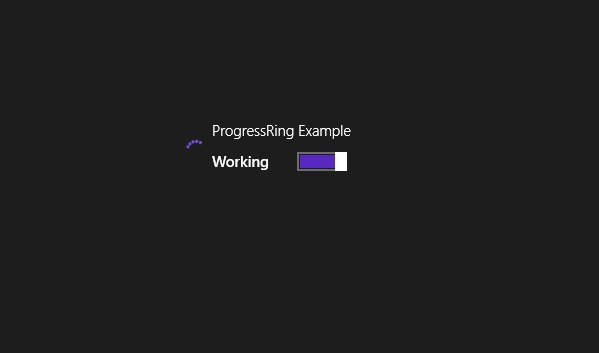
以下示例顯示如何將 ProgressRing 與 ToggleSwitch 一起使用。以下是使用 XAML 建立和初始化 ProgressRing 和 ToggleSwitch 的程式碼:
<Page x:Class = "ProgressRing.MainPage"
   xmlns = "http://schemas.microsoft.com/winfx/2006/xaml/presentation"
   xmlns:x = "http://schemas.microsoft.com/winfx/2006/xaml"
   xmlns:local = "using:ProgressRing"
   xmlns:d = "http://schemas.microsoft.com/expression/blend/2008"
   xmlns:mc = "http://schemas.openxmlformats.org/markup-compatibility/2006"
   mc:Ignorable = "d">

   <Grid Background = "{ThemeResource ApplicationPageBackgroundThemeBrush}">
      <StackPanel Orientation = "Horizontal" Margin = "342,0,-342,0">
         <ProgressRing x:Name = "progress1"/>
         <ToggleSwitch Header = "ProgressRing Example" OffContent = "Do work"
            OnContent = "Working" Toggled = "ToggleSwitch_Toggled"
            Margin = "0,348,0,347"/>
      </StackPanel>
   </Grid>

</Page>
以下是 C# 中 Toggled 事件的實現:
using System;
using System.Runtime.InteropServices.WindowsRuntime;
using Windows.Foundation;
using Windows.Foundation.Collections;
using Windows.UI.Xaml;
using Windows.UI.Xaml.Controls;
using Windows.UI.Xaml.Controls.Primitives;

namespace ProgressRing {
   public sealed partial class MainPage : Page {
      public MainPage() {
         this.InitializeComponent();
      }
      private void ToggleSwitch_Toggled(object sender, RoutedEventArgs e) {
         ToggleSwitch toggleSwitch = sender as ToggleSwitch;

         if (toggleSwitch != null) {
            if (toggleSwitch.IsOn == true) {
               progress1.IsActive = true;
               progress1.Visibility = Visibility.Visible;
            } else {
               progress1.IsActive = false;
               progress1.Visibility = Visibility.Collapsed;
            }
         }
      }
   }
}
編譯並執行以上程式碼後,將產生以下輸出:
我們建議您執行上述示例程式碼,並嘗試在 Windows 應用中使用其他屬性和事件。