
- XAML 教程
- XAML - 首頁
- XAML - 概述
- XAML - 環境設定
- 在 macOS 上編寫 XAML 應用程式
- XAML 與 C# 程式碼的比較
- XAML 與 VB.NET 的比較
- XAML - 構建塊
- XAML - 控制元件
- XAML - 佈局
- XAML - 事件處理
- XAML - 資料繫結
- XAML - 標記擴充套件
- XAML - 依賴屬性
- XAML - 資源
- XAML - 模板
- XAML - 樣式
- XAML - 觸發器
- XAML - 除錯
- XAML - 自定義控制元件
- XAML 有用資源
- XAML - 快速指南
- XAML - 有用資源
- XAML - 討論
XAML - 彈出視窗
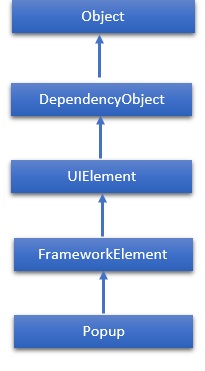
彈出視窗在應用程式視窗的範圍內,顯示在現有內容之上的內容。它是在其他內容上臨時顯示的內容。Popup 類的層次繼承如下:
屬性
| 序號 | 屬性及說明 |
|---|---|
| 1 | Child 獲取或設定要在彈出視窗中託管的內容。 |
| 2 | ChildProperty 獲取 Child 依賴屬性的識別符號。 |
| 3 | ChildTransitions 獲取或設定應用於 Popup 子內容的 Transition 樣式元素集合。 |
| 4 | ChildTransitionsProperty 標識 ChildTransitions 依賴屬性。 |
| 5 | HorizontalOffset 獲取或設定應用程式視窗左側與彈出視窗左側之間的距離。 |
| 6 | HorizontalOffsetProperty 獲取 HorizontalOffset 依賴屬性的識別符號。 |
| 7 | IsLightDismissEnabled 獲取或設定一個值,該值決定如何關閉 Popup。 |
| 8 | IsLightDismissEnabledProperty 標識 IsLightDismissEnabled 依賴屬性。 |
| 9 | IsOpen 獲取或設定彈出視窗當前是否顯示在螢幕上。 |
| 10 | IsOpenProperty 獲取 IsOpen 依賴屬性的識別符號。 |
| 11 | VerticalOffset 獲取或設定應用程式視窗頂部與彈出視窗頂部之間的距離。 |
| 12 | VerticalOffsetProperty 獲取 VerticalOffset 依賴屬性的識別符號。 |
事件
| 序號 | 事件及說明 |
|---|---|
| 1 | Closed 當 IsOpen 屬性設定為 false 時觸發。 |
| 2 | Opened 當 IsOpen 屬性設定為 true 時觸發。 |
示例
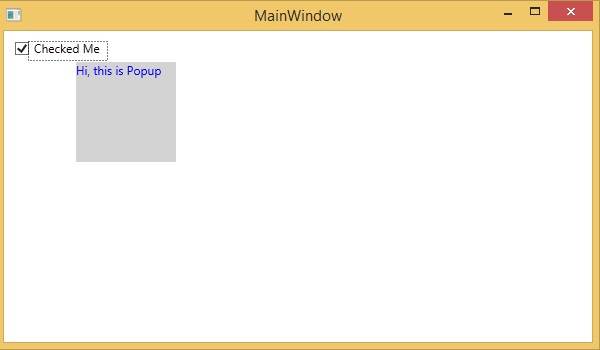
以下示例演示如何使用 Popup 控制元件。以下是建立和初始化 Popup 控制元件和 CheckBox 的 XAML 程式碼。當用戶選中 CheckBox 時,它將顯示一個 Popup。
<Window x:Class = "XAMLPopup.MainWindow"
   xmlns = "http://schemas.microsoft.com/winfx/2006/xaml/presentation"
   xmlns:x = "http://schemas.microsoft.com/winfx/2006/xaml"
   Title = "MainWindow" Height = "350" Width = "604">

   <Grid>
      <StackPanel>
         <CheckBox Name = "PCheckBox" Margin = "10,10,484,500" Content = "Checked Me" Height = "18"/>

         <Popup IsOpen = "{Binding ElementName = PCheckBox,Path = IsChecked}"
            PlacementTarget = "{Binding ElementName = PCheckBox}"
            AllowsTransparency = "True" PopupAnimation = "Slide"
            HorizontalOffset = "150" VerticalOffset = "100">

            <Canvas Width = "100" Height = "100" Background = "LightGray" Margin = "5">
               <Canvas.RenderTransform>
                  <RotateTransform x:Name = "theTransform" />
               </Canvas.RenderTransform>

               <TextBlock TextWrapping = "Wrap" Foreground = "Blue" Text = "Hi, this is Popup"/>
            </Canvas>
         </Popup>
      </StackPanel>
   </Grid>

</Window>
編譯並執行上述程式碼後,將產生以下輸出:
我們建議您執行上述示例程式碼,並嘗試其他一些屬性和事件。