
- XAML 教程
- XAML - 主頁
- XAML - 概述
- XAML - 環境設定
- 在 MAC OS 上編寫 XAML 應用程式
- XAML 與 C# 程式碼
- XAML 與 VB.NET
- XAML - 構建基塊
- XAML - 控制元件
- XAML - 佈局
- XAML - 事件處理
- XAML - 資料繫結
- XAML - 標記擴充套件
- XAML - 依賴屬性
- XAML - 資源
- XAML - 模板
- XAML - 樣式
- XAML - 觸發器
- XAML - 除錯
- XAML - 自定義控制元件
- XAML 的有用資源
- XAML - 快速指南
- XAML - 有用的資源
- XAML - 討論
XAML - 佈局級別
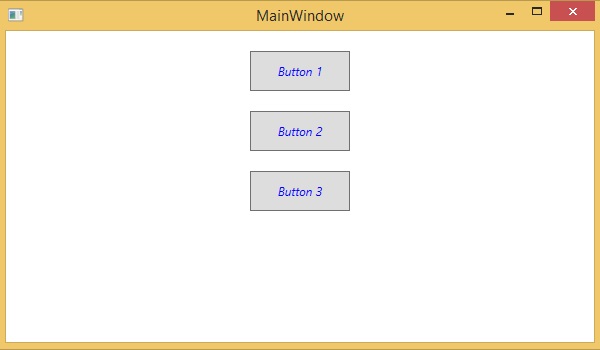
在任何佈局級別定義樣式都只能由該佈局及其子元素訪問。下面給出了一個佈局級別的示例,其中所有三個按鈕都有一個公共樣式。
<Window x:Class = "XAMLLayoutLevelStyle.MainWindow"
   xmlns = "http://schemas.microsoft.com/winfx/2006/xaml/presentation"
   xmlns:x = "http://schemas.microsoft.com/winfx/2006/xaml"
   Title = "MainWindow" Height = "350" Width = "604">

   <StackPanel Margin = "10">
      <StackPanel.Resources>
         <Style TargetType = "Button">
            <Setter Property = "Foreground" Value = "Blue" />
            <Setter Property = "FontStyle" Value = "Italic" />
            <Setter Property = "Width" Value = "100" />
            <Setter Property = "Height" Value = "40" />
            <Setter Property = "Margin" Value = "10" />
         </Style>
      </StackPanel.Resources>

      <Button>Button 1</Button>
      <Button>Button 2</Button>
      <Button Foreground = "Blue">Button 3</Button>
   </StackPanel>

</Window>
當上面程式碼編譯並執行時,它將產生以下輸出 −
xaml_styles.htm
廣告