
- XAML 教程
- XAML - 首頁
- XAML - 概述
- XAML - 環境搭建
- 在 macOS 上編寫 XAML 應用程式
- XAML 與 C# 程式碼
- XAML 與 VB.NET
- XAML - 構建塊
- XAML - 控制元件
- XAML - 佈局
- XAML - 事件處理
- XAML - 資料繫結
- XAML - 標記擴充套件
- XAML - 依賴屬性
- XAML - 資源
- XAML - 模板
- XAML - 樣式
- XAML - 觸發器
- XAML - 除錯
- XAML - 自定義控制元件
- XAML 有用資源
- XAML - 快速指南
- XAML - 有用資源
- XAML - 討論
XAML - 圖片
這是一個顯示影像的控制元件。您可以使用 Image 物件或 ImageBrush 物件。Image 物件顯示影像,而 ImageBrush 物件則用影像繪製另一個物件。
影像源透過引用使用多種受支援格式的影像檔案來指定。它可以顯示以下格式:
- 點陣圖 (BMP)
- 標記影像檔案格式 (TIFF)
- 圖示 (ICO)
- 聯合影像專家組 (JPEG)
- 圖形交換格式 (GIF)
- 行動式網路圖形 (PNG)
- JPEG XR
Image 類的層次繼承如下:
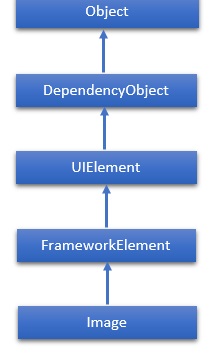
屬性
| 序號 | 屬性和說明 |
|---|---|
| 1 | CanDrag 獲取或設定一個值,該值指示元素是否可以在拖放操作中作為資料拖動。(繼承自 UIElement) |
| 2 | Height 獲取或設定 FrameworkElement 的建議高度。(繼承自 FrameworkElement) |
| 3 | HorizontalAlignment 獲取或設定當 FrameworkElement 在佈局父元素(例如面板或項控制元件)中組合時應用於它的水平對齊特性。(繼承自 FrameworkElement) |
| 4 | Margin 獲取或設定 FrameworkElement 的外邊距。(繼承自 FrameworkElement) |
| 5 | Name 獲取或設定物件的標識名稱。當 XAML 處理器從 XAML 標記建立物件樹時,執行時程式碼可以透過此名稱引用 XAML 宣告的物件。(繼承自 FrameworkElement) |
| 6 | Opacity 獲取或設定物件的透明度。(繼承自 UIElement) |
| 7 | PlayToSource 獲取如果 Image 用於 Play To 場景則傳輸的資訊。 |
| 8 | Resources 獲取本地定義的資源字典。在 XAML 中,您可以將資源項設定為 frameworkElement 的子物件元素。Resources 屬性元素,透過 XAML 隱式集合語法。(繼承自 FrameworkElement) |
| 9 | SourceProperty 標識 Source 依賴屬性。 |
| 10 | Stretch 獲取或設定一個值,該值描述如何將 Image 拉伸以填充目標矩形。 |
| 11 | StretchProperty 標識 Stretch 依賴屬性。 |
| 12 | Style 獲取或設定在此物件的佈局和呈現期間應用的例項 Style。(繼承自 FrameworkElement) |
| 13 | VerticalAlignment 獲取或設定當 FrameworkElement 在父物件(例如面板或項控制元件)中組合時應用於它的垂直對齊特性。(繼承自 FrameworkElement) |
| 14 | Width 獲取或設定 FrameworkElement 的寬度。(繼承自 FrameworkElement) |
| 15 | Source 獲取或設定影像的源。 |
事件
| 序號 | 事件和說明 |
|---|---|
| 1 | DataContextChanged 當 FrameworkElement.DataContext 屬性的值更改時發生。(繼承自 FrameworkElement) |
| 2 | DragEnter 當輸入系統報告以該元素為目標的基礎拖動事件時發生。(繼承自 UIElement) |
| 3 | DragLeave 當輸入系統報告以該元素為源的基礎拖動事件時發生。(繼承自 UIElement) |
| 4 | DragOver 當輸入系統報告以該元素為潛在放置目標的基礎拖動事件時發生。(繼承自 UIElement) |
| 5 | DragStarting 當啟動拖動操作時發生。(繼承自 UIElement) |
| 6 | Drop 當輸入系統報告以該元素為放置目標的基礎放置事件時發生。(繼承自 UIElement) |
| 7 | DropCompleted 當拖放操作結束時發生。(繼承自 UIElement) |
| 8 | GotFocus 當 UIElement 獲取焦點時發生。(繼承自 UIElement) |
| 9 | ImageFailed 當出現與影像檢索或格式相關的錯誤時發生。 |
| 10 | ImageOpened 當影像源下載並解碼且沒有錯誤時發生。您可以使用此事件來確定影像源的自然大小。 |
| 11 | KeyDown 當 UIElement 具有焦點時按下鍵盤鍵時發生。(繼承自 UIElement) |
| 12 | KeyUp 當 UIElement 具有焦點時釋放鍵盤鍵時發生。(繼承自 UIElement) |
| 13 | SizeChanged 當 FrameworkElement 上的 ActualHeight 或 ActualWidth 屬性的值更改時發生。(繼承自 FrameworkElement) |
示例
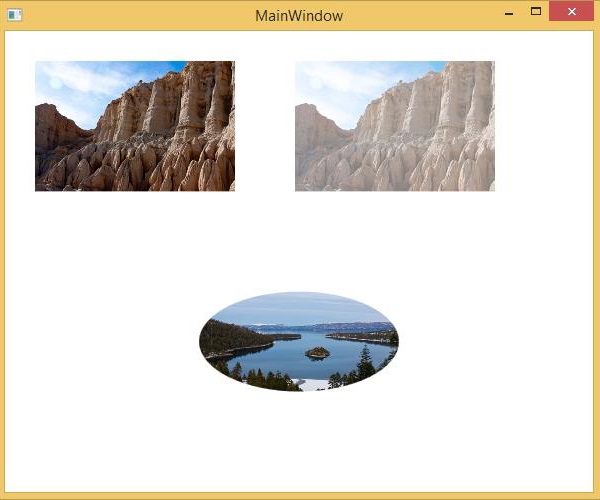
以下示例顯示三張影像。第一張是簡單的影像;在第二張影像中,設定了 Opacity 屬性;在第三張影像中,橢圓形是用 ImageBrush 繪製的。以下是 XAML 程式碼:
<Window x:Class = "XAMLImage.MainWindow"
   xmlns = "http://schemas.microsoft.com/winfx/2006/xaml/presentation"
   xmlns:x = "http://schemas.microsoft.com/winfx/2006/xaml"
   Title = "MainWindow" Height = "500" Width = "604">

   <Grid>
      <Grid.RowDefinitions>
         <RowDefinition Height = "1*"/>
         <RowDefinition Height = "1*"/>
      </Grid.RowDefinitions>

      <StackPanel Orientation="Horizontal">
         <Image Width = "200" VerticalAlignment = "Top" Margin = "30"/>
         <Image Width = "200" Source = "Images\red_rock_01.jpg"
            VerticalAlignment = "Top" Margin = "30" Opacity = "0.5"/>
      </StackPanel>

      <StackPanel Grid.Row = "1">
         <Ellipse Height = "100"
            Width = "200"
            HorizontalAlignment = "Center"
            Margin = "30">

            <Ellipse.Fill>
               <ImageBrush ImageSource = "Images\tahoe_01.jpg" />
            </Ellipse.Fill>
         </Ellipse>
      </StackPanel>

   </Grid>
</Window>
編譯並執行上述程式碼後,將產生以下輸出:
我們建議您執行上述示例程式碼並嘗試其他一些屬性和事件。