
- XAML 教程
- XAML - 首頁
- XAML - 概述
- XAML - 環境設定
- 在 MAC OS 上編寫 XAML 應用程式
- XAML 與 C# 程式碼
- XAML 與 VB.NET
- XAML - 構建塊
- XAML - 控制元件
- XAML - 佈局
- XAML - 事件處理
- XAML - 資料繫結
- XAML - 標記擴充套件
- XAML - 依賴屬性
- XAML - 資源
- XAML - 模板
- XAML - 樣式
- XAML - 觸發器
- XAML - 除錯
- XAML - 自定義控制元件
- XAML 有用資源
- XAML - 快速指南
- XAML - 有用資源
- XAML - 討論
XAML - GridView
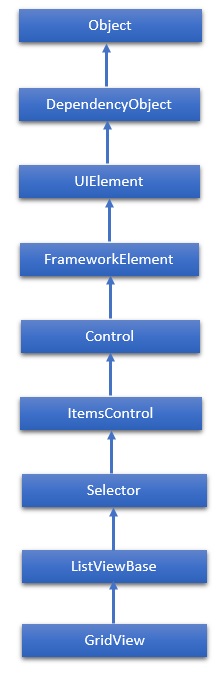
GridView 表示一個控制元件,用於以行和列的形式顯示資料項。實際上,ListView 顯示資料。預設情況下,它包含一個 GridView。GridView 類的層次繼承如下:
屬性
| 序號 | 屬性及描述 |
|---|---|
| 1 | Background 獲取或設定一個畫刷,提供控制元件的背景。(繼承自 Control) |
| 2 | BorderThickness 獲取或設定控制元件的邊框粗細。(繼承自 Control) |
| 3 | DataContext 當 FrameworkElement 參與資料繫結時,獲取或設定其資料上下文。(繼承自 FrameworkElement) |
| 4 | FontFamily 獲取或設定用於在控制元件中顯示文字的字型。(繼承自 Control) |
| 5 | FontSize 獲取或設定此控制元件中文字的大小。(繼承自 Control) |
| 6 | FontStyle 獲取或設定渲染文字的樣式。(繼承自 Control) |
| 7 | FontWeight 獲取或設定指定字型的粗細。(繼承自 Control) |
| 8 | Foreground 獲取或設定一個畫刷,描述前景色。(繼承自 Control) |
| 9 | GroupStyle 獲取 GroupStyle 物件的集合,這些物件定義每一級組的外觀。(繼承自 ItemsControl) |
| 10 | Header 獲取或設定列表標題的內容。(繼承自 ListViewBase) |
| 11 | Height 獲取或設定 FrameworkElement 的建議高度。(繼承自 FrameworkElement) |
| 12 | HorizontalAlignment 獲取或設定應用於 FrameworkElement 的水平對齊特性,當它組合在佈局父級(例如面板或專案控制元件)中時。(繼承自 FrameworkElement) |
| 13 | HorizontalContentAlignment 獲取或設定控制元件內容的水平對齊方式。(繼承自 Control) |
| 14 | Items 獲取用於生成控制元件內容的集合。(繼承自 ItemsControl) |
| 15 | ItemsSource 獲取或設定用於生成 ItemsControl 內容的物件源。(繼承自 ItemsControl) |
| 16 | ItemTemplate 獲取或設定用於顯示每個專案的 DataTemplate。(繼承自 ItemsControl) |
| 17 | Margin 獲取或設定 FrameworkElement 的外部邊距。(繼承自 FrameworkElement) |
| 18 | Name 獲取或設定物件的標識名稱。當 XAML 處理器從 XAML 標記建立物件樹時,執行時程式碼可以透過此名稱引用 XAML 宣告的物件。(繼承自 FrameworkElement) |
| 19 | Opacity 獲取或設定物件的透明度。(繼承自 UIElement) |
| 20 | Resources 獲取本地定義的資源字典。在 XAML 中,您可以將資源項作為 frameworkElement.Resources 屬性元素的子物件元素建立,透過 XAML 隱式集合語法。(繼承自 FrameworkElement) |
| 21 | SelectedIndex 獲取或設定所選專案的索引。(繼承自 Selector) |
| 22 | SelectedItem 獲取或設定所選專案。(繼承自 Selector) |
| 23 | SelectedItems 獲取當前選定的專案。(繼承自 ListViewBase) |
| 24 | SelectedRanges 獲取 ItemIndexRange 物件的集合,這些物件描述列表中當前選定的專案。(繼承自 ListViewBase) |
| 25 | SelectedValue 獲取或設定所選專案的 value,透過使用 SelectedValuePath 獲取。(繼承自 Selector) |
| 26 | Style 獲取或設定一個 Style 例項,在佈局和渲染期間應用於此物件。(繼承自 FrameworkElement) |
| 27 | VerticalAlignment 獲取或設定應用於 FrameworkElement 的垂直對齊特性,當它組合在父物件(例如面板或專案控制元件)中時。(繼承自 FrameworkElement) |
| 28 | VerticalContentAlignment 獲取或設定控制元件內容的垂直對齊方式。(繼承自 Control) |
| 29 | Width 獲取或設定 FrameworkElement 的寬度。(繼承自 FrameworkElement) |
事件
| 序號 | 事件及描述 |
|---|---|
| 1 | DataContextChanged 當 FrameworkElement.DataContext 屬性的值發生更改時發生。(繼承自 FrameworkElement) |
| 2 | DragEnter 當輸入系統報告基礎拖動事件且此元素為目標時發生。(繼承自 UIElement) |
| 3 | DragLeave 當輸入系統報告基礎拖動事件且此元素為源時發生。(繼承自 UIElement) |
| 4 | DragOver 當輸入系統報告基礎拖動事件且此元素為潛在放置目標時發生。(繼承自 UIElement) |
| 5 | DragStarting 當啟動拖動操作時發生。(繼承自 UIElement) |
| 6 | Drop 當輸入系統報告基礎放置事件且此元素為放置目標時發生。(繼承自 UIElement) |
| 7 | ImageFailed 當影像檢索或格式存在錯誤時發生。 |
| 8 | ImageOpened 當影像源下載並解碼且沒有錯誤時發生。您可以使用此事件確定影像源的自然大小。 |
| 9 | KeyDown 當 UIElement 具有焦點時按下鍵盤鍵時發生。(繼承自 UIElement) |
| 10 | KeyUp 當 UIElement 具有焦點時釋放鍵盤鍵時發生。(繼承自 UIElement) |
方法
| 序號 | 方法及描述 |
|---|---|
| 1 | Arrange 放置子物件並確定 UIElement 的大小。實現其子元素自定義佈局的父物件應從其佈局覆蓋實現中呼叫此方法,以形成遞迴佈局更新。(繼承自 UIElement) |
| 2 | ClearValue 清除依賴屬性的本地值。(繼承自 DependencyObject) |
| 3 | FindName 檢索具有指定標識名稱的物件。(繼承自 FrameworkElement) |
| 4 | GetValue 從 DependencyObject 返回依賴屬性的當前有效值。(繼承自 DependencyObject) |
| 5 | ReadLocalValue 如果設定了本地值,則返回依賴屬性的本地值。(繼承自 DependencyObject) |
| 6 | SetBinding 使用提供的繫結物件將繫結附加到 FrameworkElement。(繼承自 FrameworkElement) |
| 7 | SetValue 設定 DependencyObject 上依賴屬性的本地值。(繼承自 DependencyObject) |
示例
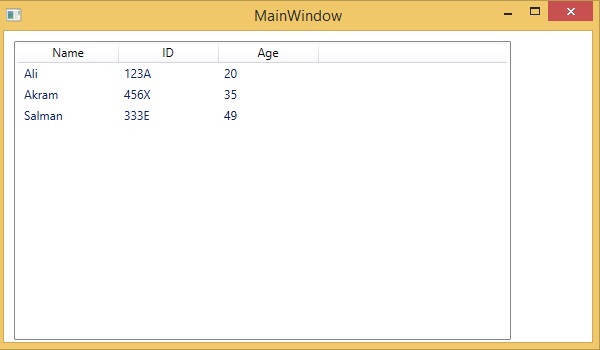
以下示例顯示錶中包含的資料(名稱、ID 和年齡)。以下是建立和初始化 GridView 的 XAML 實現。
<Window x:Class = "XAMLGridView.MainWindow"
   xmlns = "http://schemas.microsoft.com/winfx/2006/xaml/presentation"
   xmlns:x = "http://schemas.microsoft.com/winfx/2006/xaml"
   Title = "MainWindow" Height = "350" Width = "525">

   <Grid>
      <ListView HorizontalAlignment = "Left"
         Height = "299"Margin = "10,10,0,0"
         VerticalAlignment = "Top" Width = "497"
         Name = "MenList">

         <ListView.View>
            <GridView>
               <GridViewColumn Header = "Name"
                  DisplayMemberBinding = "{Binding Name}" Width = "100"/>

               <GridViewColumn Header = "ID"
                  DisplayMemberBinding = "{Binding ID}" Width = "100"/>

               <GridViewColumn Header = "Age"
                  DisplayMemberBinding = "{Binding Age}" Width = "100"/>

            </GridView>
         </ListView.View>

      </ListView>
   </Grid>
</Window>
以下是實現 Person 類的 C# 實現。
using System;
using System.Windows;
using System.Windows.Controls;

namespace XAMLGridView {
   /// <summary>
      /// Interaction logic for MainWindow.xaml
   /// </summary>

   public partial class MainWindow : Window {
      public MainWindow() {
         InitializeComponent();
         MenList.Items.Add(new Person() { Name = "Ali", ID = "123A", Age = 20 });
         MenList.Items.Add(new Person() { Name = "Akram", ID = "456X", Age = 35 });
         MenList.Items.Add(new Person() { Name = "Salman", ID = "333E", Age = 49 });
      }
   }
   class Person {
      public string Name { get; set; }
      public string ID { get; set; }
      public int Age { get; set; }
   }
}
編譯並執行上述程式碼時,將產生以下輸出:
建議您執行上述示例程式碼,並嘗試其他一些屬性和事件。