
- XAML 教程
- XAML - 首頁
- XAML - 概述
- XAML - 環境設定
- 在 macOS 上編寫 XAML 應用程式
- XAML 與 C# 程式碼
- XAML 與 VB.NET
- XAML - 構建塊
- XAML - 控制元件
- XAML - 佈局
- XAML - 事件處理
- XAML - 資料繫結
- XAML - 標記擴充套件
- XAML - 依賴屬性
- XAML - 資源
- XAML - 模板
- XAML - 樣式
- XAML - 觸發器
- XAML - 除錯
- XAML - 自定義控制元件
- XAML 有用資源
- XAML - 快速指南
- XAML - 有用資源
- XAML - 討論
XAML - 資料網格 (DataGrid)
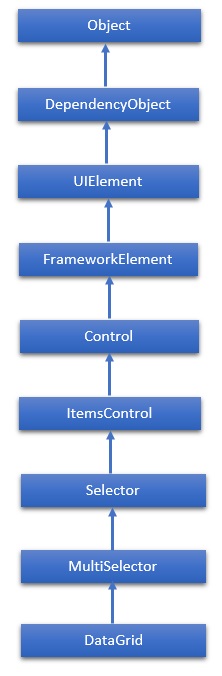
DataGrid 表示一個控制元件,用於以可自定義的網格顯示資料。它提供了一種靈活的方式來以行和列顯示資料集合。DataGrid 類的繼承層次結構如下:
屬性
| 序號 | 屬性及描述 |
|---|---|
| 1 | AlternatingRowBackground 獲取或設定用於交替行的背景畫刷。 |
| 2 | AreRowDetailsFrozen 獲取或設定一個值,該值指示行詳細資訊是否可以水平滾動。 |
| 3 | AutoGenerateColumns 獲取或設定一個值,該值指示列是否自動建立。 |
| 4 | CanUserAddRows 獲取或設定一個值,該值指示使用者是否可以向 DataGrid 新增新行。 |
| 5 | CanUserDeleteRows 獲取或設定一個值,該值指示使用者是否可以從 DataGrid 刪除行。 |
| 6 | CanUserReorderColumns 獲取或設定一個值,該值指示使用者是否可以透過使用滑鼠拖動列標題來更改列顯示順序。 |
| 7 | CanUserResizeColumns 獲取或設定一個值,該值指示使用者是否可以使用滑鼠調整列的寬度。 |
| 8 | CanUserResizeRows 獲取或設定一個值,該值指示使用者是否可以使用滑鼠調整行的高度。 |
| 9 | CanUserSortColumns 獲取或設定一個值,該值指示使用者是否可以透過單擊列標題對列進行排序。 |
| 10 | ColumnHeaderHeight 獲取或設定列標題行的高度。 |
| 11 | ColumnHeaderStyle 獲取或設定應用於 DataGrid 中所有列標題的樣式。 |
| 12 | Columns 獲取包含 DataGrid 中所有列的集合。 |
| 13 | ColumnWidth 獲取或設定 DataGrid 中列和標題的標準寬度和大小調整模式。 |
| 14 | CurrentCell 獲取或設定具有焦點的單元格。 |
| 15 | CurrentColumn 獲取或設定包含當前單元格的列。 |
| 16 | CurrentItem 獲取繫結到包含當前單元格的行的資料項。 |
| 17 | FrozenColumnCount 獲取或設定不可滾動列的數量。 |
| 18 | HorizontalScrollBarVisibility 獲取或設定一個值,該值指示如何在 DataGrid 中顯示水平捲軸。 |
| 19 | IsReadOnly 獲取或設定一個值,該值指示使用者是否可以編輯 DataGrid 中的值。 |
| 20 | RowBackground 獲取或設定行背景的預設畫刷。 |
| 21 | RowHeight 獲取或設定所有行的建議高度。 |
| 22 | SelectedCells 獲取當前選定的單元格列表。 |
方法
| 序號 | 方法及描述 |
|---|---|
| 1 | BeginEdit 呼叫 BeginEdit 命令,這將把當前單元格或行置於編輯模式。 |
| 2 | CancelEdit 為當前處於編輯模式的單元格或行呼叫 CancelEditCommand 命令。 |
| 3 | ClearDetailsVisibilityForItem 清除表示指定資料項的 DataGridRow 的 DetailsVisibility 屬性。 |
| 4 | ColumnFromDisplayIndex 獲取指定索引處的 DataGridColumn。 |
| 5 | CommitEdit 為當前處於編輯模式的單元格或行呼叫 CommitEditCommand 命令。 |
| 6 | GenerateColumns 為物件的指定屬性生成列。 |
| 7 | GetDetailsVisibilityForItem 獲取表示指定資料項的 DataGridRow 的 DetailsVisibility 屬性。 |
| 8 | OnApplyTemplate 在派生類中重寫時,每當應用程式程式碼或內部程序呼叫 ApplyTemplate 時都會呼叫。(重寫 FrameworkElement.OnApplyTemplate()) |
| 9 | ScrollIntoView 垂直滾動 DataGrid 以顯示指定資料項的行。 |
| 10 | SelectAllCells 選擇 DataGrid 中的所有單元格。 |
| 11 | SetDetailsVisibilityForItem 設定包含指定物件的 DataGridRow 的 DetailsVisibility 屬性的值。 |
| 12 | UnselectAllCells 取消選擇 DataGrid 中的所有單元格。 |
事件
| 序號 | 事件及描述 |
|---|---|
| 1 | AddingNewItem 在向 DataGrid 新增新項之前發生。 |
| 2 | AutoGeneratedColumns 所有列的自動生成完成後發生。 |
| 3 | AutoGeneratingColumn 自動生成單個列時發生。 |
| 4 | BeginningEdit 行或單元格進入編輯模式之前發生。 |
| 5 | CellEditEnding 在提交或取消單元格編輯之前發生。 |
| 6 | ColumnDisplayIndexChanged 當其中一列的 DisplayIndex 屬性更改時發生。 |
| 7 | ColumnHeaderDragCompleted 當用戶使用滑鼠拖動列標題後釋放它時發生。 |
| 8 | ColumnHeaderDragDelta 當用戶拖動列標題時,滑鼠位置每次更改都會發生。 |
| 9 | ColumnHeaderDragStarted 當用戶開始使用滑鼠拖動列標題時發生。 |
| 10 | ColumnReordered 當列移動到顯示順序中的新位置時發生。 |
| 11 | ColumnReordering 在列移動到顯示順序中的新位置之前發生。 |
| 12 | CopyingRowClipboardContent 準備預設行內容後發生。 |
| 13 | CurrentCellChanged 當 CurrentCell 屬性的值發生更改時發生。 |
| 14 | InitializingNewItem 建立新項時發生。 |
| 15 | LoadingRow 在 DataGridRow 例項化後發生,以便您可以在使用它之前對其進行自定義。 |
| 16 | LoadingRowDetails 將新的行詳細資訊模板應用於行時發生。 |
| 17 | PreparingCellForEdit 單元格進入編輯模式時發生。 |
| 18 | RowDetailsVisibilityChanged 行詳細資訊元素的可見性發生更改時發生。 |
| 19 | RowEditEnding 在提交或取消行編輯之前發生。 |
| 20 | SelectedCellsChanged 當 SelectedCells 集合發生更改時發生。 |
| 21 | Sorting 正在對列進行排序時發生。 |
| 22 | UnloadingRow DataGridRow 物件可供重用時發生。 |
| 23 | UnloadingRowDetails 行詳細資訊元素可供重用時發生。 |
示例
以下示例演示如何在 DataGrid 中顯示資料。以下是建立兩個具有某些屬性和事件的複選框的 XAML 程式碼。
<Window x:Class = "DataGrid.MainWindow"
   xmlns = "http://schemas.microsoft.com/winfx/2006/xaml/presentation"
   xmlns:x = "http://schemas.microsoft.com/winfx/2006/xaml"
   xmlns:core = "clr-namespace:System;assembly = mscorlib"
   xmlns:local = "clr-namespace:DataGrid"
   Title = "MainWindow" Height = "350" Width = "525">

   <Window.Resources>
      <ObjectDataProvider x:Key = "myEnum" MethodName = "GetValues"
         ObjectType = "{x:Type core:Enum}">

         <ObjectDataProvider.MethodParameters>
            <x:TypeExtension Type = "local:Party" />
         </ObjectDataProvider.MethodParameters>
		</ObjectDataProvider>
   </Window.Resources>

   <Grid>
      <DataGrid Name = "dataGrid" AlternatingRowBackground = "LightBlue"
         AlternationCount = "2" AutoGenerateColumns = "False">

         <DataGrid.Columns>
            <DataGridTextColumn Header = "Name" Binding = "{Binding Name}" />
            <DataGridTextColumn Header = "Title" Binding = "{Binding Title}" >
            <DataGridCheckBoxColumn Header = "ReElected?" Binding = "{Binding WasReElected}"/>

            <DataGridComboBoxColumn Header = "Party"
               SelectedItemBinding = "{Binding Affiliation}"
               ItemsSource = "{Binding Source = {StaticResource myEnum}}" />
         </DataGrid.Columns>
      </DataGrid>
   </Grid>

</Window>
以下是針對兩個不同類的 C# 實現。
using System;
using System.Collections.Generic;
using System.Linq;
using System.Text;
using System.Threading.Tasks;

using System.Windows;
using System.Windows.Controls;
using System.Windows.Data;
using System.Windows.Documents;
using System.Windows.Input;
using System.Windows.Media;
using System.Windows.Media.Imaging;
using System.Windows.Navigation;
using System.Windows.Shapes;

namespace DataGrid {
   /// <summary>
      /// Interaction logic for MainWindow.xaml
   /// </summary>

   public partial class MainWindow : Window {
      public MainWindow() {
         InitializeComponent(); dataGrid.ItemsSource = Employee.GetEmployees();
      }
   }
	public enum Party {
      Indepentent, Federalist, DemocratRepublican,
   }
}
以下是 C# 中另一個 Employee 類實現。
public class Employee : INotifyPropertyChanged {
   private string name; public string Name {
      get { return name; }
      set {
         name = value; RaiseProperChanged();
      }
   }
	private string title; public string Title {
      get { return title; }
		set {
         title = value;
         RaiseProperChanged();
      }
   }
	private bool wasReElected;
	public bool WasReElected {
      get { return wasReElected; }
      set {
         wasReElected = value; RaiseProperChanged();
      }
   }
	private Party affiliation; public Party Affiliation {
      get { return affiliation; }
		set {
         affiliation = value; RaiseProperChanged();
      }
   }
	public static ObservableCollection<Employee> GetEmployees() {
      var employees = new ObservableCollection<Employee>();
      employees.Add(new Employee() {
         Name = "Ali", Title = "Minister", WasReElected = true,
         Affiliation = Party.Indepentent });

      employees.Add(new Employee() {
         Name = "Ahmed", Title = "CM", WasReElected = false,
         Affiliation = Party.Federalist });

      employees.Add(new Employee() {
         Name = "Amjad", Title = "PM", WasReElected = true,
         Affiliation = Party.DemocratRepublican });

      employees.Add(new Employee() {
         Name = "Waqas", Title = "Minister", WasReElected = false,
         Affiliation = Party.Indepentent });

      employees.Add(new Employee() {
         Name = "Bilal", Title = "Minister", WasReElected = true,
         Affiliation = Party.Federalist });

      employees.Add(new Employee() {
         Name = "Waqar", Title = "Minister", WasReElected = false,
         Affiliation = Party.DemocratRepublican });

      return employees;
   }
   public event PropertyChangedEventHandler PropertyChanged;

   private void RaiseProperChanged( [CallerMemberName] string caller = "") {
      if (PropertyChanged != null) {
         PropertyChanged(this, new PropertyChangedEventArgs(caller));
      }
   }
}
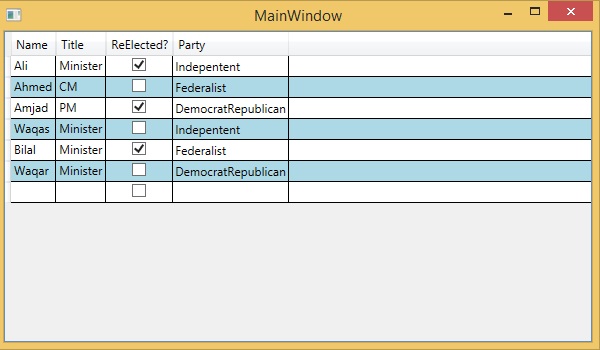
編譯並執行上述程式碼後,將產生以下輸出:
我們建議您執行上述示例程式碼並嘗試其他一些屬性和事件。