- Spring Boot 教程
- Spring Boot - 首頁
- Spring Boot - 簡介
- Spring Boot - 快速入門
- Spring Boot - 引導
- Spring Tool Suite
- Spring Boot - Tomcat 部署
- Spring Boot - 構建系統
- Spring Boot - 程式碼結構
- Spring Bean & 依賴注入
- Spring Boot - 執行器
- Spring Boot - 啟動器
- Spring Boot - 應用屬性
- Spring Boot - 配置
- Spring Boot - 註解
- Spring Boot - 日誌
- 構建 RESTful Web 服務
- Spring Boot - 異常處理
- Spring Boot - 攔截器
- Spring Boot - Servlet 過濾器
- Spring Boot - Tomcat 埠號
- Spring Boot - Rest 模板
- Spring Boot - 檔案處理
- Spring Boot - 服務元件
- Spring Boot - Thymeleaf
- 使用 RESTful Web 服務
- Spring Boot - CORS 支援
- Spring Boot - 國際化
- Spring Boot - 排程
- Spring Boot - 啟用 HTTPS
- Spring Boot - Eureka 伺服器
- 使用 Eureka 進行服務註冊
- 閘道器代理伺服器和路由
- Spring Cloud 配置伺服器
- Spring Cloud 配置客戶端
- Spring Boot - Actuator
- Spring Boot - Admin 伺服器
- Spring Boot - Admin 客戶端
- Spring Boot - 啟用 Swagger2
- Spring Boot - 使用 SpringDoc OpenAPI
- Spring Boot - 建立 Docker 映象
- 跟蹤微服務日誌
- Spring Boot - Flyway 資料庫
- Spring Boot - 傳送電子郵件
- Spring Boot - Hystrix
- Spring Boot - Web Socket
- Spring Boot - 批處理服務
- Spring Boot - Apache Kafka
- Spring Boot - Twilio
- Spring Boot - 單元測試用例
- Rest Controller 單元測試
- Spring Boot - 資料庫處理
- 保護 Web 應用程式
- Spring Boot - 帶 JWT 的 OAuth2
- Spring Boot - Google Cloud Platform
- Spring Boot - Google OAuth2 登入
- Spring Boot 資源
- Spring Boot - 快速指南
- Spring Boot - 有用資源
- Spring Boot - 討論
Spring Boot - 閘道器代理伺服器和路由
閘道器代理伺服器是一個閘道器應用程式,它處理所有請求並對微服務應用程式進行動態路由。
例如,/api/user 對映到使用者服務,/api/products 對映到產品服務,Zuul 伺服器動態地將請求路由到相應的後端應用程式。
spring-cloud-starter-zuul 依賴項用於在 Spring Boot 專案中整合 Zuul 閘道器伺服器。現在它已棄用,並替換為 spring-cloud-starter-gateway-mvc 依賴項。從現在開始,我們將使用閘道器伺服器術語代替 Zuul 伺服器。
在本章中,我們將詳細瞭解如何在 Spring Boot 中建立閘道器伺服器應用程式。
建立閘道器伺服器應用程式
閘道器伺服器與 Spring Cloud 依賴項捆綁在一起。您可以從 Spring Initializer 頁面 https://start.spring.io/ 下載 Spring Boot 專案,並選擇 Zuul 伺服器依賴項。

在您的主 Spring Boot 應用程式中新增路由資訊。在這裡,我們將接收到的每個請求重路由到不同的伺服器,同時新增一個示例請求頭。
GatewayApplication
package com.tutorialspoint.gateway;

import org.springframework.boot.SpringApplication;
import org.springframework.boot.autoconfigure.SpringBootApplication;
import org.springframework.cloud.gateway.route.RouteLocator;
import org.springframework.cloud.gateway.route.builder.RouteLocatorBuilder;
import org.springframework.context.annotation.Bean;

@SpringBootApplication
public class GatewayApplication {

   public static void main(String[] args) {
      SpringApplication.run(GatewayApplication.class, args);
   }

   @Bean
   public RouteLocator myRoutes(RouteLocatorBuilder builder) {
      return builder.routes()
         .route(p -> p
            .path("/**")
            .filters(f -> f.addRequestHeader("Src", "Tutorialspoint"))
            .uri("https://:8080/"))
            .build();
   }
}
您需要在構建配置檔案中新增 Spring Cloud Starter Gateway 依賴項。
Maven 使用者需要在您的 pom.xml 檔案中新增以下依賴項:
<dependency>
   <groupId>org.springframework.cloud</groupId>
   <artifactId>spring-cloud-starter-gateway</artifactId>
</dependency>
更新 application.properties 以指向 8111 埠
application.properties
spring.application.name=gateway
server.port = 8111
對於 Gradle 使用者,在您的 build.gradle 檔案中新增以下依賴項
compile('org.springframework.cloud:spring-cloud-starter-gateway')
application.yaml
spring
  application
     name: gateway
server
  port: 8111
注意 - 在透過閘道器代理路由之前,https://:8080/ 應用程式應該已經執行。有關 REST 服務的詳細資訊,請參閱 使用 RESTful Web 服務 章節。
完整的構建配置檔案如下所示。
Maven 使用者可以使用以下給出的 pom.xml 檔案:
<?xml version="1.0" encoding="UTF-8"?>
<project xmlns="http://maven.apache.org/POM/4.0.0" xmlns:xsi="http://www.w3.org/2001/XMLSchema-instance"
   xsi:schemaLocation="http://maven.apache.org/POM/4.0.0 https://maven.apache.org/xsd/maven-4.0.0.xsd">
   <modelVersion>4.0.0</modelVersion>
   <parent>
      <groupId>org.springframework.boot</groupId>
      <artifactId>spring-boot-starter-parent</artifactId>
      <version>3.3.3</version>
      <relativePath/> <!-- lookup parent from repository -->
   </parent>
   <groupId>com.tutorialspoint</groupId>
   <artifactId>gateway</artifactId>
   <version>0.0.1-SNAPSHOT</version>
   <name>gateway</name>
   <description>Demo project for Spring Boot</description>
   <url/>
   <licenses>
      <license/>
   </licenses>
   <developers>
      <developer/>
   </developers>
   <scm>
      <connection/>
      <developerConnection/>
      <tag/>
      <url/>
   </scm>
   <properties>
      <java.version>21</java.version>
      <spring-cloud.version>2023.0.3</spring-cloud.version>
   </properties>
   <dependencies>
      <dependency>
         <groupId>org.springframework.cloud</groupId>
         <artifactId>spring-cloud-starter-gateway</artifactId>
      </dependency>
      <dependency>
         <groupId>org.springframework.boot</groupId>
         <artifactId>spring-boot-starter-test</artifactId>
         <scope>test</scope>
      </dependency>
      <dependency>
         <groupId>io.projectreactor</groupId>
         <artifactId>reactor-test</artifactId>
         <scope>test</scope>
      </dependency>
   </dependencies>
   <dependencyManagement>
      <dependencies>
         <dependency>
            <groupId>org.springframework.cloud</groupId>
            <artifactId>spring-cloud-dependencies</artifactId>
            <version>${spring-cloud.version}</version>
            <type>pom</type>
            <scope>import</scope>
         </dependency>
      </dependencies>
   </dependencyManagement>
   <build>
      <plugins>
         <plugin>
            <groupId>org.springframework.boot</groupId>
             <artifactId>spring-boot-maven-plugin</artifactId>
         </plugin>
      </plugins>
   </build>
</project>
Gradle 使用者可以使用以下給出的 build.gradle 檔案:
buildscript {
   ext {
      springBootVersion = '3.3.3'
   }
   repositories {
      mavenCentral()
   }
   dependencies {
      classpath("org.springframework.boot:spring-boot-gradle-plugin:${springBootVersion}")
   }
}

apply plugin: 'java'
apply plugin: 'eclipse'
apply plugin: 'org.springframework.boot'

group = 'com.tutorialspoint'
version = '0.0.1-SNAPSHOT'
sourceCompatibility = 21

repositories {
   mavenCentral()
}
ext {
   springCloudVersion = 'Edgware.RELEASE'
}
dependencies {
   compile('org.springframework.cloud:spring-cloud-starter-gateway')
   testCompile('org.springframework.boot:spring-boot-starter-test')
}
dependencyManagement {
   imports {
      mavenBom "org.springframework.cloud:spring-cloud-dependencies:${springCloudVersion}"
   }
}
您可以建立一個可執行的 JAR 檔案,並使用以下給出的 Maven 或 Gradle 命令執行 Spring Boot 應用程式:
對於 Maven,您可以使用以下給出的命令:
mvn clean install
“BUILD SUCCESS” 後,您可以在 target 目錄下找到 JAR 檔案。
對於 Gradle,您可以使用以下給出的命令:
gradle clean build
“BUILD SUCCESSFUL” 後,您可以在 build/libs 目錄下找到 JAR 檔案。
現在,使用以下顯示的命令執行 JAR 檔案:
java –jar <JARFILE>
您可以發現應用程式已在 Tomcat 埠 8111 上啟動,如下所示。
  .   ____          _            __ _ _
 /\\ / ___'_ __ _ _(_)_ __  __ _ \ \ \ \
( ( )\___ | '_ | '_| | '_ \/ _` | \ \ \ \
 \\/  ___)| |_)| | | | | || (_| |  ) ) ) )
  '  |____| .__|_| |_|_| |_\__, | / / / /
 =========|_|==============|___/=/_/_/_/

[32m :: Spring Boot :: [39m              [2m (v3.3.3)[0;39m

[2m2024-09-11T14:37:33.937+05:30[0;39m [32m INFO[0;39m [35m14996[0;39m [2m---[0;39m [2m[gateway] [           main][0;39m [2m[0;39m[36mc.t.gateway.GatewayApplication          [0;39m [2m:[0;39m Starting GatewayApplication using Java 21.0.3 with PID 14996 (E:\Dev\gateway\target\classes started by Tutorialspoint in E:\Dev\gateway)
[2m2024-09-11T14:37:33.940+05:30[0;39m [32m INFO[0;39m [35m14996[0;39m [2m---[0;39m [2m[gateway] [           main][0;39m [2m[0;39m[36mc.t.gateway.GatewayApplication          [0;39m [2m:[0;39m No active profile set, falling back to 1 default profile: "default"
...
[2m[0;39m[36mo.s.c.g.r.RouteDefinitionRouteLocator   [0;39m [2m:[0;39m Loaded RoutePredicateFactory [CloudFoundryRouteService]
[2m2024-09-11T14:37:35.796+05:30[0;39m [32m INFO[0;39m [35m14996[0;39m [2m---[0;39m [2m[gateway] [           main][0;39m [2m[0;39m[36mo.s.b.web.embedded.netty.NettyWebServer [0;39m [2m:[0;39m Netty started on port 8111 (http)
[2m2024-09-11T14:37:35.832+05:30[0;39m [32m INFO[0;39m [35m14996[0;39m [2m---[0;39m [2m[gateway] [           main][0;39m [2m[0;39m[36mc.t.gateway.GatewayApplication          [0;39m [2m:[0;39m Started GatewayApplication in 2.366 seconds (process running for 3.198)
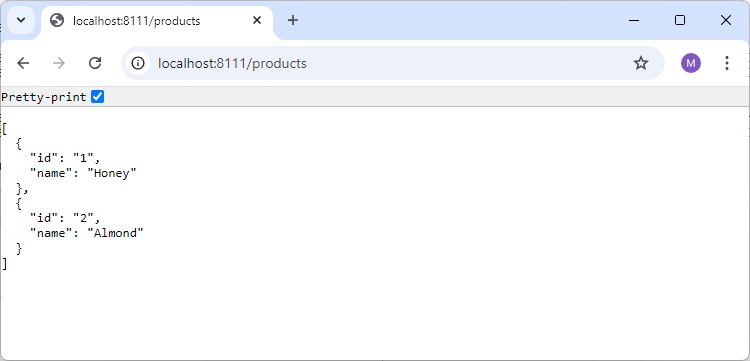
現在,在您的 Web 瀏覽器中訪問 URL https://:8111/products,您將看到 https://:8080/products REST 端點的輸出,如下所示: