
- React Native 教程
- React Native - 主頁
- 核心概念
- React Native - 概覽
- React Native - 環境設定
- React Native - 應用
- React Native - 狀態
- React Native - 道具
- React Native - 樣式
- React Native - Flexbox
- React Native - ListView
- React Native - 文字輸入
- React Native - ScrollView
- React Native - 圖片
- React Native - HTTP
- React Native - 按鈕
- React Native - 動畫
- React Native - 除錯
- React Native - 路由器
- React Native - 執行 IOS
- React Native - 執行 Android
- 元件和 API
- React Native - 檢視
- React Native - WebView
- React Native - Modal
- React Native - 活動指示器
- React Native - 選擇器
- React Native - 狀態列
- React Native - 開關
- React Native - 文字
- React Native - 警告
- React Native - 地理位置
- React Native - 非同步儲存
- React Native 有用資源
- React Native - 快速指南
- React Native - 有用資源
- React Native - 討論
React Native - 文字
在本章中,我們將討論 React Native 中的文字元件。
此元件可以巢狀,並且可以從父級繼承屬性到子級。這在許多方面很有用。我們將向您展示首字母大寫、為單詞或文字的一部分設定樣式等的示例。
步驟 1:建立檔案
我們將建立的檔案是text_example.js
步驟 2:App.js
在此步驟中,我們只會建立一個簡單的容器。
App.js
import React, { Component } from 'react'
import TextExample from './text_example.js'

const App = () => {
   return (
      <TextExample/>
   )
}
export default App
步驟 3:文字
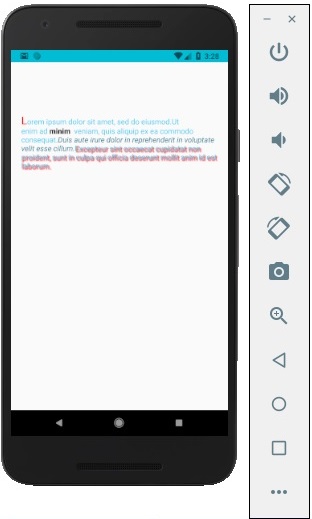
在此步驟中,我們將使用繼承模式。styles.text 將應用於所有文字元件。
您還可以注意到我們如何為文字的某些部分設定其他樣式屬性。重要的是要知道所有子元素都會繼承父級樣式。
text_example.js
import React, { Component } from 'react';
import { View, Text, Image, StyleSheet } from 'react-native'

const TextExample = () => {
   return (
      <View style = {styles.container}>
         <Text style = {styles.text}>
            <Text style = {styles.capitalLetter}>
               L
            </Text>

            <Text>
               orem ipsum dolor sit amet, sed do eiusmod.
            </Text>

            <Text>
               Ut enim ad <Text style = {styles.wordBold}>minim </Text> veniam,
               quis aliquip ex ea commodo consequat.
            </Text>

            <Text style = {styles.italicText}>
               Duis aute irure dolor in reprehenderit in voluptate velit esse cillum.
            </Text>

            <Text style = {styles.textShadow}>
               Excepteur sint occaecat cupidatat non proident, sunt in culpa qui officia
               deserunt mollit anim id est laborum.
            </Text>
         </Text>

      </View>
   )
}
export default TextExample

const styles = StyleSheet.create ({
   container: {
      alignItems: 'center',
      marginTop: 100,
      padding: 20
   },
   text: {
      color: '#41cdf4',
   },
   capitalLetter: {
      color: 'red',
      fontSize: 20
   },
   wordBold: {
      fontWeight: 'bold',
      color: 'black'
   },
   italicText: {
      color: '#37859b',
      fontStyle: 'italic'
   },
   textShadow: {
      textShadowColor: 'red',
      textShadowOffset: { width: 2, height: 2 },
      textShadowRadius : 5
   }
})
您將收到以下輸出 −
廣告