
- React Native 教程
- React Native - 首頁
- 核心概念
- React Native - 概述
- React Native - 環境搭建
- React Native - 應用
- React Native - 狀態 (State)
- React Native - 屬性 (Props)
- React Native - 樣式
- React Native - Flexbox
- React Native - ListView
- React Native - 文字輸入框
- React Native - ScrollView
- React Native - 圖片
- React Native - HTTP請求
- React Native - 按鈕
- React Native - 動畫
- React Native - 除錯
- React Native - 路由
- React Native - 執行 iOS
- React Native - 執行 Android
- 元件和API
- React Native - View
- React Native - WebView
- React Native - Modal
- React Native - ActivityIndicator
- React Native - Picker
- React Native - 狀態列
- React Native - Switch
- React Native - Text
- React Native - Alert
- React Native - 定位
- React Native - AsyncStorage
- React Native 有用資源
- React Native - 快速指南
- React Native - 有用資源
- React Native - 討論
React Native - Flexbox
為了適應不同的螢幕尺寸,React Native 提供了Flexbox 支援。
我們將使用與React Native - 樣式章節中相同的程式碼。我們只需要更改PresentationalComponent。
佈局
為了實現所需的佈局,Flexbox 提供了三個主要屬性——flexDirection、justifyContent 和 alignItems。
下表顯示了可能的選項。
| 屬性 | 值 | 描述 |
|---|---|---|
| flexDirection | 'column', 'row' | 用於指定元素是垂直排列還是水平排列。 |
| justifyContent | 'center', 'flex-start', 'flex-end', 'space-around', 'space-between' | 用於確定元素在容器內如何分佈。 |
| alignItems | 'center', 'flex-start', 'flex-end', 'stretched' | 用於確定元素在容器內沿次要軸(與flexDirection相反)如何分佈。 |
如果要垂直對齊專案並將其居中,可以使用以下程式碼。
App.js
import React, { Component } from 'react'
import { View, StyleSheet } from 'react-native'

const Home = (props) => {
   return (
      <View style = {styles.container}>
         <View style = {styles.redbox} />
         <View style = {styles.bluebox} />
         <View style = {styles.blackbox} />
      </View>
   )
}

export default Home

const styles = StyleSheet.create ({
   container: {
      flexDirection: 'column',
      justifyContent: 'center',
      alignItems: 'center',
      backgroundColor: 'grey',
      height: 600
   },
   redbox: {
      width: 100,
      height: 100,
      backgroundColor: 'red'
   },
   bluebox: {
      width: 100,
      height: 100,
      backgroundColor: 'blue'
   },
   blackbox: {
      width: 100,
      height: 100,
      backgroundColor: 'black'
   },
})
輸出
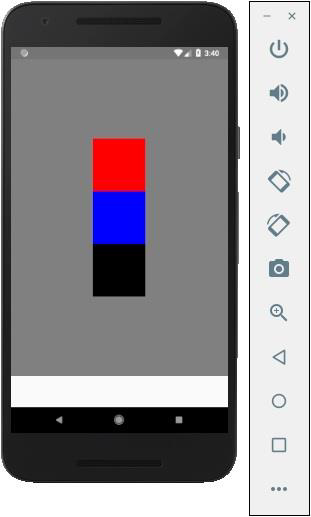
如果需要將專案移動到右側並在它們之間新增空格,則可以使用以下程式碼。
App.js
import React, { Component } from 'react'
import { View, StyleSheet } from 'react-native'

const App = (props) => {
   return (
      <View style = {styles.container}>
         <View style = {styles.redbox} />
         <View style = {styles.bluebox} />
         <View style = {styles.blackbox} />
      </View>
   )
}

export default App

const styles = StyleSheet.create ({
   container: {
      flexDirection: 'column',
      justifyContent: 'space-between',
      alignItems: 'flex-end',
      backgroundColor: 'grey',
      height: 600
   },
   redbox: {
      width: 100,
      height: 100,
      backgroundColor: 'red'
   },
   bluebox: {
      width: 100,
      height: 100,
      backgroundColor: 'blue'
   },
   blackbox: {
      width: 100,
      height: 100,
      backgroundColor: 'black'
   },
})
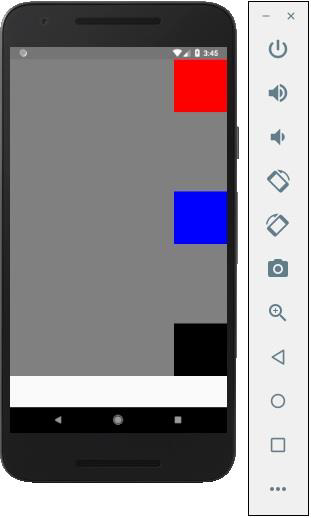
廣告