
- Puppeteer 教程
- Puppeteer - 首頁
- Puppeteer - 簡介
- Puppeteer - 元素處理
- Puppeteer - Google 使用
- Puppeteer - NodeJS 安裝
- Puppeteer VS Code 配置
- Puppeteer - 安裝
- Puppeteer - 基本測試
- Puppeteer - 非無頭執行
- Puppeteer 與 Selenium 的比較
- Puppeteer 與 Protractor 的比較
- Puppeteer 與 Cypress 的比較
- Puppeteer - 瀏覽器操作
- Puppeteer - 標籤處理
- Puppeteer - 基本命令
- Puppeteer - Firefox
- Puppeteer - Chrome
- Puppeteer - 處理確認警報
- Puppeteer - 處理下拉選單
- Puppeteer - 定位器
- Puppeteer - XPath 函式
- Puppeteer - XPath 屬性
- Puppeteer - XPath 分組
- Puppeteer - 絕對 XPath
- Puppeteer - 相對 XPath
- Puppeteer - XPath 軸
- Puppeteer - 型別選擇器
- 名稱選擇器 & 類名稱選擇器
- Puppeteer - ID 選擇器
- Puppeteer - 屬性選擇器
- Puppeteer - 處理連結/按鈕
- 處理編輯框 & 複選框
- Puppeteer - 處理框架
- Puppeteer - 鍵盤模擬
- Puppeteer - 獲取元素文字
- Puppeteer - 獲取元素屬性
- Puppeteer - 裝置模擬
- Puppeteer - 停用 JavaScript
- Puppeteer - 同步
- Puppeteer - 捕獲螢幕截圖
- Puppeteer 有用資源
- Puppeteer - 快速指南
- Puppeteer - 有用資源
- Puppeteer - 討論
Puppeteer - 絕對 XPath
為了唯一地確定一個元素,我們可以使用HTML標籤內的任何屬性,或者使用HTML標籤上屬性的組合。大多數情況下使用id屬性,因為它在頁面中是唯一的。
但是,如果id屬性不存在,我們可以使用其他屬性,例如class、name等等。如果id、name、class等屬性不存在,我們可以利用僅對該標籤可用的獨特屬性或屬性及其值的組合來識別元素。為此,我們必須使用xpath表示式。此外,如果頁面上的元素是動態的,那麼xpath選擇器可以作為選擇器的一個不錯的選擇。
XPath可以分為兩種型別——絕對路徑和相對路徑。絕對XPath以/符號開頭,從根節點開始到我們要識別的元素。下面給出了一個例子。
/html/body/div[1]/div/div[1]/a
讓我們藉助絕對XPath來識別頁面上突出顯示的徽標,然後單擊它。
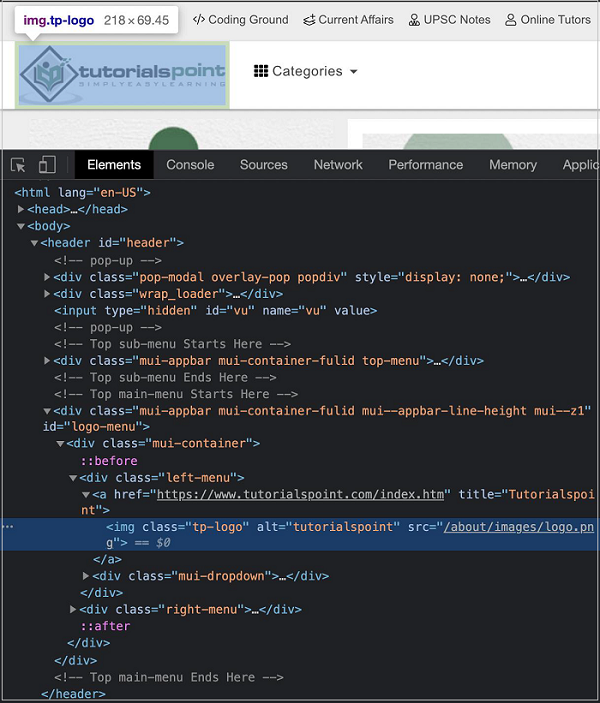
徽標的絕對XPath如下:
html/body/header/div[4]/div[1]/div[1]/a/img.
在這裡,我們使用XPath選擇器,所以我們必須使用該方法:`page.$x(xpath value)`。此方法的詳細資訊在Puppeteer定位器章節中討論。
首先,請按照Puppeteer基本測試章節中的步驟1到步驟2操作,步驟如下:
步驟1 - 在建立node_modules資料夾的目錄(Puppeteer和Puppeteer核心已安裝的位置)中建立一個新檔案。
Puppeteer安裝的詳細資訊在Puppeteer安裝章節中討論。
右鍵單擊建立node_modules資料夾的資料夾,然後單擊“新建檔案”按鈕。
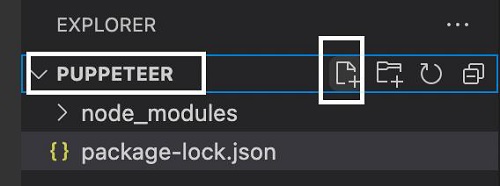
步驟2 - 輸入檔名,例如testcase1.js。
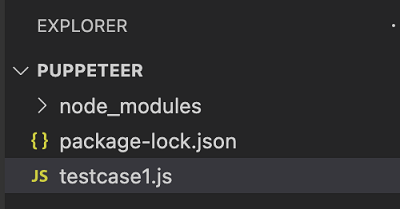
步驟3 - 在建立的testcase1.js檔案中新增以下程式碼。
//Puppeteer library
const pt= require('puppeteer')
async function selectorAbsoluteXpath(){
   //launch browser in headless mode
   const browser = await pt.launch()
   //browser new page
   const page = await browser.newPage()
   //launch URL
   await page.goto('https://tutorialspoint.tw/about/about_careers.htm')
   //identify element with absolute xpath then click
   const b = (await page.$x("/html/body/header/div[4]/div[1]/div[1]/a/img"))[0]
   b.click()
   //wait for sometime
   await page.waitForTimeout(4000)
   //obtain URL after click
   console.log(await page.url())
}
selectorAbsoluteXpath()
步驟4 - 使用下面提到的命令執行程式碼。
node <filename>
所以在我們的例子中,我們將執行以下命令:
node testcase1.js

命令成功執行後,單擊徽標影像後導航到的頁面的URL - https://tutorialspoint.tw/index.htm 將列印在控制檯中。