

- MS Powerpoint 2010 基礎
- PPT - 首頁
- PPT - 開始
- PPT - 探索視窗
- PPT - 後臺檢視
- PPT - 建立簡報
- PPT - 新增新幻燈片
- PPT - 在文字框中新增文字
- PPT - 新增新的文字框
- PPT - 刪除現有幻燈片
- PPT - 重新排列幻燈片
- PPT - 新增幻燈片備註
- PPT - 管理節
- PPT - 使用大綱
- PPT - PowerPoint 側邊欄
- PPT - 簡報檢視
- PPT - 設定背景
- PPT - 幻燈片方向
- PPT - 儲存簡報
- PPT - 審閱簡報
- PPT - 新增幻燈片編號
- PPT - 新增頁首和頁尾
- PPT - 執行幻燈片放映
- PPT - 快捷鍵
- PPT - 獲取上下文幫助
- 編輯簡報
- PPT - 複製和貼上內容
- PPT - 查詢和替換內容
- PPT - 撤消已編輯的更改
- PPT - 拼寫檢查
- PPT - 內容翻譯
- PPT - 設定語言型別
- PPT - 複製內容
- PPT - 特殊字元
- PPT - 幻燈片縮放
- 格式化簡報
- PPT - 字型管理
- PPT - 設定文字字型
- PPT - 文字修飾
- PPT - 更改文字大小寫
- PPT - 更改文字大小
- PPT - 更改文字顏色
- PPT - 文字對齊
- PPT - 縮排段落
- PPT - 設定行距
- 邊框和陰影
- PPT - 應用格式
- PPT - 使用幻燈片母版
- PPT - 儲存設計模板
- 使用多媒體
- PPT - 向幻燈片新增圖片
- PPT - 編輯已新增的圖片
- PPT - 格式化已新增的圖片
- PPT - 插入截圖
- PPT - 向幻燈片新增形狀
- PPT - 編輯已新增的形狀
- PPT - 格式化已新增的形狀
- PPT - 向形狀新增文字
- PPT - 排列形狀/圖片
- PPT - 組合/取消組合物件
- PPT - 新增音訊和影片
- PPT - 新增和格式化表格
- PPT - 新增和格式化圖表
- PPT - 新增和格式化 SmartArt
- PPT - 新增和預覽動畫
- PPT - 新增和預覽切換
- 共享簡報
- PPT - 建立 PDF 檔案
- PPT - 建立影片檔案
- PPT - 建立影像檔案
- PPT - 列印簡報
- PPT - 廣播幻燈片放映
- PPT - 打包簡報
- PPT - 設定文件密碼
- PPT - 電子郵件幻燈片放映
- MS Powerpoint 有用資源
- PPT - 快速指南
- PPT - 有用資源
- PPT - 討論
在Powerpoint 2010中插入截圖
PowerPoint 的一個有趣功能是,您可以將應用程式的螢幕截圖插入簡報中,而無需使用任何其他程式。以下是插入螢幕截圖的步驟。
步驟 1 - 轉到插入功能區的圖片組。
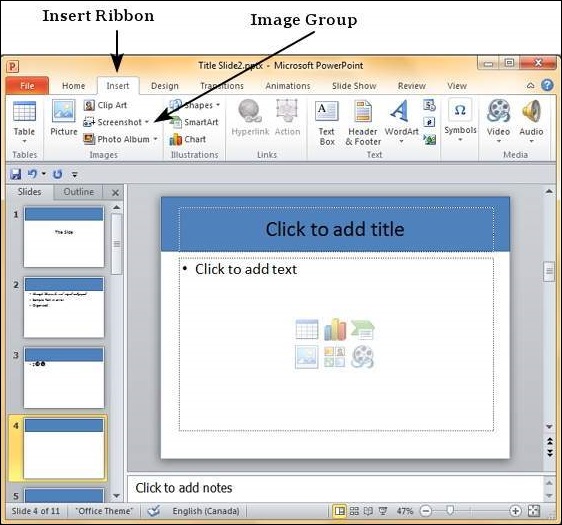
步驟 2 - 單擊截圖下拉選單,檢視計算機桌面上所有正在執行的應用程式的全屏快照。
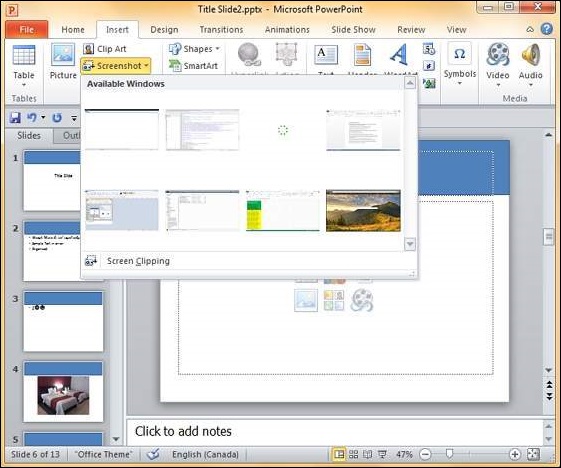
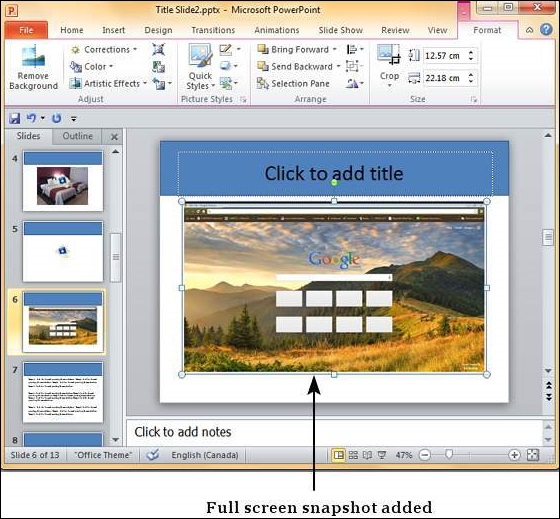
步驟 3 - 選擇其中一個螢幕截圖,將其直接新增到您的簡報中。
步驟 4 - 如果你不需要整個螢幕,只需要一部分,可以使用螢幕剪輯選項。
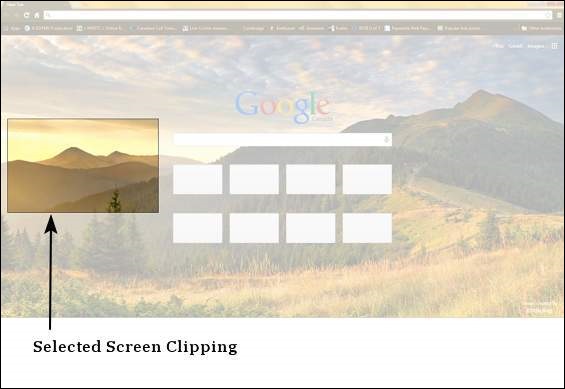
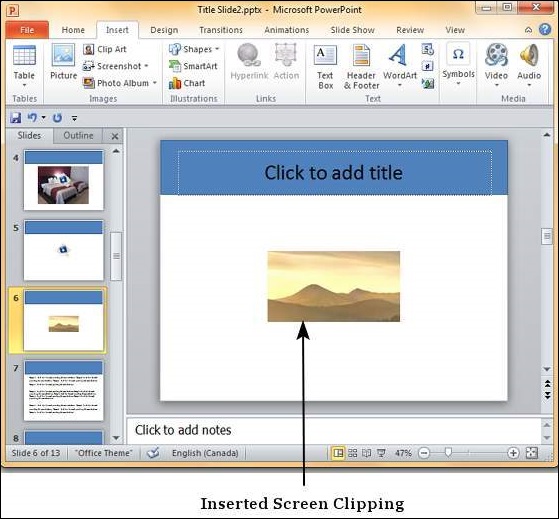
螢幕剪輯選項會自動將焦點移動到PowerPoint程式下方的程式。因此,使用此選項時,請確保PowerPoint程式後面顯示的是正確的螢幕。
廣告