
- Meteor教程
- Meteor - 主頁
- Meteor - 概述
- Meteor - 環境設定
- Meteor - 第一個應用程式
- Meteor - 模板
- Meteor - 集合
- Meteor - 表單
- Meteor - 事件
- Meteor - 會話
- Meteor - Tracker
- Meteor - 包
- Meteor - 核心 API
- Meteor - Check
- Meteor - Blaze
- Meteor - 計時器
- Meteor - EJSON
- Meteor - HTTP
- Meteor - 電子郵件
- Meteor - 資產
- Meteor - 安全
- Meteor - 排序
- Meteor - 帳戶
- Meteor - 方法
- Meteor - Package.js
- Meteor - 釋出和訂閱
- Meteor - 結構
- Meteor - 部署
- Meteor - 在移動裝置上執行
- Meteor - ToDo App
- Meteor - 最佳實踐
- Meteor 有用資源
- Meteor - 快速指南
- Meteor - 有用資源
- Meteor - 討論
Meteor - Tracker
Tracker 是一個用於在會話變數更改後自動更新模板的小型庫。在本篇中,我們將瞭解 Tracker 的工作原理。
首先,我們將建立一個按鈕,用於更新會話。
meteorApp.html
<head>
   <title>meteorApp</title>
</head>

<body>
   <div>
      {{> myTemplate}}
   </div>
</body>

<template name = "myTemplate">
   <button id = "myButton">CLICK ME</button>
</template>
接下來,我們將設定起始會話值myData並建立一個mySession物件。Tracker.autorun方法用於監視mySession。每當此物件更改時,會自動更新模板。為了進行測試,我們將設定一個單擊事件以進行更新。
meteorApp.js
if (Meteor.isClient) {

   var myData = 0
   Session.set('mySession', myData);

   Tracker.autorun(function () {
      var sessionData = Session.get('mySession');
      console.log(sessionData)
   });

   Template.myTemplate.events({

      'click #myButton': function() {
         Session.set('mySession', myData ++);
      }
   });
}
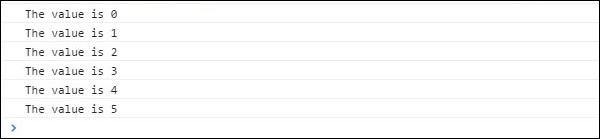
如果我們單擊點選我按鈕 5 次,則會看到每當會話更新時,Tracker 都會記錄新值。
廣告