
- Meteor 教程
- Meteor - 首頁
- Meteor - 概覽
- Meteor - 環境設定
- Meteor - 第一個應用程式
- Meteor - 模板
- Meteor - 集合
- Meteor - 表單
- Meteor - 事件
- Meteor - Session
- Meteor - Tracker
- Meteor - 包
- Meteor - 核心 API
- Meteor - Check
- Meteor - Blaze
- Meteor - 定時器
- Meteor - EJSON
- Meteor - HTTP
- Meteor - 郵件
- Meteor - 資源
- Meteor - 安全性
- Meteor - 排序
- Meteor - 賬戶
- Meteor - 方法
- Meteor - Package.js
- Meteor - 釋出與訂閱
- Meteor - 結構
- Meteor - 部署
- Meteor - 在移動裝置上執行
- Meteor - 待辦事項應用程式
- Meteor - 最佳實踐
- Meteor 有用資源
- Meteor - 快速指南
- Meteor - 有用資源
- Meteor - 討論
Meteor - 集合
在本章中,我們將學習如何使用MongoDB集合。
建立集合
我們可以使用以下程式碼建立新的集合:
meteorApp.js
MyCollection = new Mongo.Collection('myCollection');
新增資料
建立集合後,我們可以使用insert方法新增資料。
meteorApp.js
MyCollection = new Mongo.Collection('myCollection');

var myData = {
   key1: "value 1...",
   key2: "value 2...",
   key3: "value 3...",
   key4: "value 4...",
   key5: "value 5..."
}

MyCollection.insert(myData);
查詢資料
我們可以使用find方法搜尋集合中的資料。
meteorApp.js
MyCollection = new Mongo.Collection('myCollection');

var myData = {
   key1: "value 1...",
   key2: "value 2...",
   key3: "value 3...",
   key4: "value 4...",
   key5: "value 5..."
}

MyCollection.insert(myData);

var findCollection = MyCollection.find().fetch();
console.log(findCollection);
控制檯將顯示我們之前插入的資料。
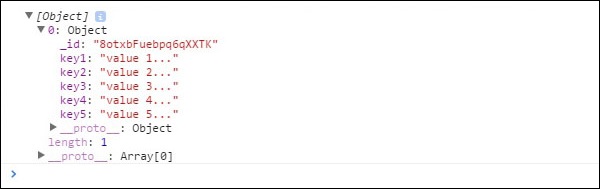
我們可以透過新增搜尋引數來獲得相同的結果。
meteorApp.js
MyCollection = new Mongo.Collection('myCollection');

var myData = {
   key1: "value 1...",
   key2: "value 2...",
   key3: "value 3...",
   key4: "value 4...",
   key5: "value 5..."
}

MyCollection.insert(myData);

var findCollection = MyCollection.find({key1: "value 1..."}).fetch();
console.log(findCollection);
更新資料
下一步是更新我們的資料。建立集合並插入新資料後,我們可以使用update方法。
meteorApp.js
MyCollection = new Mongo.Collection('myCollection');

var myData = {
   key1: "value 1...",
   key2: "value 2...",
   key3: "value 3...",
   key4: "value 4...",
   key5: "value 5..."
}

MyCollection.insert(myData);

var findCollection = MyCollection.find().fetch();
var myId = findCollection[0]._id;

var updatedData = {
   key1: "updated value 1...",
   key2: "updated value 2...",
   key3: "updated value 3...",
   key4: "updated value 4...",
   key5: "updated value 5..."
}

MyCollection.update(myId, updatedData);

var findUpdatedCollection = MyCollection.find().fetch();
console.log(findUpdatedCollection);
控制檯將顯示我們的集合已更新。
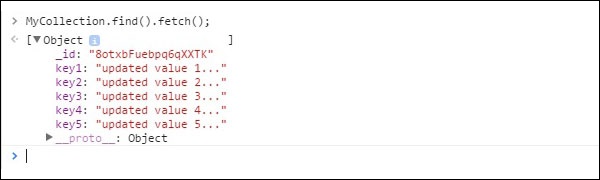
刪除資料
可以使用remove方法從集合中刪除資料。在本例中,我們將id設定為引數以刪除特定資料。
meteorApp.js
MyCollection = new Mongo.Collection('myCollection');

var myData = {
   key1: "value 1...",
   key2: "value 2...",
   key3: "value 3...",
   key4: "value 4...",
   key5: "value 5..."
}

MyCollection.insert(myData);

var findCollection = MyCollection.find().fetch();
var myId = findCollection[0]._id;

MyCollection.remove(myId);

var findDeletedCollection = MyCollection.find().fetch();
console.log(findDeletedCollection);
控制檯將顯示一個空陣列。

如果要刪除集合中的所有內容,可以使用相同的方法,但是,我們將使用空物件{}而不是id。出於安全原因,我們需要在伺服器上執行此操作。
meteorApp.js
if (Meteor.isServer) {

   MyCollection = new Mongo.Collection('myCollection');

   var myData = {
      key1: "value 1...",
      key2: "value 2...",
      key3: "value 3...",
      key4: "value 4...",
      key5: "value 5..."
   }

   MyCollection.insert(myData);
   MyCollection.remove({});

   var findDeletedCollection = MyCollection.find().fetch();
   console.log(findDeletedCollection);
}
我們還可以使用其他引數刪除資料。與前面的示例一樣,Meteor 將強制我們從伺服器執行此操作。
meteorApp.js
if (Meteor.isServer) {

   MyCollection = new Mongo.Collection('myCollection');

   var myData = {
      key1: "value 1...",
      key2: "value 2...",
      key3: "value 3...",
      key4: "value 4...",
      key5: "value 5..."
   }

   MyCollection.insert(myData);
   MyCollection.remove({key1: "value 1..."});

   var findDeletedCollection = MyCollection.find().fetch();
   console.log(findDeletedCollection);
}
可以看出資料已從命令視窗中刪除。

廣告