
- Behave 教程
- Behave - 主頁
- Behave - 介紹
- Behave - 安裝
- Behave - 命令列
- Behave - 配置檔案
- Behave - 特性測試設定
- Behave - Gherkin 關鍵字
- Behave - 特性檔案
- Behave - 步驟實現
- Behave - 第一步
- Behave - 支援的語言
- Behave - 步驟引數
- Behave - 情景提綱
- Behave - 多行文字
- Behave - 設定表
- Behave - 分步執行步驟
- Behave - 背景
- Behave - 資料型別
- Behave - 標記
- Behave - 列舉
- Behave - 步驟匹配器
- Behave - 正則表示式
- Behave - 可選部分
- Behave - 多方法
- Behave - 步驟函式
- Behave - 步驟引數
- Behave - 執行指令碼
- Behave - 排除測試
- Behave - 重試機制
- Behave - 報告
- Behave - 掛鉤
- Behave - 除錯
- Behave 有用資源
- Behave - 快速指南
- Behave - 有用資源
- Behave - 討論
Behave - 分步執行步驟
我們可以在情景中用一個宏步驟替換多個步驟。這有助於我們在步驟定義檔案中不再重複相同的程式碼。BDD 框架具有從步驟定義中呼叫多個步驟的能力。
具有類似步驟的特性檔案
具有類似步驟的特性檔案如下所示:
Feature − Payment Module
   Scenario − Verify message after payment
      Given User is on payment screen
      When User enters payment details
      And User completes payment
      Then User should get success message
   Scenario − Verify new users can process payment
      Given User keys in payment info and submits
      Then success message should get displayed
在特性檔案中,我們有兩個情景包含類似步驟。在 Behave 中,我們可以在一個步驟中執行多個步驟。這可以使用步驟實現檔案中的 context.execute_steps 方法來完成。
相應的步驟實現檔案
上述特性檔案的相應步驟實現檔案如下所示:
from behave import *
@given('User is on payment screen')
def is_on_payment_screen(context):
   print('User is on payment screen')
@when('User enters payment details')
def enters_payment_details(context):
   print('When User enters payment details')
@when('User completes payment')
def completes_payment(context):
   print('When User completes payment')
@then('User should get success message')
def get_success_message(context):
   print('Then User should get success message')
   @given('User keys in payment info and submits')
def payment_info_and_submits(context):
#passing steps within steps with context.execute_steps
   context.execute_steps(u"""
      Given User is on payment screen
      When User enters payment details
      And User completes payment
      """)
@then('success message should get displayed')
def success_message(context):
   print('Then success message should get displayed')
輸出
以下顯示執行特性檔案後的輸出,並且使用的命令是 behave --no-capture -f plain。
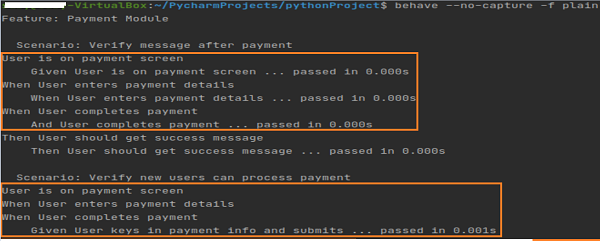
續後輸出如下:

輸出顯示情景驗證的新使用者可以擁有從情景中執行的步驟來處理支付,驗證新使用者可以處理支付。
廣告