
- Behave 教程
- Behave - 首頁
- Behave - 簡介
- Behave - 安裝
- Behave - 命令列
- Behave - 配置檔案
- Behave - 特性測試設定
- Behave - Gherkin 關鍵詞
- Behave - 特性檔案
- Behave - 步驟實現
- Behave - 初步步驟
- Behave - 支援的語言
- Behave - 步驟引數
- Behave - 場景輪廓
- Behave - 多行文字
- Behave - 設定表
- Behave - 步驟中的步驟
- Behave - 背景
- Behave - 資料型別
- Behave - 標籤
- Behave - 列舉
- Behave - 步驟匹配器
- Behave - 正則表示式
- Behave - 可選部分
- Behave - 多方法
- Behave - 步驟函式
- Behave - 步驟引數
- Behave - 執行指令碼
- Behave - 排除測試
- Behave - 重試機制
- Behave - 報告
- Behave - 鉤子
- Behave - 除錯
- Behave 有用資源
- Behave - 快速指南
- Behave - 有用資源
- Behave - 討論
Behave - 步驟實現
Behave 特性檔案中場景的步驟應該具有用 Python 編寫的實現邏輯。這被稱為實現/步驟定義檔案(.py 副檔名),應該位於 steps 目錄中。
此檔案中包含所有必要的匯入。steps 目錄應屬於 features 目錄的一部分。
您的計算機上將顯示以下螢幕:
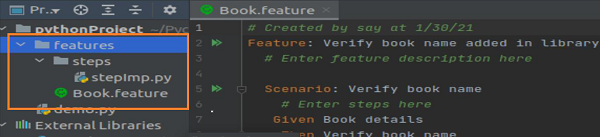
步驟定義檔案包含定義特性檔案中步驟的 Python 函式。在 Python 函式的開頭,必須使用以 @given、@when 等開頭的裝飾器。這些裝飾器會與特性檔案中的 Given、Then、When 和其他步驟進行比較和匹配。
特性檔案
特性檔案如下:
Feature − Verify book name added in Library
   Scenario − Verify Book name
      Given Book details
      Then Verify book name
對應的步驟實現檔案
對應的步驟實現檔案如下所示:
from behave import *
@given('Book details')
def impl_bk(context):
      print('Book details entered')
@then('Verify book name')
def impl_bk(context):
      print('Verify book name')
輸出
執行特性檔案後獲得的輸出如下:
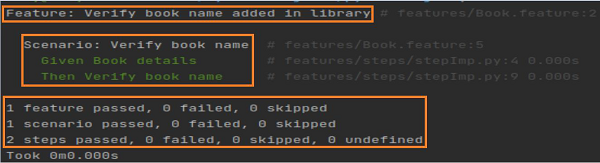
輸出顯示特性和場景名稱,以及測試結果和測試執行持續時間。
廣告