
- Behave 教程
- Behave - 首頁
- Behave - 簡介
- Behave - 安裝
- Behave - 命令列
- Behave - 配置檔案
- Behave - 功能測試設定
- Behave - Gherkin 關鍵字
- Behave - 功能檔案
- Behave - 步驟實現
- Behave - 初級步驟
- Behave - 支援的語言
- Behave - 步驟引數
- Behave - 場景大綱
- Behave - 多行文字
- Behave - 設定表
- Behave - 步驟中的步驟
- Behave - 背景
- Behave - 資料型別
- Behave - 標籤
- Behave - 列舉
- Behave - 步驟匹配器
- Behave - 正則表示式
- Behave - 可選部分
- Behave - 多方法
- Behave - 步驟函式
- Behave - 步驟引數
- Behave - 執行指令碼
- Behave - 排除測試
- Behave - 重試機制
- Behave - 報告
- Behave - 鉤子
- Behave - 除錯
- Behave 有用資源
- Behave - 快速指南
- Behave - 有用資源
- Behave - 討論
Behave - 背景
新增背景是為了將一組步驟組合在一起。它類似於場景。我們可以使用背景為多個場景新增上下文。它在功能的每個場景之前執行,但在執行 before 鉤子之後。
背景通常用於執行前提條件,例如登入場景或資料庫連線等。
可以新增背景描述以提高人類可讀性。它在一個功能檔案中只能出現一次,並且必須在場景或場景大綱之前宣告。
不應使用背景來建立複雜的狀態(除非無法避免)。此部分應簡短而準確。此外,我們應該避免在一個功能檔案中包含大量場景。
包含背景的功能檔案
名為“支付流程”的功能的包含背景的功能檔案如下所示:
Feature − Payment Process
   Background:
      Given launch application
      Then Input credentials
   Scenario − Credit card transaction
      Given user is on credit card payment screen
      Then user should be able to complete credit card payment
   Scenario − Debit card transaction
      Given user is on debit card payment screen
      Then user should be able to complete debit card payment
相應的步驟實現檔案
檔案如下所示:
from behave import *
@given('launch application')
def launch_application(context):
   print('launch application')
@then('Input credentials')
def input_credentials(context):
   print('Input credentials')
@given('user is on credit card payment screen')
def credit_card_pay(context):
   print('User is on credit card payment screen')
@then('user should be able to complete credit card payment')
def credit_card_pay_comp(context):
   print('user should be able to complete credit card pay')
@given('user is on debit card payment screen')
def debit_card_pay(context):
   print('User is on debit card payment screen')
@then('user should be able to complete debit card payment')
def debit_card_pay_comp(context):
   print('user should be able to complete debit card payment')
輸出
執行功能檔案後獲得的輸出如下所示,此處使用的命令為behave --no-capture -f plain。
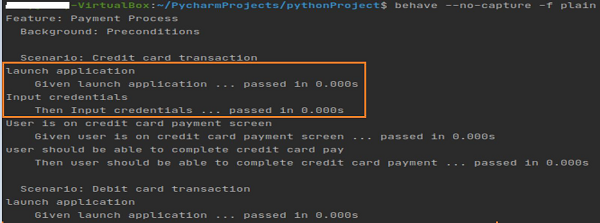
接下來的輸出如下:
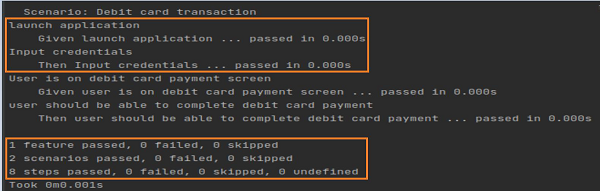
輸出顯示背景步驟(Given 啟動應用程式 & Then 輸入憑據)在每個場景之前執行兩次。
廣告