- Behave 教程
- Behave - 首頁
- Behave - 簡介
- Behave - 安裝
- Behave - 命令列
- Behave - 配置檔案
- Behave - 特性測試設定
- Behave - Gherkin 關鍵字
- Behave - 特性檔案
- Behave - 步驟實現
- Behave - 初級步驟
- Behave - 支援的語言
- Behave - 步驟引數
- Behave - 場景大綱
- Behave - 多行文字
- Behave - 設定表
- Behave - 步驟中的步驟
- Behave - 背景
- Behave - 資料型別
- Behave - 標籤
- Behave - 列舉
- Behave - 步驟匹配器
- Behave - 正則表示式
- Behave - 可選部分
- Behave - 多方法
- Behave - 步驟函式
- Behave - 步驟引數
- Behave - 執行指令碼
- Behave - 排除測試
- Behave - 重試機制
- Behave - 報告
- Behave - 鉤子函式
- Behave - 除錯
- Behave 有用資源
- Behave - 快速指南
- Behave - 有用資源
- Behave - 討論
Behave - 鉤子函式
Behave 的設定和拆卸函式在一個名為 environment.py 的檔案中實現,該檔案與包含步驟資料夾的同一目錄中。
設定函式包括:開啟瀏覽器、資料庫連線、配置等等。
拆卸函式包括:關閉瀏覽器、終止資料庫連線、撤銷更改等等。
environment.py 檔案包含以下函式:
before_feature(context, feature) - 在每個特性之前執行。
before_scenario(context, scenario) - 在每個場景之前執行。
before_step(context, step) - 在每個步驟之前執行。
before_tag(context, tag) - 在每個標籤之前執行。
before_all(context) - 在所有內容之前執行。
after_feature(context, feature) - 在每個特性之後執行。
after_scenario(context, scenario) - 在每個場景之後執行。
after_step(context, step) - 在每個步驟之後執行。
after_tag(context, tag) - 在每個標籤之後執行。
after_all(context) - 在所有內容之後執行。
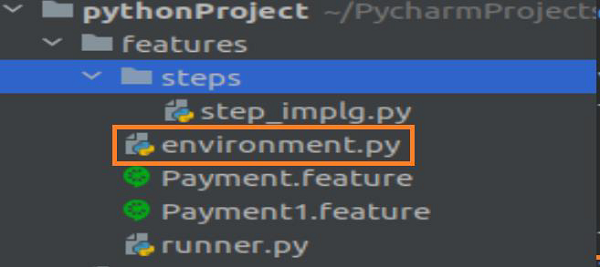
以上函式在 Behave 中用作鉤子函式。專案結構應如下所示:
包含鉤子函式的特性檔案 (Payment.feature)
Feature − Payment Process
Scenario − Verify transactions
         Given user makes a payment of 100 INR And user makes a payment of 10 Dollar
包含 Payment.feature 鉤子函式的特性檔案如下:
包含鉤子函式的特性檔案 (Payment1.feature)
Feature − Administration Process
Scenario − Verify admin transactions
         Given user is on admin screen
Payment1.feature 的包含鉤子函式的特性檔案如下:
相應的步驟實現檔案
from behave import *
from parse_type import TypeBuilder
parse_amt = TypeBuilder.make_choice(["100", "10"])
register_type(Amt=parse_amt)
parse_curr = TypeBuilder.make_choice(["INR", "Dollar"])
register_type(Curn=parse_curr)
@given("user makes a payment of {n:Amt} {t:Curn}")
def step_payment(context, n, t):
   pass
@given('user is on admin screen')
def step_admin(context):
   pass
步驟實現檔案如下:
步驟 4 - environment.py 檔案中的鉤子函式
# before all
def before_all(context):
   print('Before all executed')
# before every scenario
def before_scenario(scenario, context):
   print('Before scenario executed')
# after every feature
def after_feature(scenario, context):
   print('After feature executed')
# after all
def after_all(context):
   print('After all executed')
environment.py 檔案中的鉤子函式如下:
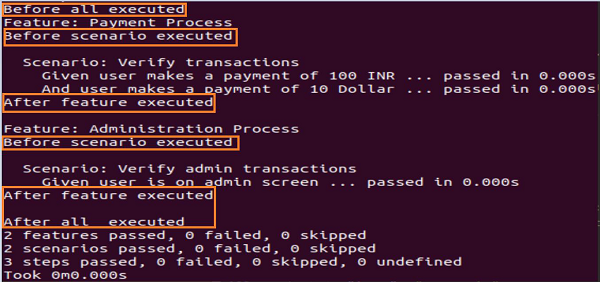
輸出