
- Behave 教程
- Behave - 首頁
- Behave - 簡介
- Behave - 安裝
- Behave - 命令列
- Behave - 配置檔案
- Behave - 特性測試設定
- Behave - Gherkin 關鍵字
- Behave - 特性檔案
- Behave - 步驟實現
- Behave - 入門步驟
- Behave - 支援的語言
- Behave - 步驟引數
- Behave - 場景大綱
- Behave - 多行文字
- Behave - 設定表
- Behave - 步驟中的步驟
- Behave - 背景
- Behave - 資料型別
- Behave - 標籤
- Behave - 列舉
- Behave - 步驟匹配器
- Behave - 正則表示式
- Behave - 可選部分
- Behave - 多方法
- Behave - 步驟函式
- Behave - 步驟引數
- Behave - 執行指令碼
- Behave - 排除測試
- Behave - 重試機制
- Behave - 報告
- Behave - 鉤子
- Behave - 除錯
- Behave 有用資源
- Behave - 快速指南
- Behave - 有用資源
- Behave - 討論
Behave - 步驟函式
步驟函式在steps目錄中的Python檔案中建立。該目錄中的每個Python檔案(副檔名為.py)都會被匯入以獲取步驟實現。
一旦特性檔案被觸發執行,實現檔案就會被載入。步驟函式與步驟裝飾器相關聯。
步驟實現必須以匯入開始,使用如下命令:
from behave import *
這將匯入Behave中描述的多個裝飾器,以幫助我們找到步驟函式。像given、when、then等裝飾器接受一個字串引數。
例如,考慮以下程式碼:
@given('user is on admin screen')
def step_impl(context):
      pass
上述程式碼將匹配以下特性檔案的Given步驟:
Feature − Admin Module
Scenario − Admin verification
      Given user is on admin screen
特性檔案中以And/But開頭的步驟將被重新命名為其之前的步驟關鍵字。
例如,考慮以下特性檔案:
Feature − Admin Module
Scenario − Admin verification
      Given user is on admin screen
       And user is on history screen
       Then user should be able to see admin name
         But user should not able to check history
And步驟將被重新命名為Given步驟,But步驟將被重新命名為之前的步驟關鍵字。所有這些都在內部處理。
如果有多個And/But步驟連續出現,它們將繼承非And或But關鍵字的關鍵字。
具有步驟裝飾器的步驟函式至少需要一個引數。第一個引數稱為上下文變數。其他引數來自步驟引數(如果需要)。
例如,參考根據步驟引數的步驟函式。
@given('user is on admin screen')
def step_impl(context):
      pass
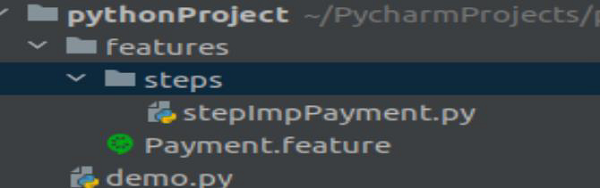
專案結構
特性的專案結構如下:
廣告