
- Behave 教程
- Behave - 主頁
- Behave - 介紹
- Behave - 安裝
- Behave - 命令列
- Behave - 配置檔案
- Behave - 功能測試設定
- Behave - Gherkin 關鍵字
- Behave - 功能檔案
- Behave - 步驟實現
- Behave - 第一步
- Behave - 支援的語言
- Behave - 步驟引數
- Behave - 場景大綱
- Behave - 多行文字
- Behave - 設定表
- Behave - 步驟中的步驟
- Behave - 背景
- Behave - 資料型別
- Behave - 標籤
- Behave - 列舉
- Behave - 步驟匹配器
- Behave - 正則表示式
- Behave - 可選部分
- Behave - 多方法
- Behave - 步驟函式
- Behave - 步驟引數
- Behave - 執行程式指令碼
- Behave - 排除測試
- Behave - 重試機制
- Behave - 報告
- Behave - 掛鉤
- Behave - 除錯
- Behave 有用資源
- Behave - 快速指南
- Behave - 有用資源
- Behave - 討論
Behave - 多行文字
用 """ 括起來的步驟之後的文字塊將與該步驟關聯。在此,解析縮排。文字開頭的所有空格都會從文字中刪除,所有後續行至少必須有一個最小空格作為起始行。
透過 context 變數(在步驟函式中傳遞)中的 .text 屬性,可以在實現 Python 程式碼中訪問文字。
特徵檔案
標題為使用者資訊的特徵檔案如下所示 −
Feature − User information
Scenario − Check login functionality
   Given user enters name and password
         """
         Tutorialspoint Behave
          Topic – Multiline Text
         """
   Then user should be logged in
相應的步驟實現檔案
該特徵的相應步驟實現檔案如下所示 −
from behave import *
@given('user enters name and password')
def step_impl(context):
#access multiline text with .text attribute
      print("Multiline Text: " + context.text)
@then('user should be logged in')
def step_impl(context):
      pass
輸出
執行特徵檔案後獲得的輸出如下所示,使用的命令是 behave --no-capture -f plain。
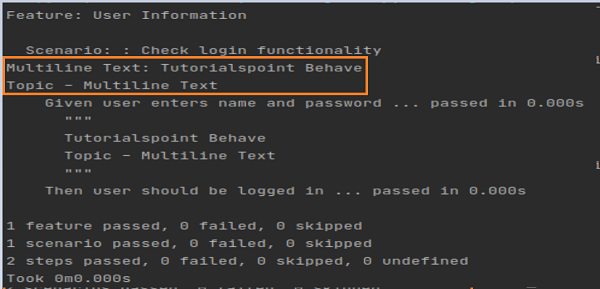
輸出顯示列印的多行文字。
廣告