
- Behave 教程
- Behave - 首頁
- Behave - 簡介
- Behave - 安裝
- Behave - 命令列
- Behave - 配置檔案
- Behave - 功能測試設定
- Behave - Gherkin 關鍵字
- Behave - 功能檔案
- Behave - 步驟實現
- Behave - 初步步驟
- Behave - 支援的語言
- Behave - 步驟引數
- Behave - 場景大綱
- Behave - 多行文字
- Behave - 設定表
- Behave - 步驟中的步驟
- Behave - 背景
- Behave - 資料型別
- Behave - 標籤
- Behave - 列舉
- Behave - 步驟匹配器
- Behave - 正則表示式
- Behave - 可選部分
- Behave - 多方法
- Behave - 步驟函式
- Behave - 步驟引數
- Behave - 執行指令碼
- Behave - 排除測試
- Behave - 重試機制
- Behave - 報告
- Behave - 鉤子
- Behave - 除錯
- Behave 有用資源
- Behave - 快速指南
- Behave - 有用資源
- Behave - 討論
Behave - 設定表
一個步驟可以包含文字和資料表。我們可以為步驟新增資料表。建議縮排表格資料,並且每一行都必須具有相同的列數。
列資料應以 | 符號分隔。
包含表格的功能檔案 (Login.feature)
功能檔案如下所示:
Feature − User Information
Scenario − Check login functionality
   Given Collection of credentials
      | username |password |
      | user1    | pwd1    |
      | user2    | pwd2    |
   Then user should be logged in
表格可以透過上下文變數(傳遞到步驟函式中)的 .table 屬性訪問 Python 程式碼。表格是 Table 的一個例項。我們可以使用設定表來促進測試設定。
Python 程式碼
訪問表格的 Python 程式碼 (login_module.py) 如下所示:
class Deprt(object):
   def __init__(self, username, ms=None):
      if not ms:
         ms = []
      self.username = username
      self.ms = ms
   def m_addition(self, usernane):
      assert usernane not in self.ms
      self.ms.append(usernane)
class LModel(object):
   def __init__(self):
      self.loginusrs = []f
      self.passwords = {}
   def usr_addition(self, username, password):
      assert username not in self.loginusrs
      if password not in self.passwords:
         self.passwords[password] = Deprt(password)
      self.passwords[password].m_addition(username)
相應的步驟實現檔案 (step_implg.py)
檔案如下所示:
from behave import *
from features.steps.login_module import LModel
@given('Collection of credentials')
def step_impl(context):
   model = getattr(context, "model", None)
   if not model:
      context.model = LModel()
   #iterate rows of table
    for r in context.table:
      context.model.usr_addition(r["username"], password=r["password"])
@then('user should be logged in')
def step_impl(context):
   pass
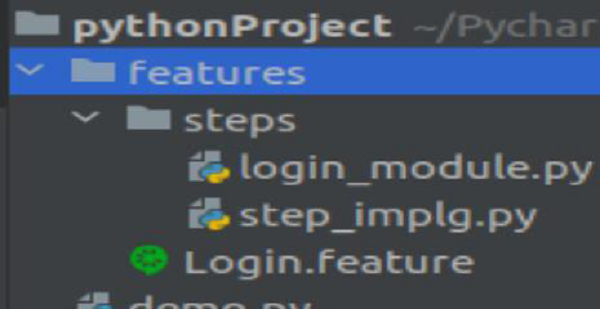
專案設定
Python 專案中檔案的專案設定如下所示
輸出
執行功能檔案後獲得的輸出如下所示,使用的命令為 **behave --no-capture -f plain**。
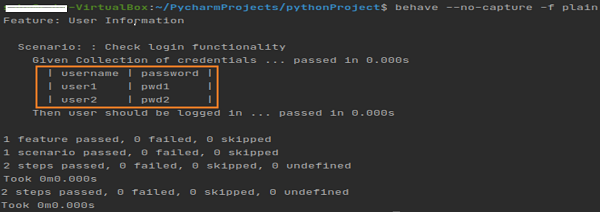
輸出顯示了列印的設定表。
廣告