
- Behave 教程
- Behave - 首頁
- Behave - 簡介
- Behave - 安裝
- Behave - 命令列
- Behave - 配置檔案
- Behave - 特性測試設定
- Behave - Gherkin 關鍵詞
- Behave - 特性檔案
- Behave - 步驟實現
- Behave - 初始步驟
- Behave - 支援的語言
- Behave - 步驟引數
- Behave - 場景大綱
- Behave - 多行文字
- Behave - 設定表
- Behave - 步驟中的步驟
- Behave - 背景
- Behave - 資料型別
- Behave - 標籤
- Behave - 列舉
- Behave - 步驟匹配器
- Behave - 正則表示式
- Behave - 可選部分
- Behave - 多方法
- Behave - 步驟函式
- Behave - 步驟引數
- Behave - 執行指令碼
- Behave - 排除測試
- Behave - 重試機制
- Behave - 報告
- Behave - 鉤子
- Behave - 除錯
- Behave 有用資源
- Behave - 快速指南
- Behave - 有用資源
- Behave - 討論
Behave - 資料型別
Behave 中有兩種資料型別,分別是預定義和使用者自定義。讓我們首先了解什麼是預定義資料型別。
預定義資料型別
Behave 利用 parse 模組解析步驟定義中的引數。讓我們探索一些對步驟定義有支援且不需要像使用者定義資料型別那樣註冊的解析型別。
w(str 型別) - 下劃線和字母。
W(str 型別) - 下劃線和非字母。
s(str 型別) - 空格。
S(str 型別) - 非空格。
d(int 型別) - 數字。
D(str 型別) - 非數字。
n(int 型別) - 帶有千位分隔符的數字。
%(float 型別) - 百分比。(轉換為 value/100.0)
f(float 型別) - 定點數字。
e(float 型別) - 浮點數以及指數。
g(float 型別) - 數字格式。
b(int 型別) - 二進位制數。
o(int 型別) - 八進位制數。
x(int 型別) - 十六進位制數。
ti(datetime 型別) - ISO 8601 日期/時間格式的時間。
te(datetime 型別) - RFC 2822 電子郵件日期/時間格式的時間。
tg(datetime 型別) - 全球日期/時間格式的時間。
ta(datetime 型別) - 美國日期/時間格式的時間。
tc(datetime 型別) - ctime() 日期/時間格式。
th(datetime 型別) - HTTP 日誌日期/時間格式的時間。
tt(time 型別)
在步驟實現中,我們將傳遞引數:用“{}”括起來的資料型別。
帶有 % 資料型別的特性檔案
帶有 % 資料型別的特性檔案如下所示:
Feature − Payment Process
   Scenario Outline: Credit card transaction
   Given user is on credit card payment screen
   When user makes a payment of "<p>" percent of total
   Examples: Amounts
      | p      |
      |80%     |
      |90%     |
相應的步驟實現檔案
檔案如下所示:
from behave import *
@given('user is on credit card payment screen')
def credit_card_pay(context):
   print('User is on credit card payment screen')
#passing parameter in % datatype enclosed in {}
@when('user makes a payment of "{p:%}" percent of total')
def step_impl(context, p):
   print('Number is: ')
   print(p)
輸出
執行特性檔案後獲得輸出,使用的命令為behave --no-capture -f plain。
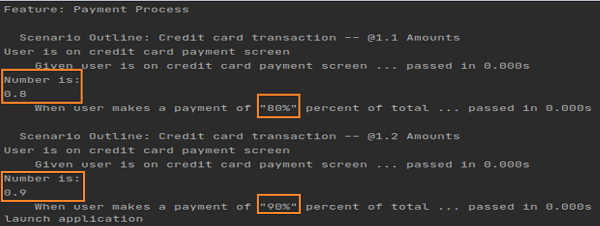
輸出如下所示:

輸出顯示 0.8 和 0.9,這是從 % 資料型別獲得的,用於表示從特性檔案中傳遞的 80% 和 90% 值。
使用者自定義資料型別
Behave 還具有使用者自定義資料型別。register_type 方法用於註冊使用者定義的型別,該型別可以在匹配步驟時解析任何型別轉換。
特性檔案
名為支付流程的特性檔案的特性檔案如下所示:
Feature − Payment Process
   Scenario Outline: Credit card transaction
      Given user is on credit card payment screen
      When user makes a payment of "<amount>" of total
      Examples: Amounts
         |amount  |
         |75      |
         |85      |
在步驟實現中,我們將傳遞引數:用“{}”括起來的使用者定義資料型別。register_type 方法用於註冊使用者定義的型別,該型別可以在匹配步驟時解析任何型別轉換。
相應的步驟實現檔案
檔案如下所示:
from behave import *
from behave import register_type
#convert parsed text to float
def parse_percent(t):
   return float(t)
#register user-defined type
register_type(Float=parse_percent)
@given('user is on credit card payment screen')
def credit_card_pay(context):
   print('User is on credit card payment screen')
@when('user makes a payment of "{amount:Float}" of total')
def step_impl(context, amount):
   print('Number is: ')
   print(amount)
輸出
執行特性檔案後獲得輸出,使用的命令為behave --no-capture -f plain。
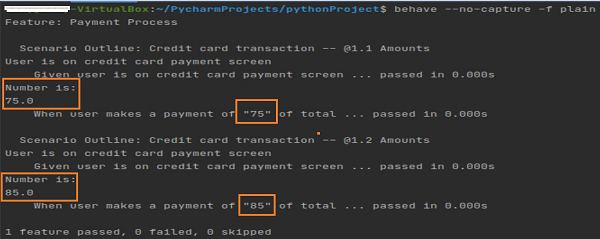
輸出如下所示:

輸出顯示 75.0 和 85.0,它們已轉換為浮點值(藉助使用者定義的轉換)。這些引數作為整數型別從特性檔案中傳遞。