

- Windows 10 教程
- Windows 10 - 主頁
- Windows 10 - 概述
- Windows 10 - 安裝
- Windows 10 - 入門
- Windows 10 - GUI 基礎知識
- Windows 10 - 導航
- Windows 10 - 開始選單
- Windows 10 - 工作列
- Windows 10 - 平板電腦模式
- Windows 10 - 檔案資源管理器
- Windows 10 - Cortana
- Windows 10 - 通知
- Windows 10 - 快速操作
- Windows 10 - 雲
- Windows 10 - 通用應用程式
- Windows 10 - 多個桌面
- Windows 10 - 使用者管理
- Windows 10 - 安全
- Windows 10 - 家長控制
- Windows 10 - 應用程式
- Windows 10 - 網頁瀏覽
- Windows 10 - 網路
- Windows 10 - 虛擬化
- Windows 10 - 遠端訪問
- Windows 10 - 備份和恢復
- Windows 10 - 斯巴達專案
- Windows 10 - 應用程式管理
- Windows 10 - 電子郵件管理
- Windows 10 - 鍵盤快捷鍵
- Windows 10 - 系統托盤
- Windows 10 - 媒體管理
- Windows 10 - 收藏設定
- Windows 10 - 快捷方式
- Windows 10 - 手機
- Windows 10 有用資源
- Windows 10 - 快速指南
- Windows 10 - 有用資源
- Windows 10 - 討論
Windows 10 - 通用應用程式
藉助 Windows 10,Microsoft 已發起了一項倡議,讓應用程式在其不同平臺上“通用”。這意味著為您的計算機設計的應用程式還可以在 Windows 手機、Xbox 或任何其他相容 Windows 的裝置上執行。
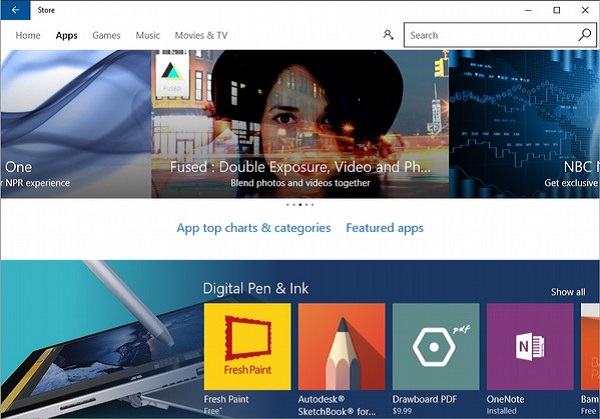
為了實現此目的,Windows 開發了通用 Windows 平臺 (UWP) 並改進了Windows 應用商店,使其成為所有 Windows 應用程式的統一店面。要訪問 Windows 應用商店,使用者可以單擊工作列上的圖示。這將開啟 Windows 應用商店,允許使用者瀏覽其想要的所有應用程式。
Windows 還允許“交叉購買”,這意味著在一種裝置上購買應用程式的許可證也將適用於使用者擁有的任何其他相容裝置。
廣告