
- TurboGears 教程
- TurboGears - 首頁
- TurboGears - 概述
- TurboGears - 環境
- TurboGears - 第一個程式
- TurboGears - 依賴項
- TurboGears - 服務模板
- TurboGears - HTTP 方法
- Genshi 模板語言
- TurboGears - 包含
- TurboGears - JSON 渲染
- TurboGears - URL 層次結構
- TurboGears - Toscawidgets 表單
- TurboGears - 驗證
- TurboGears - 快閃記憶體訊息
- TurboGears - Cookie 和會話
- TurboGears - 快取
- TurboGears - Sqlalchemy
- TurboGears - 建立模型
- TurboGears - CRUD 操作
- TurboGears - 資料網格
- TurboGears - 分頁
- TurboGears - 管理員訪問
- 授權和認證
- TurboGears - 使用 MongoDB
- TurboGears - 腳手架
- TurboGears - 鉤子
- TurboGears - 編寫擴充套件
- TurboGears - 可插拔應用程式
- TurboGears - RESTful 應用程式
- TurboGears - 部署
- TurboGears 有用資源
- TurboGears - 快速指南
- TurboGears - 有用資源
- TurboGears - 討論
TurboGears - HTTP 方法
HTTP 協議是全球資訊網中資料通訊的基礎。此協議中定義了從指定 URL 檢索資料的不同方法。下表總結了不同的 HTTP 方法:
| 序號 | HTTP 方法和描述 |
|---|---|
| 1 | GET 以未加密的形式將資料傳送到伺服器。最常見的方法。 |
| 2 | HEAD 與 GET 相同,但沒有響應主體 |
| 3 | POST 用於將 HTML 表單資料傳送到伺服器。POST 方法接收的資料不會被伺服器快取。 |
| 4 | PUT 用上傳的內容替換目標資源的所有當前表示形式。 |
| 5 | DELETE 刪除 URL 給出的目標資源的所有當前表示形式 |
建立 HTML 表單
讓我們建立一個 HTML 表單並將表單資料傳送到 URL。將以下指令碼儲存為 login.html
<html>
   <body>
      <form action = "https://:8080/login" method = "get">
         <p>Enter Name:</p>
         <p><input type = "text" name = "nm" /></p>
         <p><input type = "submit" value = "submit" /></p>
      </form>
   </body>
</html>
此表單中輸入的資料將提交到“/login URL”。現在建立一個控制器函式loginpage() 並將其公開到上述 html 頁面。
@expose("hello.templates.login")
   def loginpage(self):
      return {}
為了接收表單資料,提供一個login()控制器,該控制器以表單屬性作為其引數。這裡“nm”是登入表單中文字輸入欄位的名稱,它與 login() 函式的引數相同。
@expose("hello.templates.sample")
   def login(self, nm):
      name = nm
      return {'person':name}
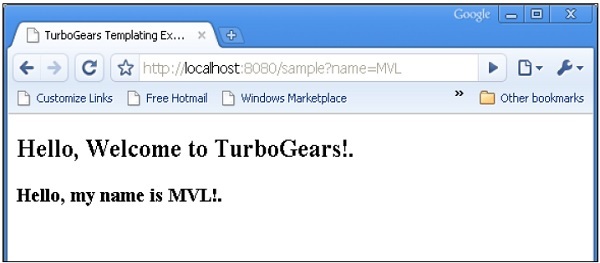
可以看出,從登入表單接收到的資料正在傳送到 sample.html 模板(之前使用過)。它由Genshi 模板引擎解析以生成以下輸出:
POST 方法
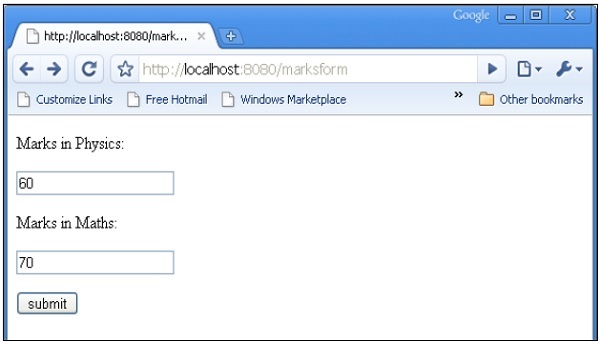
當 HTML 表單使用 POST 方法將資料分派到 action 屬性中的 URL 時,表單資料不會在 URL 中公開。編碼後的資料由控制器函式以dict引數接收。下面的kw引數是儲存表單資料的字典物件。
HTML 表單包含兩個文字輸入欄位。
<html>
   <body>

      <form action = "https://:8080/marks" method = "post">
         <p>Marks in Physics:</p>
         <p><input type = "text" name = "phy" /></p>
         <p>Marks in Maths:</p>
         <p><input type = "text" name = "maths" /></p>
         <p><input type = "submit" value = "submit" /></p>
      </form>

   </body>
</html>
marks()控制器接收表單資料並將其傳送到sample.html模板。root.py的程式碼如下:
from hello.lib.base import BaseController
from tg import expose, request

class RootController(BaseController):
   @expose("hello.templates.marks")
   def marksform(self):
      return {}

   @expose("hello.templates.sample")
   def marks(self, **kw):
      phy = kw['phy']
      maths = kw['maths']
      ttl = int(phy)+int(maths)
      mydata = {'phy':phy, 'maths':maths, 'total':ttl}
      return mydata
最後,sample.html 模板如下:
<html>
   <head>
      <title>TurboGears Templating Example</title>
   </head>

   <body>
      <h2>Hello, Welcome to TurboGears!.</h2>
      <h3>Marks in Physics: ${phy}.</h3>
      <h3>Marks in Maths: ${maths}.</h3>
      <h3>Total Marks: ${total}</h3>
   </body>

</html>
啟動伺服器(如果尚未執行)
Gearbox server –reload –debug
在瀏覽器中輸入https://::8080/marksform
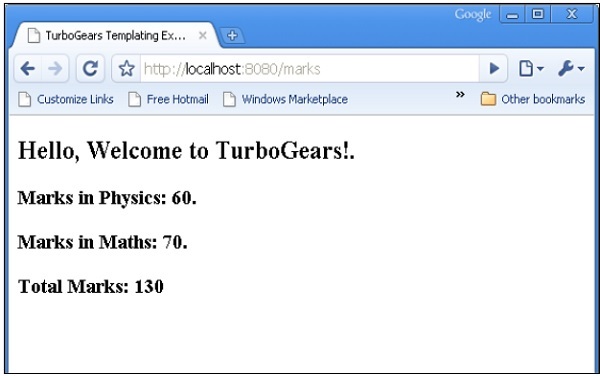
sample.html將呈現以下輸出:
廣告