
- TurboGears 教程
- TurboGears - 主頁
- TurboGears - 概述
- TurboGears - 開發環境
- TurboGears - 第一個程式
- TurboGears - 依賴性
- TurboGears - 使用模板
- TurboGears - HTTP 方法
- Genshi 模板語言
- TurboGears - Include
- TurboGears - JSON 渲染
- TurboGears - URL 層次結構
- TurboGears - Toscawidgets 表單
- TurboGears - 驗證
- TurboGears - 快閃記憶體訊息
- TurboGears - Cookies 和會話
- TurboGears - 快取
- TurboGears - Sqlalchemy
- TurboGears - 建立模型
- TurboGears - CRUD 操作
- TurboGears - 資料網格
- TurboGears - 分頁
- TurboGears - 管理員訪問
- 授權和認證
- TurboGears - 使用 MongoDB
- TurboGears - 腳手架
- TurboGears - 掛鉤
- TurboGears - 編寫擴充套件
- TurboGears - 可插入應用程式
- TurboGears - RESTful 應用程式
- TurboGears - 部署
- TurboGears 有用資源
- TurboGears - 快速指南
- TurboGears - 有用資源
- TurboGears - 討論
TurboGears – 資料網格
ToscaWidgets 包含一個 DataGrid 控制元件,它提供了一種快速以表格形式呈現資料的方法。DataGrid 物件宣告如下 −
from tw2.forms import DataGrid
student_grid = DataGrid(fields = [('Name', 'name'),('City', 'city'),
   ('Address','address'), ('PINCODE', 'pincode')])
現在,showgrid() 函式檢索學生表中的所有記錄並將資料公開到 grid.html 模板。首先給出 showgrid() 函式的程式碼,然後給出 grid.html 程式碼 −
showgrid()
@expose('hello.templates.grid')
def showgrid(self):
   data = DBSession.query(student).all()
   return dict(page = 'grid', grid = student_grid, data = data)
grid.html
<!DOCTYPE html>
<html xmlns = "http://www.w3.org/1999/xhtml"
   xmlns:py = "http://genshi.edgewall.org/"
   lang = "en">

   <head>
      <title>Student Registration Form</title>
   </head>

   <body>
      <div id = "getting_started">
         <div>${grid.display(value = data)}</div>
      </div>
   </body>

</html>
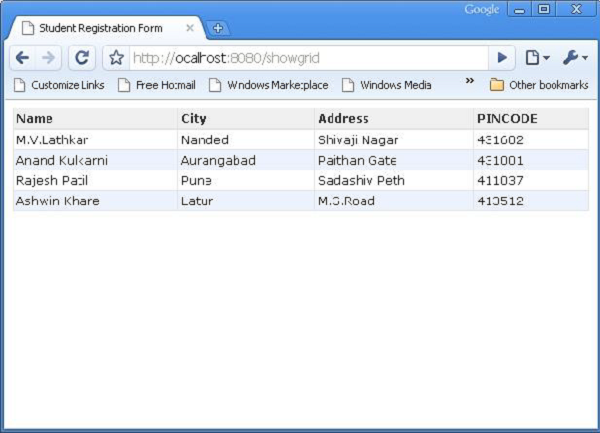
當在瀏覽器中輸入 https://:8080/showlist URL 時,將顯示以下表格資料 −
廣告