
- TurboGears 教程
- TurboGears - 首頁
- TurboGears - 概述
- TurboGears - 環境
- TurboGears - 第一個程式
- TurboGears - 依賴項
- TurboGears - 服務模板
- TurboGears - HTTP 方法
- Genshi 模板語言
- TurboGears - 包含
- TurboGears - JSON 渲染
- TurboGears - URL 層次結構
- TurboGears - Toscawidgets 表單
- TurboGears - 驗證
- TurboGears - 快閃記憶體訊息
- TurboGears - Cookie 和會話
- TurboGears - 快取
- TurboGears - SQLAlchemy
- TurboGears - 建立模型
- TurboGears - CRUD 操作
- TurboGears - 資料表格
- TurboGears - 分頁
- TurboGears - 管理員訪問
- 授權與認證
- TurboGears - 使用 MongoDB
- TurboGears - 腳手架
- TurboGears - 鉤子
- TurboGears - 編寫擴充套件
- TurboGears - 可插拔應用程式
- TurboGears - RESTful 應用程式
- TurboGears - 部署
- TurboGears 有用資源
- TurboGears - 快速指南
- TurboGears - 有用資源
- TurboGears - 討論
TurboGears - Genshi 模板語言
Genshi 是一種基於 XML 的模板語言。它類似於Kid,後者曾是早期版本 TurboGears 的模板引擎。Genshi 和 Kid 都受到其他知名模板語言的啟發,例如HSLT、TAL和PHP。
Genshi 模板包含處理指令。這些指令是模板中的元素和屬性。Genshi 指令在一個名稱空間中定義 http://genshi.edgewall.org/ 。因此,需要在模板的根元素中宣告此名稱空間。
<html xmlns = "http://www.w3.org/1999/xhtml"
   xmlns:py = "http://genshi.edgewall.org/"
   lang = "en">
...
</html>
上述宣告意味著預設名稱空間設定為 XHTML,而 Genshi 指令具有“py”字首。
Genshi 指令
Genshi 中定義了許多指令。以下列表列出了 Genshi 指令:
- py:if
- py:choose
- py:for
- py:def
- py:match
- py:with
- py:replace
- py:content
- py:attrs
- py:strip
條件部分
Genshi 提供了兩個指令用於條件渲染內容:py:if 和 py:choose。
py:if
只有當if 子句中的表示式計算結果為 true 時,才會渲染此指令元素的內容。假設模板上下文中的資料為{‘foo’:True, ‘bar’:’Hello’},則以下指令:
<div>
   <b py:if = "foo">${bar}</b>
</div>
將產生以下結果:
Hello
但是,如果‘foo’設定為 False,則不會渲染此輸出。
此指令也可以用作元素。在這種情況下,<py:if>必須由相應的</py:if>關閉。
<div>
   <py:if test = "foo">
      <b>${bar}</b>
   </py:if>
</div>
py:choose
可以使用py:choose結合py:when和py:otherwise指令實現高階條件處理。此功能類似於C/C++中的switch-case結構。
檢查py:choose指令中的表示式與使用py:when替代項標識的不同值,並將渲染相應的內容。可以以py:otherwise指令的形式提供預設替代項。
<div py:choose = "foo”>
   <span py:when = "0">0</span>
   <span py:when = "1">1</span>
   <span py:otherwise = "">2</span>
</div>
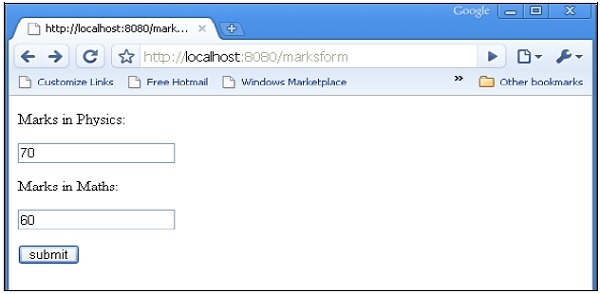
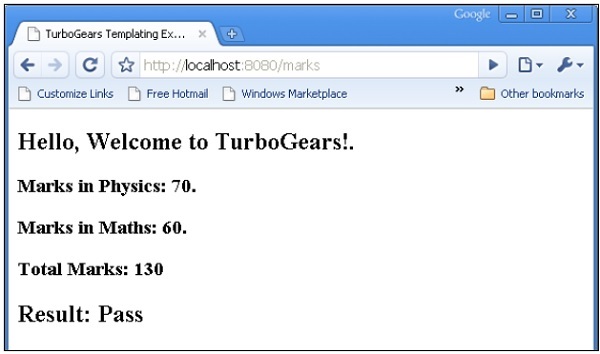
以下示例說明了py:choose和py:when指令的使用。HTML 表單將資料釋出到 /marks URL。marks()函式重定向標記並將字典物件形式的結果傳送到total.html模板。結果 Pass/Fail的條件顯示是透過使用py:choose和py:when指令實現的。
輸入標記的HTML指令碼(marks.html)如下:
<html>
   <body>
      <form action = "https://:8080/marks" method = "post">
         <p>Marks in Physics:</p>
         <p><input type = "text" name = "phy" /></p>
         <p>Marks in Maths:</p>
         <p><input type = "text" name = "maths" /></p>
         <p><input type = "submit" value = "submit" /></p>
      </form>
   </body>
</html>
root.py的完整程式碼如下。marks()控制器將標記和結果傳送到total.html模板:
from hello.lib.base import BaseController
from tg import expose, request

class RootController(BaseController):
   @expose("hello.templates.marks")
      def marksform(self):
      return {}

   @expose("hello.templates.total")
      def marks(self, **kw):
      phy = kw['phy']
      maths = kw['maths']
      ttl = int(phy)+int(maths)
      avg = ttl/2

      if avg ≥ 50:
         mydata = {'phy':phy, 'maths':maths, 'total':ttl, 'result':2}
      else:
         mydata = {'phy':phy, 'maths':maths, 'total':ttl,'result':1}

      return mydata
templates 資料夾中的total.html接收字典資料,並有條件地將其解析為 html 輸出,如下所示:
<html xmlns = "http://www.w3.org/1999/xhtml"
   xmlns:py = "http://genshi.edgewall.org/"
   lang = "en">

   <head>
      <title>TurboGears Templating Example</title>
   </head>

   <body>
      <h2>Hello, Welcome to TurboGears!.</h2>
      <h3>Marks in Physics: ${phy}.</h3>
      <h3>Marks in Maths: ${maths}.</h3>
      <h3>Total Marks: ${total}</h3>

      <div py:choose = "result">
         <span py:when = "1"><h2>Result: Fail</h2></span>
         <span py:when = "2"><h2>Result: Pass</h2></span>
      </div>

   </body>
</html>
啟動伺服器(如果尚未執行)
Gearbox server –reload –debug
在瀏覽器中輸入https://::8080/marksform:
total.html將呈現以下輸出:
py:for
py:for 指令中的元素將針對可迭代物件中的每個專案重複,通常是 Python 列表物件。如果模板上下文中存在items = [1,2,3],則可以透過以下 py:for 指令對其進行迭代:
<ul>
   <li py:for = "item in items">${item}</li>
</ul>
將呈現以下輸出:
1
2
3
以下示例顯示了使用 py:for 指令在 total.html 模板中渲染的 HTML 表單資料,也可以如下使用:
<py:for each = "item in items">
   <li>${item}</li>
</py:for>
HTML 表單指令碼
<html>
   <body>

      <form action = "https://:8080/loop" method="post">
         <p>Marks in Physics:</p>
         <p><input type = "text" name = "phy" /></p>
         <p>Marks in Chemistry:</p>
         <p><input type = "text" name = "che" /></p>
         <p>Marks in Maths:</p>
         <p><input type = "text" name = "maths" /></p>
         <p><input type = "submit" value = "submit" /></p>
      </form>

   </body>
</html>
loop()控制器讀取表單資料並將其以列表物件的形式傳送到 total.template。
from hello.lib.base import BaseController
from tg import expose, request

class RootController(BaseController):
   @expose("hello.templates.marks")
   def marksform(self):
   return {}

   @expose("hello.templates.temp")
   def loop(self, **kw):
      phy = kw['phy']
      maths = kw['maths']
      che = kw['che']
      l1 = []
      l1.append(phy)
      l1.append(che)
      l1.append(maths)

   return ({'subjects':['physics', 'Chemistry', 'Mathematics'], 'marks':l1})
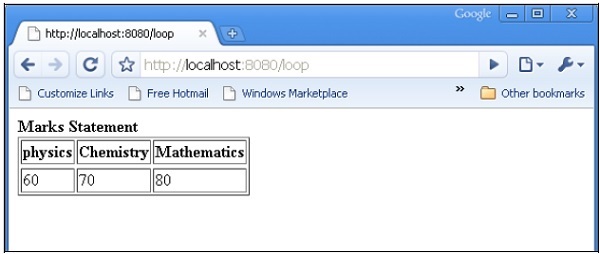
temp.html 模板使用 py:for 迴圈以表格形式呈現 dict 物件的內容。
<html xmlns = "http://www.w3.org/1999/xhtml"
   xmlns:py = "http://genshi.edgewall.org/" lang = "en">

   <body>
      <b>Marks Statement</b>
      <table border = '1'>
         <thead>
            <py:for each = "key in subjects"><th>${key}</th></py:for>
         </thead>
         <tr>
            <py:for each = "key in marks"><td>${key}</td></py:for>
         </tr>
      </table>
   </body>
</html>
啟動伺服器(如果尚未執行)
gearbox server –reload –debug
在瀏覽器中輸入https://::8080/marksform。
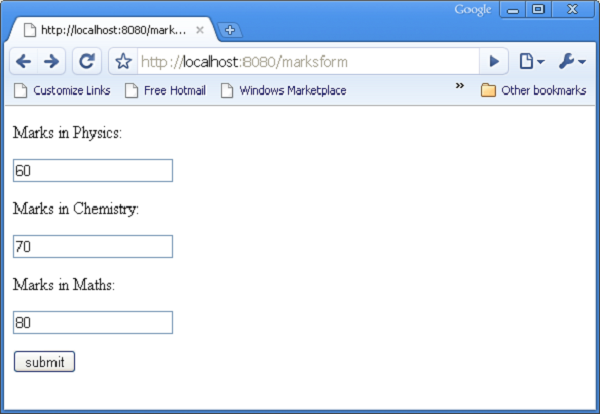
提交上述表單後,瀏覽器將顯示以下輸出。
py:def
此指令用於建立宏。宏是可重用的模板程式碼片段。類似於 Python 函式,它具有名稱,並且可以選擇具有引數。此宏的輸出可以插入到模板中的任何位置。
py:def 指令遵循以下語法:
<p py:def = "greeting(name)">
   Hello, ${name}!
</p>
此宏可以使用變數值渲染到“name”引數。
${greeting('world')}
${greeting('everybody)}
此指令也可以與另一個版本的語法一起使用,如下所示:
<py:def function = "greeting(name)">
   <p>Hello, ${name}! </p>
</py:def>
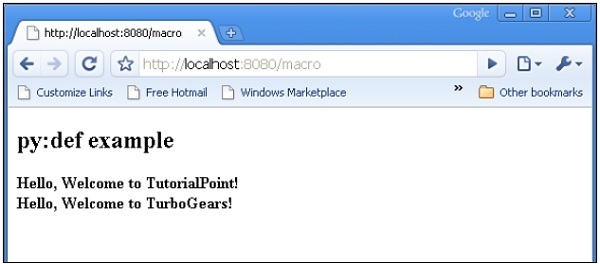
在以下示例中,root.py中的macro()控制器將包含兩個鍵 name1 和 name2 的dict物件傳送到 macro.html 模板。
from hello.lib.base import BaseController
from tg import expose, request

class RootController(BaseController):
   @expose('hello.templates.macro')
   def macro(self):
      return {'name1':'TutorialPoint', 'name2':'TurboGears'}
此 macro.html 模板包含名為 greeting 的宏的定義。它用於為從控制器接收的資料生成問候訊息。
<html xmlns = "http://www.w3.org/1999/xhtml"
   xmlns:py = "http://genshi.edgewall.org/"
   lang = "en">

   <body>
      <h2>py:def example</h2>

      <div>
         <div py:def = "greeting(name)">
            Hello, Welcome to ${name}!
         </div>

         <b>
            ${greeting(name1)}
            ${greeting(name2)}
         </b>

      </div>
   </body>
</html>
使用 gearbox 啟動伺服器
gearbox serve –reload –debug
透過在瀏覽器中輸入以下 URL 來呼叫 macro() 控制器:
https://:8080/macro
瀏覽器將呈現以下輸出:
py:with
此指令允許您將表示式分配給區域性變數。這些區域性變數使表示式內部更簡潔且更高效。
假設模板的上下文資料中給出了 x = 50,則以下將是 py:with 指令:
<div>
   <span py:with = "y = 50; z = x+y">$x $y $z</span>
</div>
它將產生以下輸出:
50 50 100
py:with 指令也有另一種版本:
<div>
   <py:with = "y = 50; z = x+y">$x $y $z</py:with>
</div>
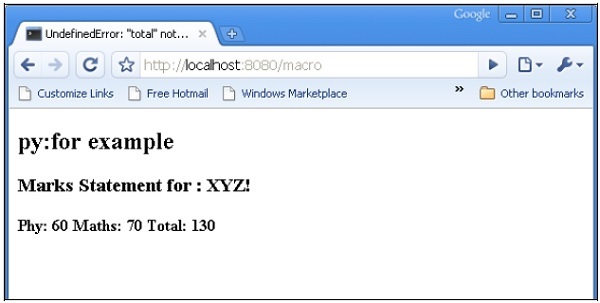
在以下示例中,macro() 控制器返回一個包含 name、phy 和 maths 鍵的 dict 物件。
from hello.lib.base import BaseController
from tg import expose, request

class RootController(BaseController):
   @expose('hello.templates.macro')
   def macro(self):
      return {'name':'XYZ', 'phy':60, 'maths':70}
macro.html 模板使用 py:with 指令新增 phy 和 maths 鍵的值。
<html xmlns = "http://www.w3.org/1999/xhtml"
   xmlns:py = "http://genshi.edgewall.org/"
   lang = "en">

   <body>
      <h2>py:with example</h2>
      <h3>Marks Statement for : ${name}!</h3>

      <b>Phy: $phy Maths: $maths
         <span py:with = "ttl = phy+maths">Total: $ttl</span>
      </b>

   </body>

</html>
瀏覽器將針對 URL https://:8080/macro 呈現以下輸出
結構操作指令
py:attrs指令新增、修改或刪除元素的屬性。
<ul>
   <li py:attrs = "foo">Bar</li>
</ul>
如果模板上下文中存在foo = {‘class’:’collapse’},則上述程式碼段將呈現。
<ul>
   <li class = "collapse">Bar</li>
</ul>
py:content指令將任何巢狀內容替換為表示式求值的結果:
<ul>
   <li py:content = "bar">Hello</li>
</ul>
在上下文資料中給定 bar = 'Bye',這將產生
<ul>
   <li>Bye</li>
</ul>
py:replace指令將元素本身替換為表示式求值的結果:
<div>
   <span py:replace = "bar">Hello</span>
</div>
在上下文資料中給定 bar = 'Bye',它將產生
<div>
   Bye
</div>