
- SpecFlow 教程
- SpecFlow - 首頁
- SpecFlow - 介紹
- 測試驅動開發
- 行為驅動開發
- SpecFlow - Visual Studio 安裝
- Visual Studio 擴充套件安裝
- SpecFlow - 專案設定
- 其他專案依賴項
- SpecFlow - 執行程式啟用
- SpecFlow - HTML 報告
- SpecFlow - 繫結測試步驟
- SpecFlow - 建立第一個測試
- 配置 Selenium WebDriver
- SpecFlow - Gherkin
- SpecFlow - Gherkin 關鍵詞
- SpecFlow - 特性檔案
- SpecFlow - 步驟定義檔案
- SpecFlow - 掛鉤
- SpecFlow - 背景插圖
- 透過示例進行資料驅動測試
- 無示例的資料驅動測試
- 將表格轉換為資料表
- 將表格轉換為字典
- 使用 CreateInstance 的表格
- SpecFlow - 表格帶 CreateSet
- SpecFlow 有用資源
- SpecFlow - 快速指南
- SpecFlow - 有用資源
- SpecFlow - 討論
SpecFlow - 無示例的資料驅動測試
我們可以藉助關鍵詞示例執行資料驅動測試。可透過將 Feature 檔案括號內的 ('' ) 中的資料直接傳遞給步驟來執行該操作。然後,它將作為一個輸入提供給步驟定義檔案。
以下步驟需要執行,讓我們驗證一個模型 −
- 使用者啟動 URL
- URL 應開啟
第 1 步:建立特徵檔案
如何在建立特徵檔案的詳細資訊將在章節中詳細討論:特徵檔案。
Feature: Launching application

Scenario: Launch URL
   Given User hits URL 'https://tutorialspoint.tw/index.htm'
   Then URL should be launched
第 2 步:建立步驟定義檔案
如何在建立步驟定義檔案的詳細資訊將在章節中詳細討論:步驟定義檔案。
using System;
using TechTalk.SpecFlow;
namespace SpecFlowProject1.Features{
   [Binding]
   public class LaunchingApplicationSteps{
      [Given(@"User hits URL '(.*)'")]
      public void GivenUserHitsURL(string url){
         Console.WriteLine(url);
      }
      [Then(@"URL should be launched")]
      public void ThenURLShouldBeLaunched(){
         Console.WriteLine("URL should be launched");
      }
   }
}
第 3 步:執行和結果
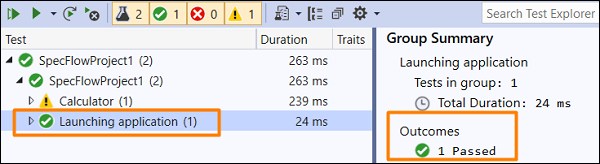
選擇啟動應用程式功能,然後單擊“檢視中執行所有測試”。
選擇啟動 URL 場景,然後單擊“為此結果開啟其他輸出”連結。

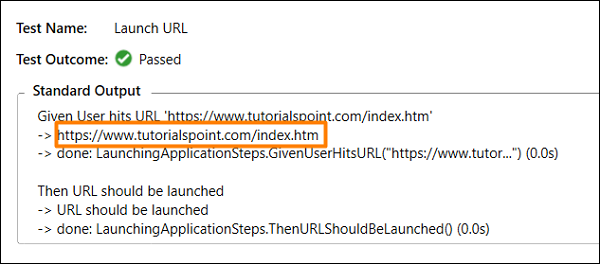
在上述輸出中,獲得了 url (https://tutorialspoint.tw/index.htm),該 URL 直接從 Given 步驟中的特徵檔案傳遞過來。
廣告