
- Python資料科學教程
- Python資料科學 - 首頁
- Python資料科學 - 入門
- Python資料科學 - 環境設定
- Python資料科學 - Pandas
- Python資料科學 - Numpy
- Python資料科學 - SciPy
- Python資料科學 - Matplotlib
- Python資料處理
- Python資料操作
- Python資料清洗
- Python處理CSV資料
- Python處理JSON資料
- Python處理XLS資料
- Python關係型資料庫
- Python NoSQL資料庫
- Python日期和時間
- Python資料整理
- Python資料聚合
- Python讀取HTML頁面
- Python處理非結構化資料
- Python詞元化
- Python詞幹提取和詞形還原
- Python資料視覺化
- Python圖表屬性
- Python圖表樣式
- Python箱線圖
- Python熱力圖
- Python散點圖
- Python氣泡圖
- Python 3D圖表
- Python時間序列
- Python地理資料
- Python圖資料
Python圖表屬性
Python擁有優秀的用於資料視覺化的庫。結合Pandas、numpy和matplotlib,可以建立幾乎所有型別的視覺化圖表。本章我們將開始學習一些簡單的圖表及其各種屬性。
建立圖表
我們使用numpy庫建立建立圖表所需的數字,並使用matplotlib中的pyplot方法繪製實際圖表。
import numpy as np
import matplotlib.pyplot as plt

x = np.arange(0,10)
y = x ^ 2
#Simple Plot
plt.plot(x,y)
其輸出如下:

軸標籤
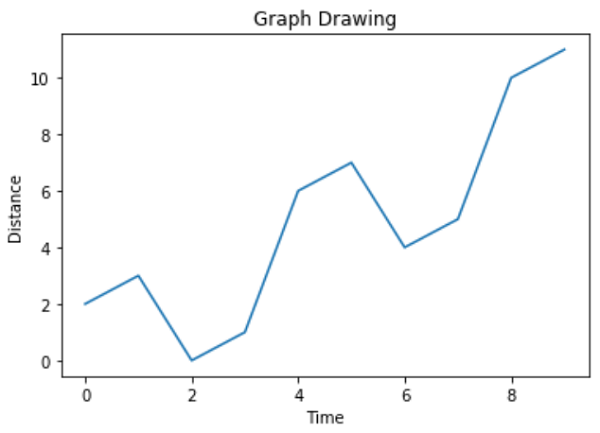
我們可以使用庫中的適當方法為軸新增標籤,併為圖表新增標題,如下所示。
import numpy as np
import matplotlib.pyplot as plt

x = np.arange(0,10)
y = x ^ 2
#Labeling the Axes and Title
plt.title("Graph Drawing")
plt.xlabel("Time")
plt.ylabel("Distance")
#Simple Plot
plt.plot(x,y)
其輸出如下:
格式化線型和顏色
可以使用庫中的適當方法指定圖表中線的樣式和顏色,如下所示。
import numpy as np
import matplotlib.pyplot as plt

x = np.arange(0,10)
y = x ^ 2
#Labeling the Axes and Title
plt.title("Graph Drawing")
plt.xlabel("Time")
plt.ylabel("Distance")

# Formatting the line colors
plt.plot(x,y,'r')

# Formatting the line type
plt.plot(x,y,'>')
其輸出如下:

儲存圖表檔案
可以使用庫中的適當方法將圖表儲存為不同的影像檔案格式,如下所示。
import numpy as np
import matplotlib.pyplot as plt

x = np.arange(0,10)
y = x ^ 2
#Labeling the Axes and Title
plt.title("Graph Drawing")
plt.xlabel("Time")
plt.ylabel("Distance")

# Formatting the line colors
plt.plot(x,y,'r')

# Formatting the line type
plt.plot(x,y,'>')

# save in pdf formats
plt.savefig('timevsdist.pdf', format='pdf')
以上程式碼在Python環境的預設路徑下建立pdf檔案。
廣告