
- MFC 教程
- MFC - 主頁
- MFC - 概述
- MFC - 環境設定
- MFC - VC++ 專案
- MFC - 入門
- MFC - Windows 基礎
- MFC - 對話方塊
- MFC - Windows 資源
- MFC - 屬性頁
- MFC - Windows 佈局
- MFC - 控制元件管理
- MFC - Windows 控制元件
- MFC - 訊息和事件
- MFC - ActiveX 控制元件
- MFC - 檔案系統
- MFC - 標準輸入輸出
- MFC - 文件檢視
- MFC - 字串
- MFC - C 陣列
- MFC - 連結串列
- MFC - 資料庫類
- MFC - 序列化
- MFC - 多執行緒
- MFC - Internet 程式設計
- MFC - GDI
- MFC - 庫
- MFC 有用資源
- MFC - 快速指南
- MFC - 有用資源
- MFC - 討論
MFC - 管理升降控制元件
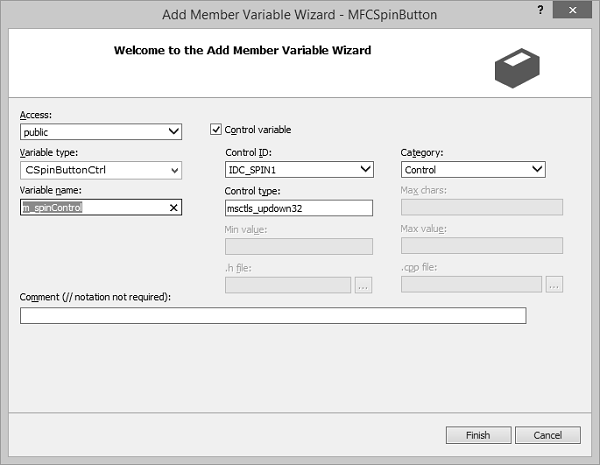
步驟 1 − 新增控制元件變數 m_spinControl,用於設定自旋控制元件,如下快照所示。
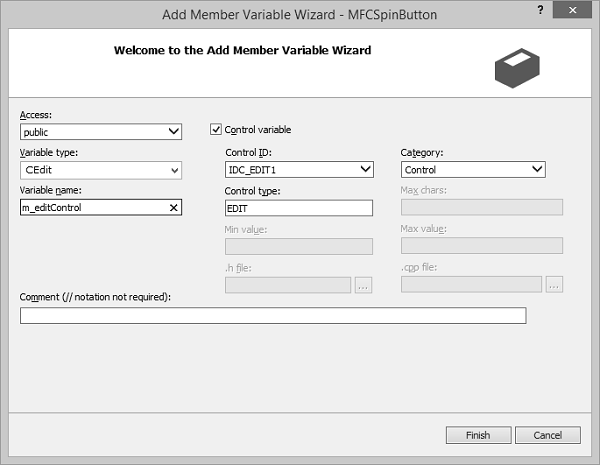
步驟 2 − 新增用於編輯控制元件的控制元件變數 m_editControl。
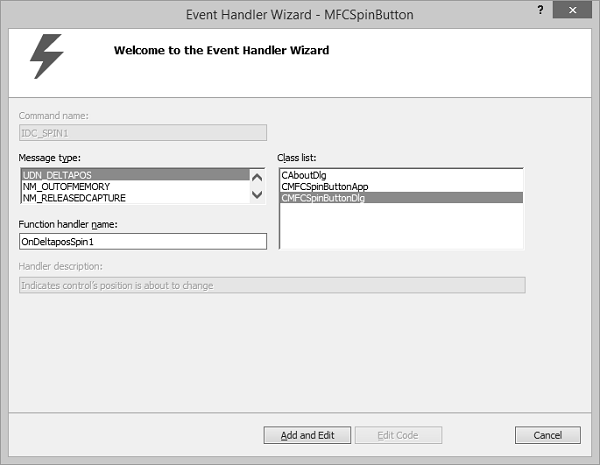
步驟 3 − 為旋轉按鈕新增 UDN_DELTAPOS 事件的事件處理程式。
步驟 4 − 按以下程式碼更新 OnInitDialog()。
BOOL CMFCSpinButtonDlg::OnInitDialog() {
   CDialogEx::OnInitDialog();

   // Set the icon for this dialog. The framework does this automatically
   // when the application's main window is not a dialog
   SetIcon(m_hIcon, TRUE);        // Set big icon
   SetIcon(m_hIcon, FALSE);      // Set small icon
   // TODO: Add extra initialization here
   m_spinControl.SetRange(0, 100);
   m_spinControl.SetPos(50);
   m_editControl.SetWindowText(L"50");
   return TRUE; // return TRUE unless you set the focus to a control
}
步驟 5 − 以下是自旋控制元件事件的實現。
void CMFCSpinButtonDlg::OnDeltaposSpin1(NMHDR *pNMHDR, LRESULT *pResult) {
   LPNMUPDOWN pNMUpDown = reinterpret_cast<LPNMUPDOWN>(pNMHDR);
   // TODO: Add your control notification handler code here
   // Declare a pointer to a CSpinButtonCtrl;
   CSpinButtonCtrl *Spinner;
   // Get a pointer to our spin button
   Spinner = reinterpret_cast<CSpinButtonCtrl *>(GetDlgItem(IDC_SPIN1));
   // Found out if it is our spin button that sent the message
   // This conditional statement appears useless but so what?
   if (pNMHDR -> hwndFrom == Spinner -> m_hWnd) {
      // Get the current value of the spin button
      int CurPos = pNMUpDown→iPos;
      // Convert the value to a string

      CString str;
      str.Format(L"%d", CurPos);
      // Display the value into the accompanying edit box
      m_editControl.SetWindowText(str);
   }
   *pResult = 0;
}
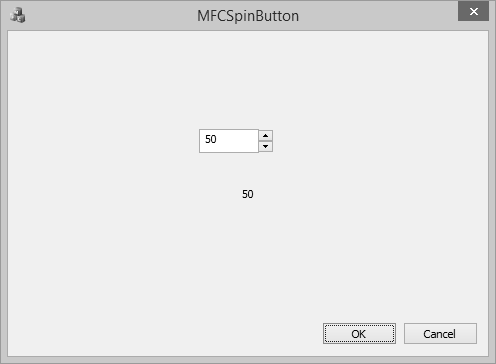
步驟 6 − 編譯並執行以上程式碼時,您將看到以下輸出。
mfc_windows_controls.htm
廣告