
- MFC 教程
- MFC - 首頁
- MFC - 概述
- MFC - 環境設定
- MFC - VC++ 專案
- MFC - 入門
- MFC - Windows 基礎
- MFC - 對話方塊
- MFC - Windows 資源
- MFC - 屬性表
- MFC - Windows 佈局
- MFC - 控制元件管理
- MFC - Windows 控制元件
- MFC - 訊息與事件
- MFC - ActiveX 控制元件
- MFC - 檔案系統
- MFC - 標準 I/O
- MFC - 文件/檢視
- MFC - 字串
- MFC - CArray
- MFC - 連結串列
- MFC - 資料庫類
- MFC - 序列化
- MFC - 多執行緒
- MFC - 網際網路程式設計
- MFC - GDI
- MFC - 庫
- MFC 有用資源
- MFC - 快速指南
- MFC - 有用資源
- MFC - 討論
MFC - 字串
字串是表示字元序列的物件。C 風格字串起源於 C 語言,並且在 C++ 中繼續得到支援。
該字串實際上是一個以空字元 '\0' 結尾的字元一維陣列。
以 null 結尾的字串包含構成字串的字元,後跟一個 null 字元。
這是一個字元陣列的簡單示例。
char word[12] = { 'H', 'e', 'l', 'l', 'o', ' ', 'W', 'o', 'r', 'l', 'd', '\0' };
以下是另一種表示方法。
char word[] = "Hello, World";
Microsoft Foundation Class (MFC) 庫提供了一個名為 CString 的類來操作字串。以下是 CString 的一些重要特性。
CString 沒有基類。
CString 物件由可變長度的字元序列組成。
CString 使用類似於 Basic 的語法提供函式和運算子。
連線和比較運算子以及簡化的記憶體管理使 CString 物件比普通字元陣列更容易使用。
以下是 CString 的建構函式。
| 序號 | 方法和描述 |
|---|---|
| 1 | CString 以各種方式構造 CString 物件 |
以下是陣列方法列表:
| 序號 | 方法和描述 |
|---|---|
| 1 | GetLength 返回 CString 物件中的字元數。 |
| 2 | IsEmpty 測試 CString 物件是否不包含任何字元。 |
| 3 | Empty 強制字串長度為 0。 |
| 4 | GetAt 返回指定位置的字元。 |
| 5 | SetAt 設定指定位置的字元。 |
以下是比較方法列表:
| 序號 | 方法和描述 |
|---|---|
| 1 | Compare 比較兩個字串(區分大小寫)。 |
| 2 | CompareNoCase 比較兩個字串(不區分大小寫)。 |
以下是提取方法列表:
| 序號 | 方法和描述 |
|---|---|
| 1 | Mid 提取字串的中間部分(類似於 Basic MID$ 函式)。 |
| 2 | Left 提取字串的左部分(類似於 Basic LEFT$ 函式)。 |
| 3 | Right 提取字串的右部分(類似於 Basic RIGHT$ 函式)。 |
| 4 | SpanIncluding 從字串中提取屬於給定字元集的字元。 |
| 5 | SpanExcluding 從字串中提取不屬於給定字元集的字元。 |
以下是轉換方法列表。
| 序號 | 方法和描述 |
|---|---|
| 1 | MakeUpper 將此字串中的所有字元轉換為大寫字元。 |
| 2 | MakeLower 將此字串中的所有字元轉換為小寫字元。 |
| 3 | MakeReverse 反轉此字串中的字元。 |
| 4 | Format 像 sprintf 一樣格式化字串。 |
| 5 | TrimLeft 從字串中修剪前導空格字元。 |
| 6 | TrimRight 從字串中修剪尾隨空格字元。 |
以下是搜尋方法列表。
| 序號 | 方法和描述 |
|---|---|
| 1 | Find 在較大的字串內查詢字元或子字串。 |
| 2 | ReverseFind 在較大的字串內查詢字元;從末尾開始。 |
| 3 | FindOneOf 從集合中查詢第一個匹配的字元。 |
以下是緩衝區訪問方法列表。
| 序號 | 方法和描述 |
|---|---|
| 1 | GetBuffer 返回指向 CString 中字元的指標。 |
| 2 | GetBufferSetLength 返回指向 CString 中字元的指標,截斷為指定的長度。 |
| 3 | ReleaseBuffer 釋放 GetBuffer 返回的緩衝區的控制權。 |
| 4 | FreeExtra 透過釋放以前分配給字串的任何額外記憶體來移除此字串物件的任何開銷。 |
| 5 | LockBuffer 停用引用計數並保護緩衝區中的字串。 |
| 6 | UnlockBuffer 啟用引用計數並釋放緩衝區中的字串。 |
以下是 Windows 特定的方法列表。
| 序號 | 方法和描述 |
|---|---|
| 1 | AllocSysString 從 CString 資料分配 BSTR。 |
| 2 | SetSysString 使用來自 CString 物件的資料設定現有的 BSTR 物件。 |
| 3 | LoadString 從 Windows CE 資源載入現有的 CString 物件。 |
以下是 CString 物件的不同操作:
建立字串
您可以透過使用字串文字或建立 CString 類的例項來建立字串。
BOOL CMFCStringDemoDlg::OnInitDialog() {

   CDialogEx::OnInitDialog();

   // Set the icon for this dialog. The framework does this automatically
   // when the application's main window is not a dialog
   SetIcon(m_hIcon, TRUE);         // Set big icon
   SetIcon(m_hIcon, FALSE);       // Set small icon

   CString string1 = _T("This is a string1");
   CString string2("This is a string2");

   m_strText.Append(string1 + L"\n");
   m_strText.Append(string2);

   UpdateData(FALSE);

   return TRUE; // return TRUE unless you set the focus to a control
}
編譯並執行上述程式碼後,您將看到以下輸出。

空字串
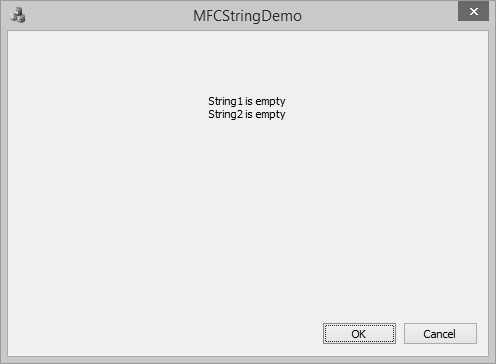
您可以透過使用空字串文字或使用 CString::Empty() 方法來建立空字串。您還可以使用布林屬性 isEmpty 檢查字串是否為空。
BOOL CMFCStringDemoDlg::OnInitDialog() {
   CDialogEx::OnInitDialog();

   // Set the icon for this dialog. The framework does this automatically
   // when the application's main window is not a dialog
   SetIcon(m_hIcon, TRUE);            // Set big icon
   SetIcon(m_hIcon, FALSE);           // Set small icon

   CString string1 = _T("");
   CString string2;
   string2.Empty();

   if(string1.IsEmpty())
      m_strText.Append(L"String1 is empty\n");
   else
      m_strText.Append(string1 + L"\n");

   if(string2.IsEmpty())
      m_strText.Append(L"String2 is empty");
   else
      m_strText.Append(string2);
   UpdateData(FALSE);
   return TRUE; // return TRUE unless you set the focus to a control
}
編譯並執行上述程式碼後,您將看到以下輸出。
字串連線
要連線兩個或多個字串,您可以使用 + 運算子連線兩個字串或使用 CString::Append() 方法。
BOOL CMFCStringDemoDlg::OnInitDialog() {
   CDialogEx::OnInitDialog();

   // Set the icon for this dialog. The framework does this automatically
   // when the application's main window is not a dialog
   SetIcon(m_hIcon, TRUE);              // Set big icon
   SetIcon(m_hIcon, FALSE);              // Set small icon

   //To concatenate two CString objects
   CString s1 = _T("This ");           // Cascading concatenation
   s1 += _T("is a ");
   CString s2 = _T("test");
   CString message = s1;
   message.Append(_T("big ") + s2);
   // Message contains "This is a big test".

   m_strText = L"message: " + message;

   UpdateData(FALSE);

   return TRUE; // return TRUE unless you set the focus to a control
}
編譯並執行上述程式碼後,您將看到以下輸出。

字串長度
要查詢字串的長度,您可以使用 CString::GetLength() 方法,該方法返回 CString 物件中的字元數。
BOOL CMFCStringDemoDlg::OnInitDialog() {
   CDialogEx::OnInitDialog();

   // Set the icon for this dialog. The framework does this automatically
   // when the application's main window is not a dialog
   SetIcon(m_hIcon, TRUE);              // Set big icon
   SetIcon(m_hIcon, FALSE);              // Set small icon

   CString string1 = _T("This is string 1");
   int length = string1.GetLength();
   CString strLen;

   strLen.Format(L"\nString1 contains %d characters", length);
   m_strText = string1 + strLen;

   UpdateData(FALSE);

   return TRUE; // return TRUE unless you set the focus to a control
}
編譯並執行上述程式碼後,您將看到以下輸出。

字串比較
要比較兩個字串變數,您可以使用 == 運算子。
BOOL CMFCStringDemoDlg::OnInitDialog() {
   CDialogEx::OnInitDialog();

   // Set the icon for this dialog. The framework does this automatically
   // when the application's main window is not a dialog
   SetIcon(m_hIcon, TRUE);            // Set big icon
   SetIcon(m_hIcon, FALSE);          // Set small icon

   CString string1 = _T("Hello");
   CString string2 = _T("World");

   CString string3 = _T("MFC Tutorial");
   CString string4 = _T("MFC Tutorial");

   if (string1 == string2)
      m_strText = "string1 and string1 are same\n";
   else
      m_strText = "string1 and string1 are not same\n";

   if (string3 == string4)
      m_strText += "string3 and string4 are same";
   else
      m_strText += "string3 and string4 are not same";

   UpdateData(FALSE);

   return TRUE; // return TRUE unless you set the focus to a control
}
編譯並執行上述程式碼後,您將看到以下輸出。
