- MFC 教程
- MFC - 首頁
- MFC - 概述
- MFC - 環境設定
- MFC - VC++ 專案
- MFC - 入門
- MFC - Windows 基礎
- MFC - 對話方塊
- MFC - Windows 資源
- MFC - 屬性表
- MFC - Windows 佈局
- MFC - 控制元件管理
- MFC - Windows 控制元件
- MFC - 訊息與事件
- MFC - ActiveX 控制元件
- MFC - 檔案系統
- MFC - 標準 I/O
- MFC - 文件檢視
- MFC - 字串
- MFC - Carray
- MFC - 連結串列
- MFC - 資料庫類
- MFC - 序列化
- MFC - 多執行緒
- MFC - 網際網路程式設計
- MFC - GDI
- MFC - 庫
- MFC 有用資源
- MFC - 快速指南
- MFC - 有用資源
- MFC - 討論
MFC - 資料庫類
資料庫是資訊的集合,這些資訊經過組織,以便於訪問、管理和更新。基於 ODBC 的 MFC 資料庫類旨在提供對任何資料庫的訪問,只要有相應的 ODBC 驅動程式即可。由於這些類使用 ODBC,因此您的應用程式可以訪問許多不同的資料格式和不同的本地/遠端配置中的資料。
您不必編寫特殊程式碼來處理不同的資料庫管理系統 (DBMS)。只要您的使用者擁有他們想要訪問的資料的相應 ODBC 驅動程式,他們就可以使用您的程式來操作儲存在其中的表中的資料。資料來源是由某個資料庫管理系統 (DBMS) 託管的特定資料例項。例如 Microsoft SQL Server、Microsoft Access 等。
CDatabase
MFC 提供了一個類CDatabase,它表示與資料來源的連線,您可以透過它對資料來源進行操作。您的應用程式可以同時啟用一個或多個 CDatabase 物件。
讓我們透過建立一個新的基於 MFC 對話方塊的應用程式來了解一個簡單的示例。
步驟 1 - 將 TODO 行的標題更改為從資料庫檢索資料,並拖動一個按鈕和一個列表控制元件,如下面的快照所示。
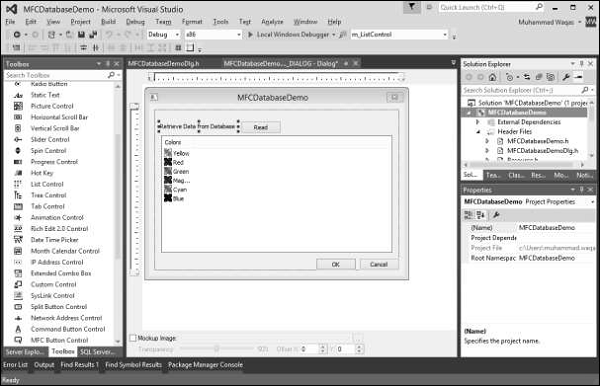
步驟 2 - 為按鈕新增單擊事件處理程式,併為列表控制元件新增控制變數 m_ListControl。
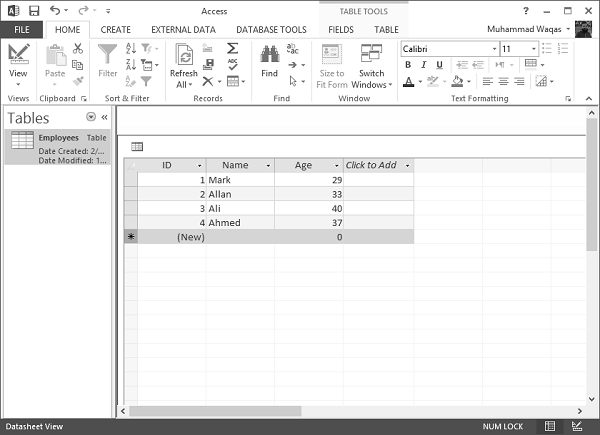
步驟 3 - 我們有一個簡單的資料庫,其中包含一個 Employees 表以及一些記錄,如下面的快照所示。
步驟 4 - 我們需要包含以下標頭檔案,以便我們可以使用 CDatabase 類。
#include "odbcinst.h"
#include "afxdb.h"
插入查詢
SQL INSERT INTO 語句用於向資料庫中的表新增新的資料行。
步驟 1 - 要新增新記錄,我們將使用 CDatabase 類的 ExecuteSQL() 函式,如下面的程式碼所示。
CDatabase database;
CString SqlString;
CString strID, strName, strAge;
CString sDriver = L"MICROSOFT ACCESS DRIVER (*.mdb)";
CString sDsn;
CString sFile = L"D:\\Test.mdb";
// You must change above path if it's different
int iRec = 0;

// Build ODBC connection string
sDsn.Format(L"ODBC;DRIVER={%s};DSN='';DBQ=%s", sDriver, sFile);
TRY {
   // Open the database
   database.Open(NULL,false,false,sDsn);

   SqlString = "INSERT INTO Employees (ID,Name,age) VALUES (5,'Sanjay',69)";
   database.ExecuteSQL(SqlString);
   // Close the database
   database.Close();
}CATCH(CDBException, e) {
   // If a database exception occured, show error msg
   AfxMessageBox(L"Database error: " + e→m_strError);
}
END_CATCH;
步驟 2 - 編譯並執行上述程式碼後,您將看到資料庫中添加了一條新記錄。

檢索記錄
為了在 MFC 應用程式中檢索上述表,我們在按鈕事件處理程式中實現了與資料庫相關的操作,如下面的步驟所示。
步驟 1 - 要使用 CDatabase,請構造一個 CDatabase 物件並呼叫其 Open() 函式。這將開啟連線。
步驟 2 - 構造 CRecordset 物件以對連線的資料來源進行操作,並將記錄集建構函式傳遞給您的 CDatabase 物件的指標。
步驟 3 - 使用完連線後,呼叫 Close 函式並銷燬 CDatabase 物件。
void CMFCDatabaseDemoDlg::OnBnClickedButtonRead() {
   // TODO: Add your control notification handler code here
   CDatabase database;
   CString SqlString;
   CString strID, strName, strAge;
   CString sDriver = "MICROSOFT ACCESS DRIVER (*.mdb)";
   CString sFile = L"D:\\Test.mdb";
   // You must change above path if it's different
   int iRec = 0;

   // Build ODBC connection string
   sDsn.Format("ODBC;DRIVER={%s};DSN='';DBQ=%s",sDriver,sFile);
   TRY {
      // Open the database
      database.Open(NULL,false,false,sDsn);

      // Allocate the recordset
      CRecordset recset( &database );

      // Build the SQL statement
      SqlString = "SELECT ID, Name, Age " "FROM Employees";

      // Execute the query

      recset.Open(CRecordset::forwardOnly,SqlString,CRecordset::readOnly);
      // Reset List control if there is any data
      ResetListControl();
      // populate Grids
      ListView_SetExtendedListViewStyle(m_ListControl,LVS_EX_GRIDLINES);

      // Column width and heading
      m_ListControl.InsertColumn(0,"Emp ID",LVCFMT_LEFT,-1,0);
      m_ListControl.InsertColumn(1,"Name",LVCFMT_LEFT,-1,1);
      m_ListControl.InsertColumn(2, "Age", LVCFMT_LEFT, -1, 1);
      m_ListControl.SetColumnWidth(0, 120);
      m_ListControl.SetColumnWidth(1, 200);
      m_ListControl.SetColumnWidth(2, 200);

      // Loop through each record
      while( !recset.IsEOF() ) {
         // Copy each column into a variable
         recset.GetFieldValue("ID",strID);
         recset.GetFieldValue("Name",strName);
         recset.GetFieldValue("Age", strAge);

         // Insert values into the list control
         iRec = m_ListControl.InsertItem(0,strID,0);
         m_ListControl.SetItemText(0,1,strName);
         m_ListControl.SetItemText(0, 2, strAge);

         // goto next record
         recset.MoveNext();
      }
      // Close the database
      database.Close();
   }CATCH(CDBException, e) {
      // If a database exception occured, show error msg
      AfxMessageBox("Database error: "+e→m_strError);
   }
   END_CATCH;
}

// Reset List control
void CMFCDatabaseDemoDlg::ResetListControl() {
   m_ListControl.DeleteAllItems();
   int iNbrOfColumns;
   CHeaderCtrl* pHeader = (CHeaderCtrl*)m_ListControl.GetDlgItem(0);
   if (pHeader) {
      iNbrOfColumns = pHeader→GetItemCount();
   }
   for (int i = iNbrOfColumns; i >= 0; i--) {
      m_ListControl.DeleteColumn(i);
   }
}
步驟 4 - 這是標頭檔案。
// MFCDatabaseDemoDlg.h : header file
//

#pragma once
#include "afxcmn.h"


// CMFCDatabaseDemoDlg dialog
class CMFCDatabaseDemoDlg : public CDialogEx {
   // Construction
   public:
      CMFCDatabaseDemoDlg(CWnd* pParent = NULL);    // standard constructor

   // Dialog Data
   #ifdef AFX_DESIGN_TIME
      enum { IDD = IDD_MFCDATABASEDEMO_DIALOG };
   #endif

   protected:
      virtual void DoDataExchange(CDataExchange* pDX);    // DDX/DDV support
      void ResetListControl();

   // Implementation
   protected:
      HICON m_hIcon;

      // Generated message map functions
      virtual BOOL OnInitDialog();
      afx_msg void OnPaint();
      afx_msg HCURSOR OnQueryDragIcon();
      DECLARE_MESSAGE_MAP()
   public:
      CListCtrl m_ListControl;
      afx_msg void OnBnClickedButtonRead();
};
步驟 5 - 編譯並執行上述程式碼後,您將看到以下輸出。

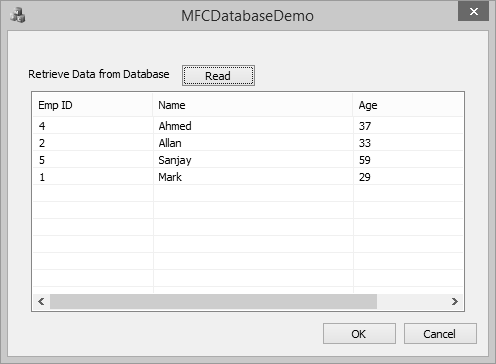
步驟 6 - 按下“讀取”按鈕以執行資料庫操作。它將檢索 Employees 表。
更新記錄
SQL UPDATE 查詢用於修改表中現有的記錄。您可以將 WHERE 子句與 UPDATE 查詢一起使用以更新選定的行,否則所有行都將受到影響。
步驟 1 - 讓我們透過更新 ID 等於 5 的 Age 來了解一個簡單的示例。
SqlString = L"UPDATE Employees SET Age = 59 WHERE ID = 5;";
database.ExecuteSQL(SqlString);
步驟 2 - 這是按鈕單擊事件的完整程式碼。
void CMFCDatabaseDemoDlg::OnBnClickedButtonRead() {
   // TODO: Add your control notification handler code here
   CDatabase database;
   CString SqlString;
   CString strID, strName, strAge;
   CString sDriver = L"MICROSOFT ACCESS DRIVER (*.mdb)";
   CString sDsn;
   CString sFile =
      L"C:\\Users\\Muhammad.Waqas\\Downloads\\Compressed\\ReadDB_demo\\Test.mdb";
   // You must change above path if it's different
   int iRec = 0;

   // Build ODBC connection string
   sDsn.Format(L"ODBC;DRIVER={%s};DSN='';DBQ=%s", sDriver, sFile);
   TRY {
      // Open the database
      database.Open(NULL,false,false,sDsn);

      // Allocate the recordset
      CRecordset recset(&database);

      SqlString = L"UPDATE Employees SET Age = 59 WHERE ID = 5;";

      database.ExecuteSQL(SqlString);

      SqlString = "SELECT ID, Name, Age FROM Employees";

      // Build the SQL statement
      SqlString = "SELECT ID, Name, Age FROM Employees";

      // Execute the query
      recset.Open(CRecordset::forwardOnly,SqlString,CRecordset::readOnly);

      // Reset List control if there is any data
      ResetListControl();
      // populate Grids
      ListView_SetExtendedListViewStyle(m_listCtrl,LVS_EX_GRIDLINES);

      // Column width and heading
      m_listCtrl.InsertColumn(0,L"Emp ID",LVCFMT_LEFT,-1,0);
      m_listCtrl.InsertColumn(1,L"Name",LVCFMT_LEFT,-1,1);
      m_listCtrl.InsertColumn(2, L"Age", LVCFMT_LEFT, -1, 1);
      m_listCtrl.SetColumnWidth(0, 120);
      m_listCtrl.SetColumnWidth(1, 200);
      m_listCtrl.SetColumnWidth(2, 200);

      // Loop through each record
      while (!recset.IsEOF()) {
         // Copy each column into a variable
         recset.GetFieldValue(L"ID",strID);
         recset.GetFieldValue(L"Name",strName);
         recset.GetFieldValue(L"Age", strAge);

         // Insert values into the list control
         iRec = m_listCtrl.InsertItem(0,strID,0);
         m_listCtrl.SetItemText(0,1,strName);
         m_listCtrl.SetItemText(0, 2, strAge);

         // goto next record
         recset.MoveNext();
      }

      // Close the database
      database.Close();
   }CATCH(CDBException, e) {
      // If a database exception occured, show error msg
      AfxMessageBox(L"Database error: " + e→m_strError);
   }
   END_CATCH;
}
步驟 3 - 編譯並執行上述程式碼後,您將看到以下輸出。
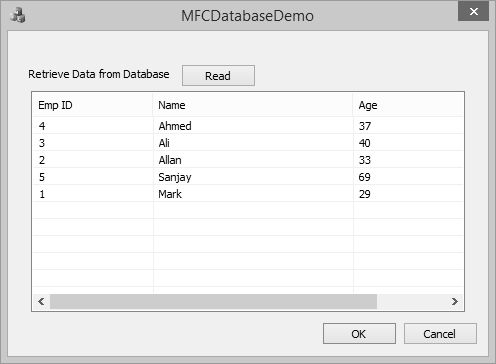
步驟 4 - 按下“讀取”按鈕以執行資料庫操作。它將檢索以下 Employees 表。
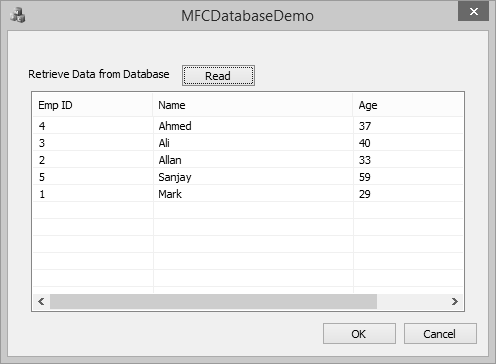
步驟 5 - 您現在可以看到年齡已從 69 更新為 59。
刪除記錄
SQL DELETE 查詢用於從表中刪除現有記錄。您可以將 WHERE 子句與 DELETE 查詢一起使用以刪除選定的行,否則所有記錄都將被刪除。
步驟 1 - 讓我們透過刪除 ID 等於 3 的記錄來了解一個簡單的示例。
SqlString = L"DELETE FROM Employees WHERE ID = 3;";

database.ExecuteSQL(SqlString);
步驟 2 - 這是按鈕單擊事件的完整程式碼。
void CMFCDatabaseDemoDlg::OnBnClickedButtonRead() {
   // TODO: Add your control notification handler code here
   CDatabase database;
   CString SqlString;
   CString strID, strName, strAge;
   CString sDriver = L"MICROSOFT ACCESS DRIVER (*.mdb)";
   CString sDsn;
   CString sFile =
       L"C:\\Users\\Muhammad.Waqas\\Downloads\\Compressed\\ReadDB_demo\\Test.mdb";

   // You must change above path if it's different
   int iRec = 0;

   // Build ODBC connection string
   sDsn.Format(L"ODBC;DRIVER={%s};DSN='';DBQ=%s", sDriver, sFile);
   TRY {
      // Open the database
      database.Open(NULL,false,false,sDsn);

      // Allocate the recordset
      CRecordset recset(&database);

      SqlString = L"DELETE FROM Employees WHERE ID = 3;";

      database.ExecuteSQL(SqlString);

      SqlString = "SELECT ID, Name, Age FROM Employees";

      // Build the SQL statement
      SqlString = "SELECT ID, Name, Age FROM Employees";

      // Execute the query
      recset.Open(CRecordset::forwardOnly,SqlString,CRecordset::readOnly);

      // Reset List control if there is any data
      ResetListControl();
      // populate Grids
      ListView_SetExtendedListViewStyle(m_listCtrl,LVS_EX_GRIDLINES);
      // Column width and heading
      m_listCtrl.InsertColumn(0,L"Emp ID",LVCFMT_LEFT,-1,0);
      m_listCtrl.InsertColumn(1,L"Name",LVCFMT_LEFT,-1,1);
      m_listCtrl.InsertColumn(2, L"Age", LVCFMT_LEFT, -1, 1);
      m_listCtrl.SetColumnWidth(0, 120);
      m_listCtrl.SetColumnWidth(1, 200);
      m_listCtrl.SetColumnWidth(2, 200);

      // Loop through each record
      while (!recset.IsEOF()) {
         // Copy each column into a variable
         recset.GetFieldValue(L"ID",strID);
         recset.GetFieldValue(L"Name",strName);
         recset.GetFieldValue(L"Age", strAge);

         // Insert values into the list control
         iRec = m_listCtrl.InsertItem(0,strID,0);
         m_listCtrl.SetItemText(0,1,strName);
         m_listCtrl.SetItemText(0, 2, strAge);

         // goto next record
         recset.MoveNext();
      }
      // Close the database
      database.Close();
   }CATCH(CDBException, e) {
      // If a database exception occured, show error msg
      AfxMessageBox(L"Database error: " + e→m_strError);
   }
   END_CATCH;
}
步驟 3 - 編譯並執行上述程式碼後,您將看到以下輸出。
步驟 4 - 按下“讀取”按鈕以執行資料庫操作。它將檢索 Employees 表。