- MFC 教程
- MFC - 首頁
- MFC - 概述
- MFC - 環境設定
- MFC - VC++ 專案
- MFC - 入門
- MFC - Windows 基礎
- MFC - 對話方塊
- MFC - Windows 資源
- MFC - 屬性表
- MFC - Windows 佈局
- MFC - 控制元件管理
- MFC - Windows 控制元件
- MFC - 訊息和事件
- MFC - ActiveX 控制元件
- MFC - 檔案系統
- MFC - 標準 I/O
- MFC - 文件/檢視
- MFC - 字串
- MFC - CArray
- MFC - 連結串列
- MFC - 資料庫類
- MFC - 序列化
- MFC - 多執行緒
- MFC - 網際網路程式設計
- MFC - GDI
- MFC - 庫
- MFC 有用資源
- MFC - 快速指南
- MFC - 有用資源
- MFC - 討論
MFC - CArray
CArray 是一種集合,最適合用於以隨機或非順序方式訪問的資料。CArray 類支援類似於 C 陣列的陣列,但可以根據需要動態縮小和增長。
陣列索引始終從位置 0 開始。
您可以決定是修復上限還是在將元素新增到當前邊界之外時允許陣列擴充套件。
即使某些元素為空,記憶體也會連續分配到上限。
以下是 CArray 物件的不同操作:
建立 CArray 物件
要建立 CArray 值或物件的集合,您必須首先確定集合的值型別。您可以使用現有的基本資料型別,例如 int、CString、double 等,如下所示:
CArray<CString, CString>strArray;
新增專案
要新增專案,您可以使用 CArray::Add() 函式。它在陣列末尾新增一個專案。在 OnInitDialog() 中,建立了 CArray 物件並添加了三個名稱,如下面的程式碼所示。
CArray<CString, CString>strArray;

//Add names to CArray
strArray.Add(L"Ali");
strArray.Add(L"Ahmed");
strArray.Add(L"Mark");
檢索專案
要檢索任何專案,您可以使用 CArray::GetAt() 函式。此函式將一個整數引數作為陣列的索引。
步驟 1 - 讓我們來看一個簡單的示例,它將檢索所有名稱。
//Retrive names from CArray
   for (int i = 0; i < strArray.GetSize(); i++) {
      m_strText.Append(strArray.GetAt(i) + L"\n");
   }
步驟 2 - 以下是 CMFCCArrayDlg::OnInitDialog() 的完整實現
BOOL CMFCCArrayDlg::OnInitDialog() {
   CDialogEx::OnInitDialog();

   // Set the icon for this dialog. The framework does this automatically
   // when the application's main window is not a dialog
   SetIcon(m_hIcon, TRUE);               // Set big icon
   SetIcon(m_hIcon, FALSE);             // Set small icon

   // TODO: Add extra initialization here
   CArray<CString, CString>strArray;

   //Add names to CArray
   strArray.Add(L"Ali");
   strArray.Add(L"Ahmed");
   strArray.Add(L"Mark");

   //Retrive names from CArray
   for (int i = 0; i < strArray.GetSize(); i++) {
      m_strText.Append(strArray.GetAt(i) + L"\n");
   }

   UpdateData(FALSE);
   return TRUE; // return TRUE unless you set the focus to a control
}
步驟 3 - 當上述程式碼編譯並執行時,您將看到以下輸出。

在中間新增專案
要在陣列中間新增專案,您可以使用 CArray::.InsertAt() 函式。它有兩個引數 - 第一個,索引;第二個,值。
讓我們在索引 1 處插入一個新專案,如下面的程式碼所示。
BOOL CMFCCArrayDlg::OnInitDialog() {

   CDialogEx::OnInitDialog();

   // Set the icon for this dialog. The framework does this automatically
   // when the application's main window is not a dialog
   SetIcon(m_hIcon, TRUE);             // Set big icon
   SetIcon(m_hIcon, FALSE);            // Set small icon

   // TODO: Add extra initialization here
   CArray<CString, CString>strArray;
   //Add names to CArray
   strArray.Add(L"Ali");
   strArray.Add(L"Ahmed");
   strArray.Add(L"Mark");

   strArray.InsertAt(1, L"Allan");

   //Retrive names from CArray
   for (int i = 0; i < strArray.GetSize(); i++) {
      m_strText.Append(strArray.GetAt(i) + L"\n");
   }

   UpdateData(FALSE);
   return TRUE; // return TRUE unless you set the focus to a control
}
當上述程式碼編譯並執行時,您將看到以下輸出。您現在可以看到 Allan 作為第二個索引新增的名稱。

更新專案值
要在陣列中間更新專案,您可以使用 CArray::.SetAt() 函式。它有兩個引數 - 第一個,索引;第二個,值。
讓我們更新陣列中的第三個元素,如下面的程式碼所示。
BOOL CMFCCArrayDlg::OnInitDialog() {
   CDialogEx::OnInitDialog();

   // Set the icon for this dialog. The framework does this automatically
   // when the application's main window is not a dialog
   SetIcon(m_hIcon, TRUE);                 // Set big icon
   SetIcon(m_hIcon, FALSE);               // Set small icon

   // TODO: Add extra initialization here
   CArray<CString, CString>strArray;

   //Add names to CArray
   strArray.Add(L"Ali");
   strArray.Add(L"Ahmed");
   strArray.Add(L"Mark");

   strArray.InsertAt(1, L"Allan");

   strArray.SetAt(2, L"Salman");

   //Retrive names from CArray
   for (int i = 0; i < strArray.GetSize(); i++) {
      m_strText.Append(strArray.GetAt(i) + L"\n");
   }

   UpdateData(FALSE);
   return TRUE; // return TRUE unless you set the focus to a control
}
當上述程式碼編譯並執行時,您將看到以下輸出。您現在可以看到第三個元素的值已更新。

複製陣列
要將整個陣列複製到另一個 CArray 物件,您可以使用 CArray::Copy() 函式。
步驟 1 - 讓我們建立另一個數組並將第一個陣列中的所有元素複製到其中,如下面的程式碼所示。
BOOL CMFCCArrayDlg::OnInitDialog() {
   CDialogEx::OnInitDialog();

   // Add "About..." menu item to system menu.

   // IDM_ABOUTBOX must be in the system command range.
   ASSERT((IDM_ABOUTBOX & 0xFFF0) == IDM_ABOUTBOX);
   ASSERT(IDM_ABOUTBOX < 0xF000);
   CMenu* pSysMenu = GetSystemMenu(FALSE);
   if (pSysMenu != NULL) {
      BOOL bNameValid;
      CString strAboutMenu;
      bNameValid = strAboutMenu.LoadString(IDS_ABOUTBOX);
      ASSERT(bNameValid);
      if (!strAboutMenu.IsEmpty()) {
         pSysMenu→AppendMenu(MF_SEPARATOR);
         pSysMenu→AppendMenu(MF_STRING, IDM_ABOUTBOX, strAboutMenu);
      }
   }
   // Set the icon for this dialog. The framework does this automatically
   // when the application's main window is not a dialog
   SetIcon(m_hIcon, TRUE);               // Set big icon
   SetIcon(m_hIcon, FALSE);              // Set small icon

   // TODO: Add extra initialization here
   CArray<CString, CString>strArray;
   //Add names to CArray
   strArray.Add(L"Ali");
   strArray.Add(L"Ahmed");
   strArray.Add(L"Mark");

   strArray.InsertAt(1, L"Allan");

   strArray.SetAt(2, L"Salman");

   CArray<CString, CString>strArray2;
   strArray2.Copy(strArray);
   //Retrive names from CArray
   for (int i = 0; i < strArray2.GetSize(); i++) {
      m_strText.Append(strArray2.GetAt(i) + L"\n");
   }

   UpdateData(FALSE);
   return TRUE; // return TRUE unless you set the focus to a control
}
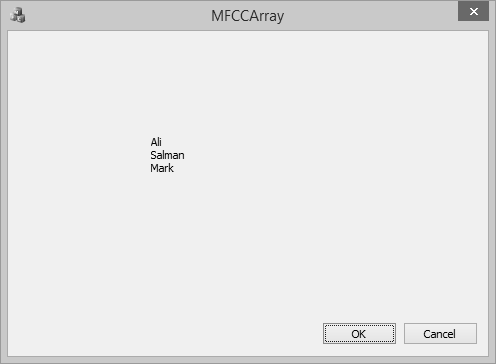
您現在可以看到我們已從第二個陣列中檢索了元素,並且輸出相同,因為我們使用了複製函式。

刪除專案
要刪除任何特定專案,您可以使用 CArray::RemoveAt() 函式。要從列表中刪除所有元素,可以使用 CArray::RemoveAll() 函式。
讓我們從陣列中刪除第二個元素。
BOOL CMFCCArrayDlg::OnInitDialog() {
   CDialogEx::OnInitDialog();

   SetIcon(m_hIcon, TRUE);             // Set big icon
   SetIcon(m_hIcon, FALSE);            // Set small icon

   // TODO: Add extra initialization here
   CArray<CString, CString>strArray;

   //Add names to CArray
   strArray.Add(L"Ali");
   strArray.Add(L"Ahmed");
   strArray.Add(L"Mark");

   strArray.InsertAt(1, L"Allan");

   strArray.SetAt(2, L"Salman");

   CArray<CString, CString>strArray2;
   strArray2.Copy(strArray);

   strArray2.RemoveAt(1);

   //Retrive names from CArray
   for (int i = 0; i < strArray2.GetSize(); i++) {
      m_strText.Append(strArray2.GetAt(i) + L"\n");
   }

   UpdateData(FALSE);
   return TRUE; // return TRUE unless you set the focus to a control
}
當上述程式碼編譯並執行時,您將看到以下輸出。您現在可以看到 Allan 名稱不再是陣列的一部分。