
- Google Colab 教程
- Google Colab - 主頁
- Google Colab - 簡介
- 什麼是 Google Colab?
- 你的第一個 Colab 筆記本
- 為你的程式碼編制文件
- Google Colab - 儲存你的工作
- Google Colab - 分享筆記本
- 呼叫系統命令
- 執行外部 Python 檔案
- Google Colab - 圖形輸出
- Google Colab - 程式碼編輯幫助
- Google Colab - 命令
- Google Colab - 新增表單
- Google Colab - 安裝 ML 庫
- Google Colab - 使用免費 GPU
- Google Colab - 結論
- Google Colab 有用資源
- Google Colab - 快速指南
- Google Colab - 有用資源
- Google Colab - 討論
Google Colab - 使用免費 GPU
Google 為你的 Colab 筆記本提供免費 GPU。
啟用 GPU
要為你的筆記本啟用 GPU,請按以下選單選項 -
Runtime / Change runtime type
你將看到以下螢幕作為輸出 -
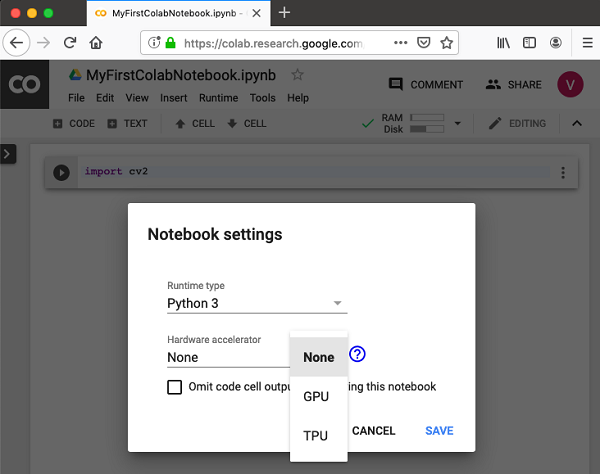
選擇 **GPU**,你的筆記本將使用處理過程中雲中提供的免費 GPU。要感受一下 GPU 處理,請嘗試從你之前克隆的 **MNIST** 教程中執行示例應用程式。
!python3 "/content/drive/My Drive/app/mnist_cnn.py"
嘗試在未啟用 GPU 的情況下運行同一個 Python 檔案。你注意到執行速度的差異了嗎?
測試 GPU
你可以執行以下程式碼來輕鬆檢查 GPU 是否已啟用 -
import tensorflow as tf
tf.test.gpu_device_name()
如果 GPU 已啟用,它將給出以下輸出 -
'/device:GPU:0'
列出裝置
如果你想知道你的筆記本在雲中執行期間使用的裝置,請嘗試以下程式碼 -
from tensorflow.python.client import device_lib
device_lib.list_local_devices()
你將看到以下輸出 -
[name: "/device:CPU:0"
   device_type: "CPU"
   memory_limit: 268435456
   locality { }
   incarnation: 1734904979049303143, name: "/device:XLA_CPU:0"
   device_type: "XLA_CPU" memory_limit: 17179869184
   locality { }
   incarnation: 16069148927281628039
   physical_device_desc: "device: XLA_CPU device", name: "/device:XLA_GPU:0"
   device_type: "XLA_GPU"
   memory_limit: 17179869184
   locality { }
   incarnation: 16623465188569787091
   physical_device_desc: "device: XLA_GPU device", name: "/device:GPU:0"
   device_type: "GPU"
   memory_limit: 14062547764
   locality {
      bus_id: 1
      links { }
   }
   incarnation: 6674128802944374158
physical_device_desc: "device: 0, name: Tesla T4, pci bus id: 0000:00:04.0, compute capability: 7.5"]
檢查 RAM
要檢視你的程序可用的記憶體資源,請鍵入以下命令 -
!cat /proc/meminfo
你將看到以下輸出 -
MemTotal: 13335276 kB
MemFree: 7322964 kB
MemAvailable: 10519168 kB
Buffers: 95732 kB
Cached: 2787632 kB
SwapCached: 0 kB
Active: 2433984 kB
Inactive: 3060124 kB
Active(anon): 2101704 kB
Inactive(anon): 22880 kB
Active(file): 332280 kB
Inactive(file): 3037244 kB
Unevictable: 0 kB
Mlocked: 0 kB
SwapTotal: 0 kB
SwapFree: 0 kB
Dirty: 412 kB
Writeback: 0 kB
AnonPages: 2610780 kB
Mapped: 838200 kB
Shmem: 23436 kB
Slab: 183240 kB
SReclaimable: 135324 kB
SUnreclaim: 47916
kBKernelStack: 4992 kB
PageTables: 13600 kB
NFS_Unstable: 0 kB
Bounce: 0 kB
WritebackTmp: 0 kB
CommitLimit: 6667636 kB
Committed_AS: 4801380 kB
VmallocTotal: 34359738367 kB
VmallocUsed: 0 kB
VmallocChunk: 0 kB
AnonHugePages: 0 kB
ShmemHugePages: 0 kB
ShmemPmdMapped: 0 kB
HugePages_Total: 0
HugePages_Free: 0
HugePages_Rsvd: 0
HugePages_Surp: 0
Hugepagesize: 2048 kB
DirectMap4k: 303092 kB
DirectMap2M: 5988352 kB
DirectMap1G: 9437184 kB
你現在可以使用 Google Colab 中的 Python 來開發機器學習模型了。
廣告