
- Google Colab 教程
- Google Colab - 主頁
- Google Colab - 簡介
- 什麼是 Google Colab?
- 你的第一個 Colab 筆記本
- 記錄你的程式碼
- Google Colab - 儲存你的工作
- Google Colab - 共享筆記本
- 呼叫系統命令
- 執行外部 Python 檔案
- Google Colab - 圖形輸出
- Google Colab - 程式碼編輯幫助
- Google Colab - Magics
- Google Colab - 新增表單
- Google Colab - 安裝機器學習庫
- Google Colab - 使用免費 GPU
- Google Colab - 結論
- Google Colab 有用資源
- Google Colab - 快速指南
- Google Colab - 有用資源
- Google Colab - 討論
Google Colab - 儲存你的工作
使用 Colab 允許你將你的作品儲存到 Google 雲端硬碟,甚至可以直接儲存到你的 GitHub 儲存庫。
儲存到 Google 雲端硬碟
Colab 允許你將你的作品儲存到 Google 雲端硬碟。若要儲存你的筆記本,選擇以下選單選項 −
File / Save a copy in Drive…
你會看到以下螢幕 −
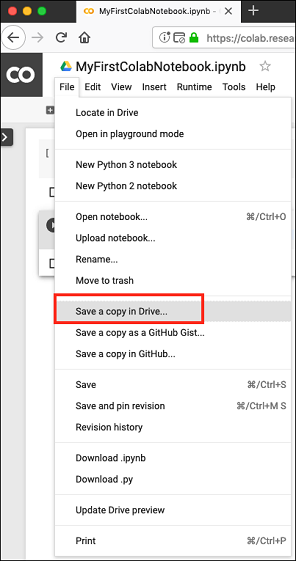
該操作將建立你筆記本的副本並將其儲存到你的雲端硬碟。稍後你也許要將副本重新命名為你的選擇的名字。
儲存到 GitHub
你也可以透過選擇以下選單選項將你的作品儲存到你的 GitHub 儲存庫 −
File / Save a copy in GitHub...
為便於快速參考,你的選單選擇將在以下螢幕截圖中顯示 −
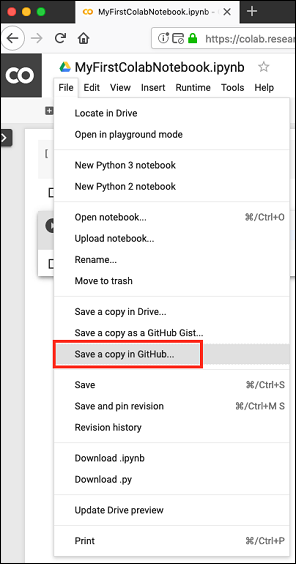
你必須一直等待,直到你看到 GitHub 登入螢幕。
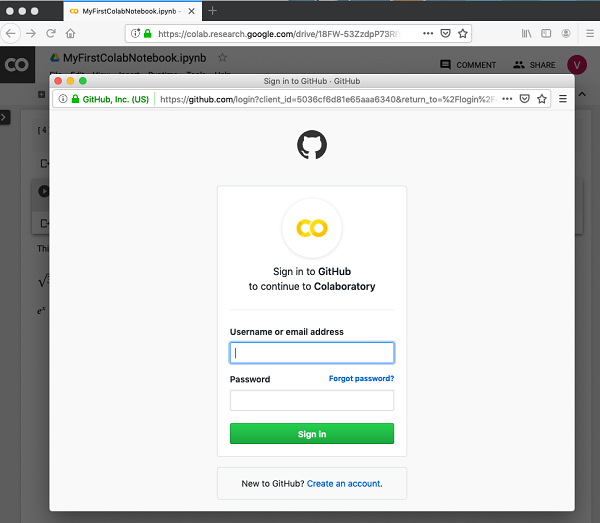
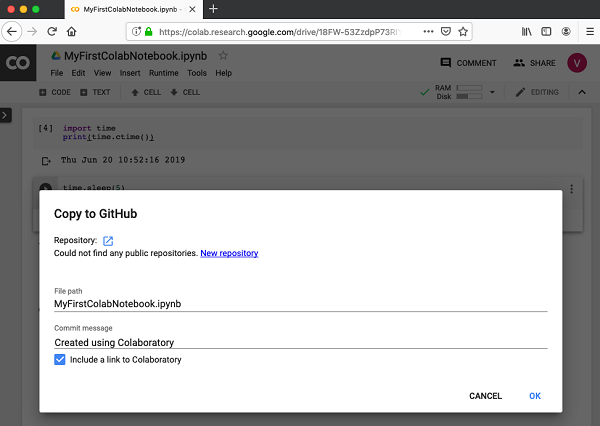
現在,輸入你的憑據。如果你沒有儲存庫,建立一個新的儲存庫,並像以下螢幕截圖所示那樣儲存你的專案 −
在下一章節,我們將學習如何與他人分享你的工作。
廣告